Olympus FV1200 User guide June 23, 2015
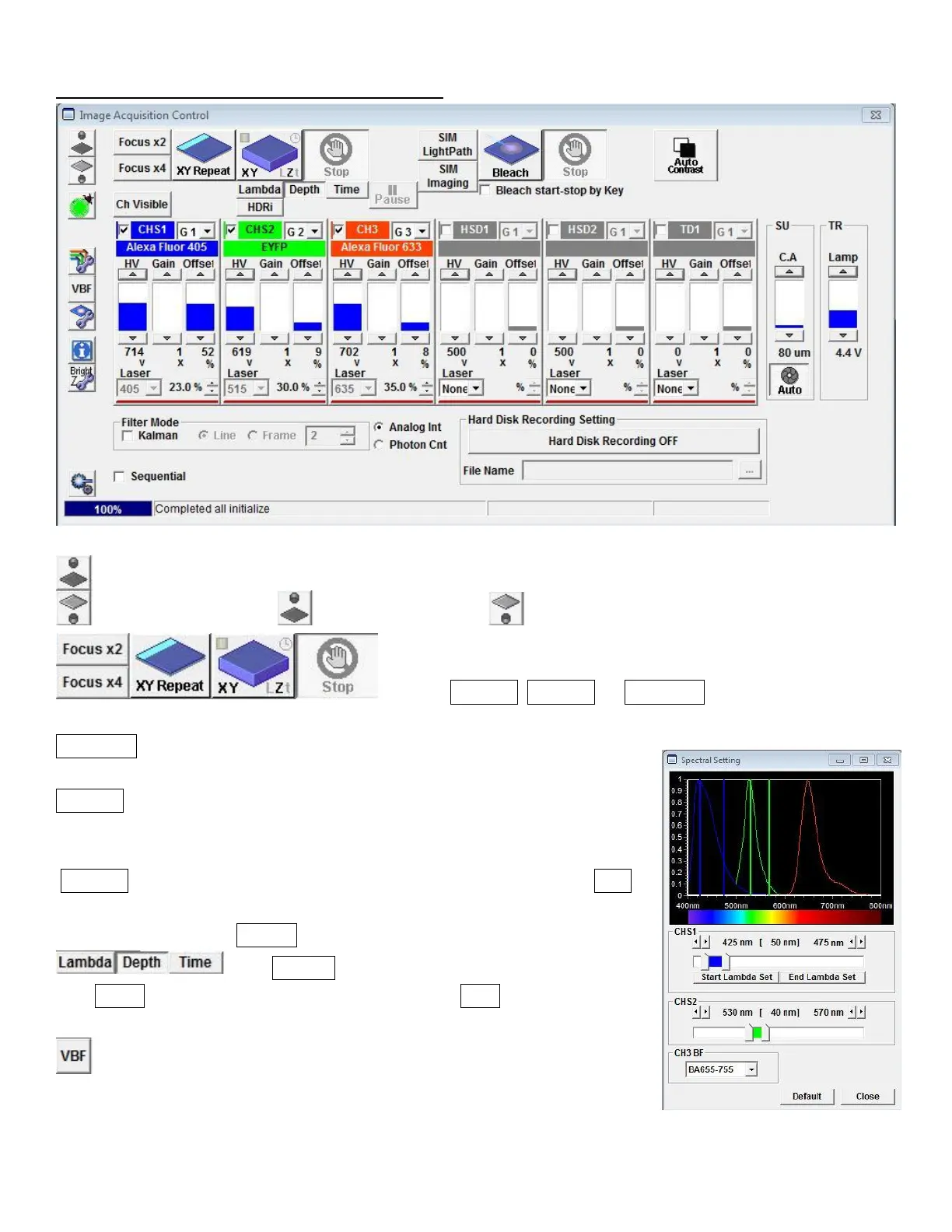
D. Overview of Image Acquisition Control window
: Click Transmission light or Epifluorescent light to turn it on and off.
: Click on Focus x2, Focus x4, or XY Repeat begins scanning without
image acquisition.
XY Repeat scans at the imaging speed that you set with scan speed on Mode
panel.
Focus x2 automatically scans the sample at 2us/pixel – because of its fast
display refreshing rate, this will be good for focusing and searching for ROIs
without bleaching your sample.
Focus x4 will be faster, but the display quality may be too rough. Click Stop
scanning.
To acquire image, click XY (LZt) .
: Click Lambda to acquire lambda scan imaging (XYL).
Click Depth for z-series image acquisition (XYZ). Click Time for time-lapse
image series (XYt).
: Click on this will open the Spectral Setting window, where the range of
emission wavelength can be adjusted to prevent overlap between
fluorescences.



 To Next Page