9
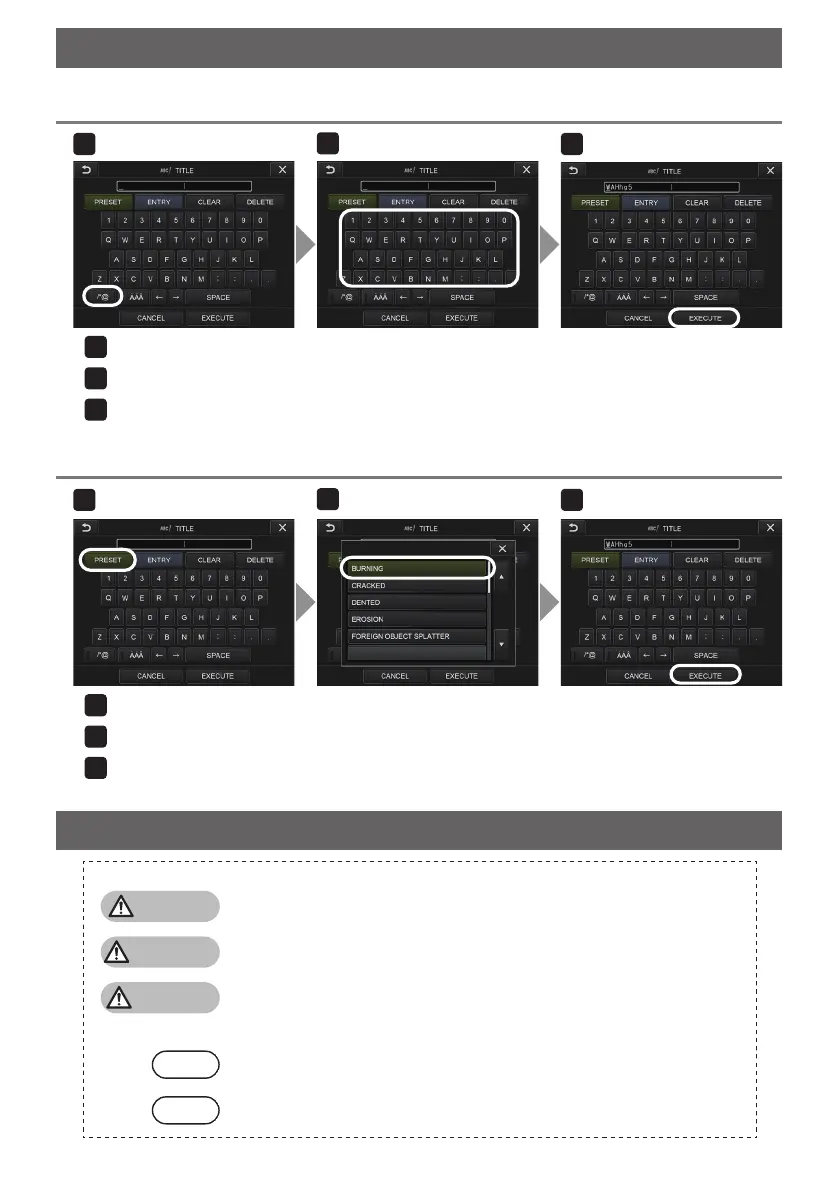
Input text from the on-screen keyboard
Select the input mode.
Select the text buttons you want.
Select <EXECUTE>.
2
Select <PRESET>.
Select the strings you want to input as titles from the preset title list.
Select <EXECUTE>.
2
3
Selecting a preset title for input
Inputting a title
Marks used in this manual
The following signal words are used throughout this manual.
DANGER
: Indicates an imminently hazardous situation which, if not avoided, will
result in death, serious injury or damage of observation object.
WARNING
: Indicates a potentially hazardous situation which, if not avoided, could
result in death, serious injury or damage of observation object.
CAUTION
: Indicates a potentially hazardous situation which, if not avoided, may result
in minor or moderate injury. It may also be used to alert against unsafe
practices or potential material damage.
: Indicates a potential situation which, if not avoided, may result in failure of
this instrument.
: Indicates additional helpful information.
1
3




 To Next Page