13
Fig. 7
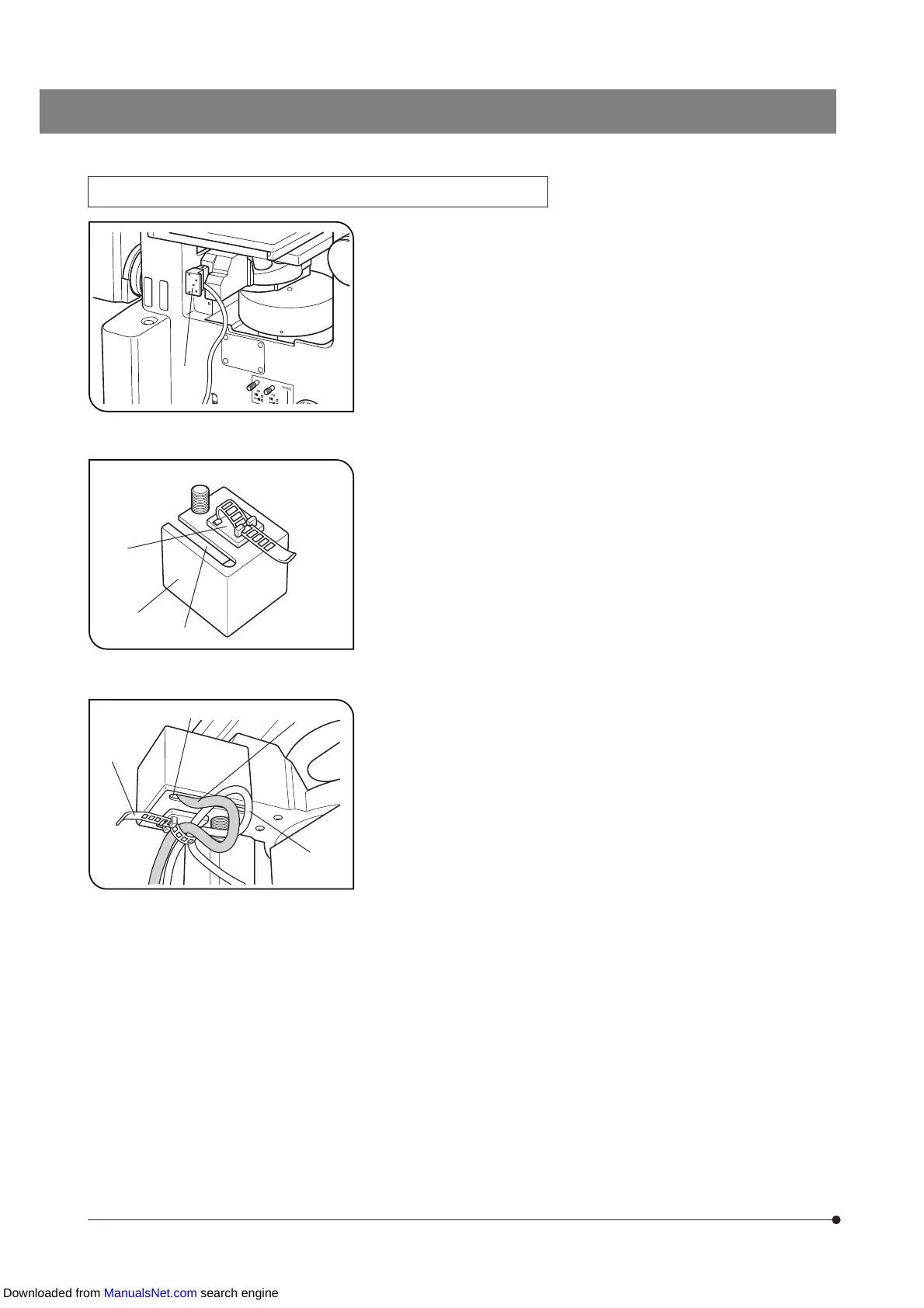
Attaching and Using the Cable Cover (Figs. 7 to 9)
1. Connect the connector @ of the motorized revolving nosepiece connec-
tion cable.
@
Fig. 8
Fig. 9
2. Attach the cord clamp ³, provided with the GX71/GX51, to the bottom
of the cable cover ² by adhesion.
3. Pass the motorized revolving nosepiece cable through the slot | on
the cable cover and fit the cable cover around the revolving nosepiece
connector.
|
²
³
³
…
ƒ
|
4. Clamp the cable cover by lightly tightening the two clamping knobs on
the bottom and left side panel.
# Do not tighten the knobs too much, for this will damage the revolving
nosepiece connector.
5. Pass the revolving nosepiece cable ƒ and mirror unit turret cable …
through the cord clamp ³ and clamp the cables by reserving certain
slacks on them.
Downloaded from ManualsNet.com search engine


 To Next Page