LVS-7500 External System Operations Manual
LVS-7500 External System Operations Manual Page 18 of 129
Operators
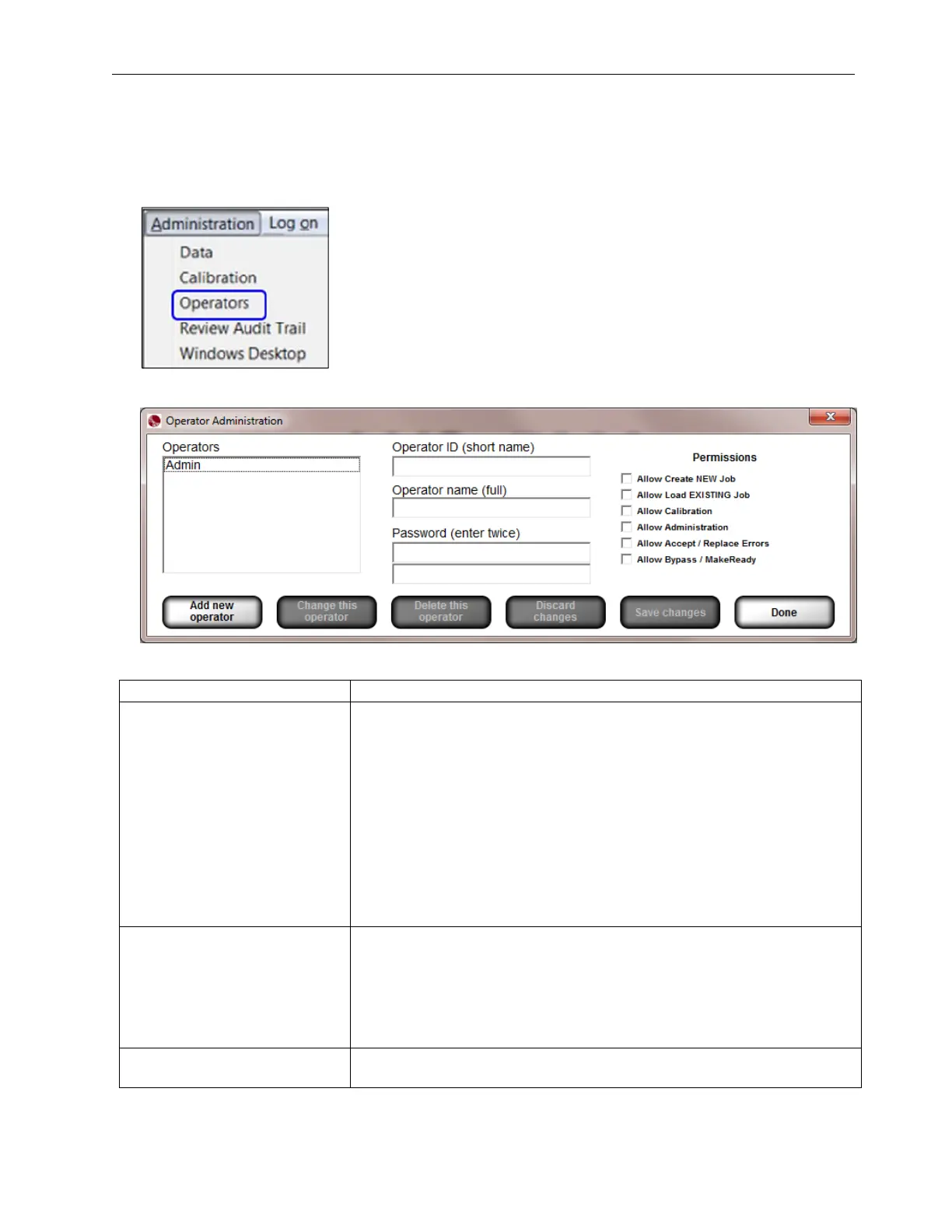
The Operators feature allows you to establish operator permissions.
1. Select Administration, and then Operators from the menu bar.
2. The following screen allows you to setup operators and operator permissions.
The buttons at the bottom of the screen are described below:
Option Description
Add new operator
Click the Add new operator button to add a new operator, and then
complete the following fields:
• Operator ID (short name)
• Operator name (full name)
• Password. Each password must consist of the following:
o At least 8 characters
o At least 1 letter from A to Z
o At least 1 number from 0 to 9
• Select the desired permissions
• Click Save changes to save your changes or Discard changes to
discard and not save your changes
Change this operator Allows you to make changes to an operator’s permissions.
• Select the operator’s name from the Operators list
• Click the Change this operator button
• Make any necessary changes
• Click the Save Changes button to save your changes or the
Discard Changes button to not save your changes
Delete this operator
Select the operator’s name from the Operators list, and then click the
Delete this operator button.



 To Next Page