LVS-7500 External System Operations Manual
LVS-7500 External System Operations Manual Page 41 of 129
Sector Type 3: OCR Read
This sector type is used to “read” the human readable characters located within the drawn sector.
IMPORTANT: The LVS-7500 External System does not distinguish between
touching/overlapping characters; thus, characters must not touch or overlap. The LVS-7500
External System reads and/or verifies uppercase characters only.
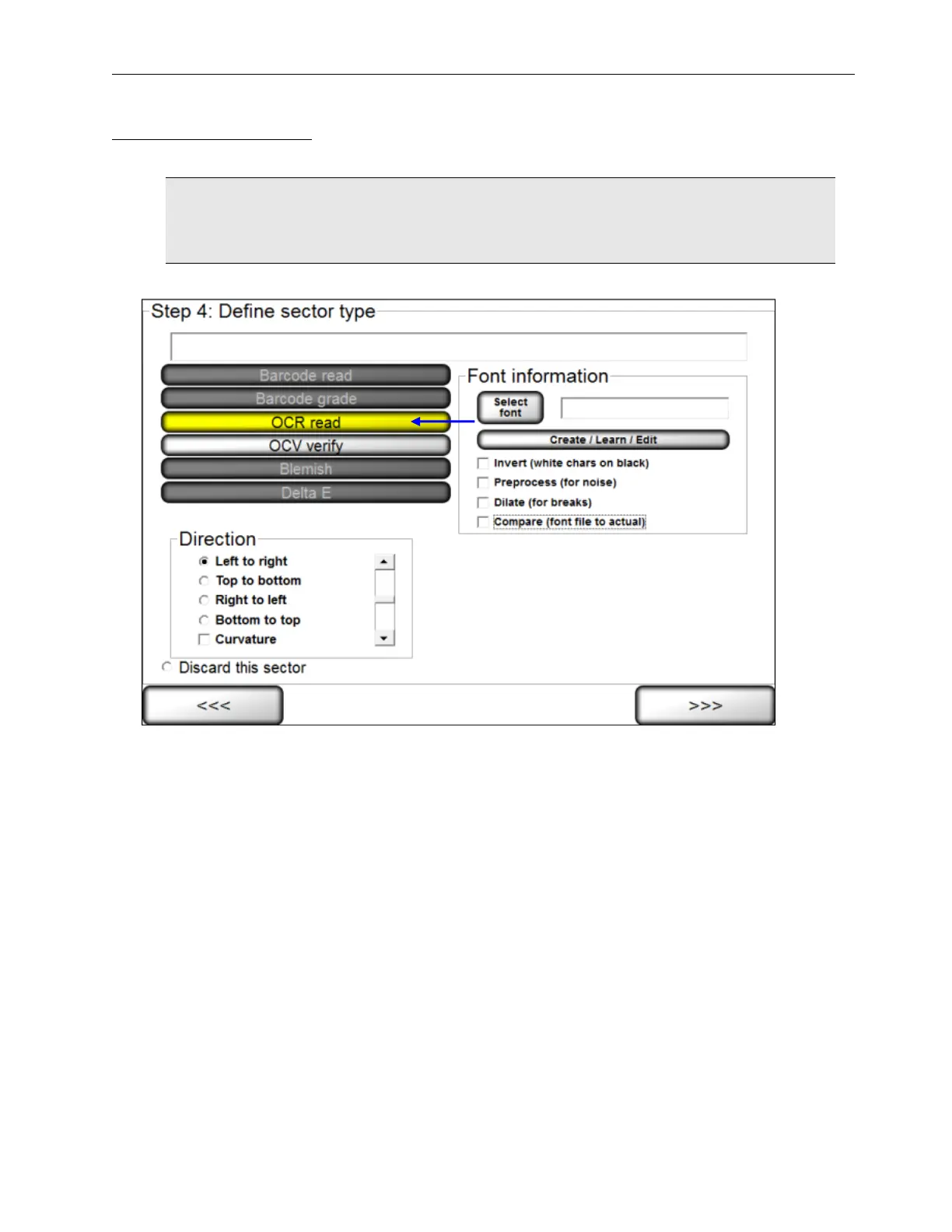
1. Select OCR (read).
2. Select the desired direction.
3. Follow the steps below:
a. Select the desired font by choosing one of the options below:
• To choose a specific font, click the Select font button and select the desired font.
• To create, train and edit fonts, click the Create/Learn/Edit button. See the section below for more
information.
b. Additional options include:
• Invert (white chars on black) tells the sector to look for white characters on a dark background.
• PreProcess (for noise) reduces noise and background contrast variances.
• Dilate (for breaks) joins characters using a blurring and joining technique; it makes the characters
bold and darker. This option is useful for Dot Matrix-type printing.
• Compare (font file to actual) displays an Actual vs. Font File image in the lower half of the screen.
The image shows the font file across the top of the image and the actual characters within the
sector down the left side. Differences between a font file and an actual character are highlighted in
white over black in the center of the screen. Each character is matched against the font file and
given a score. The character with the highest score is then used as the result.



 To Next Page