27
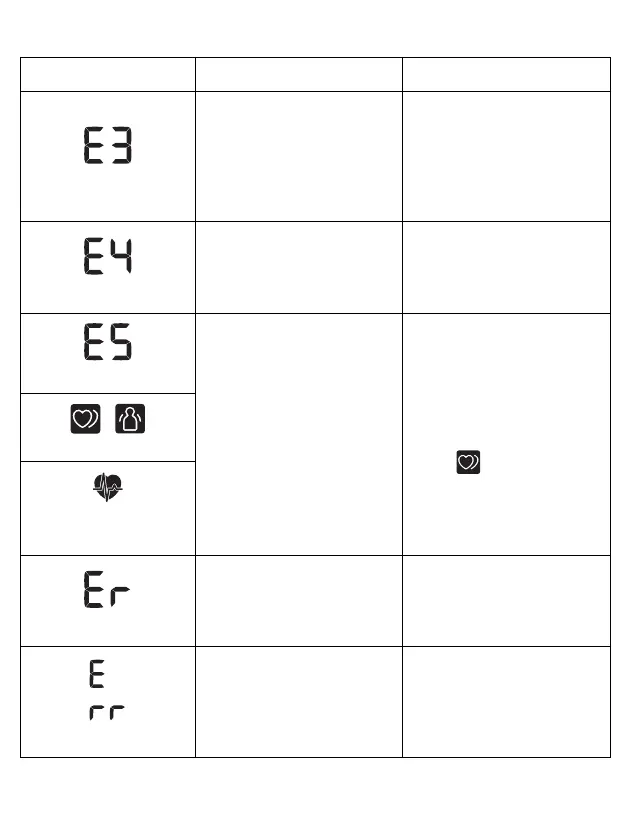
appears
The arm cuff is inflated
exceeding the maximum
allowable pressure.
Do not touch the arm cuff
and/or bend the air tube
while taking a
measurement. If inflating
the arm cuff manually, refer
to sub-section 3.1.
appears
Moving or talking during a
measurement results in
vibrations that disrupt the
measurement.
Remain still and do not talk
during a measurement.
appears
The pulse rate is not
detected correctly.
Apply the arm cuff correctly,
then take another
measurement. Refer to sub-
section 2.3.
Remain still and sit correctly
during a measurement.
If the “ ” symbol
continues to appear, it is
recommended that you
consult with your physician.
/
appears
does not flash during a
measurement
appears
The monitor has
malfunctioned.
Press the [START/STOP]
button again. If “Er” still
appears, contact customer
service. Refer to section 12.
appears
The monitor cannot connect
to a smart device or
transmit data correctly.
Follow the instructions
shown in the app. If the “Err”
still appears after checking
the app, contact customer
service. Refer to section 12.
Display/Problem Possible Cause Solution


 To Next Page