17
Connecting to DeviceNet Section 2-3
2-3-3 DeviceNet Node Address and Baud Rate Software Settings
Use the following procedure to set the ED Router DeviceNet node address
and baud rate from the Network Configurator.
1,2,3... 1. Select Programs - OMRON Network Configurator for DeviceNet Safety
- Network Configurator from the Start Menu. The Network Configurator
will be started.
2. Connect the Network Configurator online. (First set the interface with Op-
tion - Select Interface, and then select Network - Connect.)
3. Select DeviceNet in the Network Configuration Window. (For example,
click the DeviceNet_1 Ta b. )
4. Select Tool - Node Address/Baud Rate Setting.
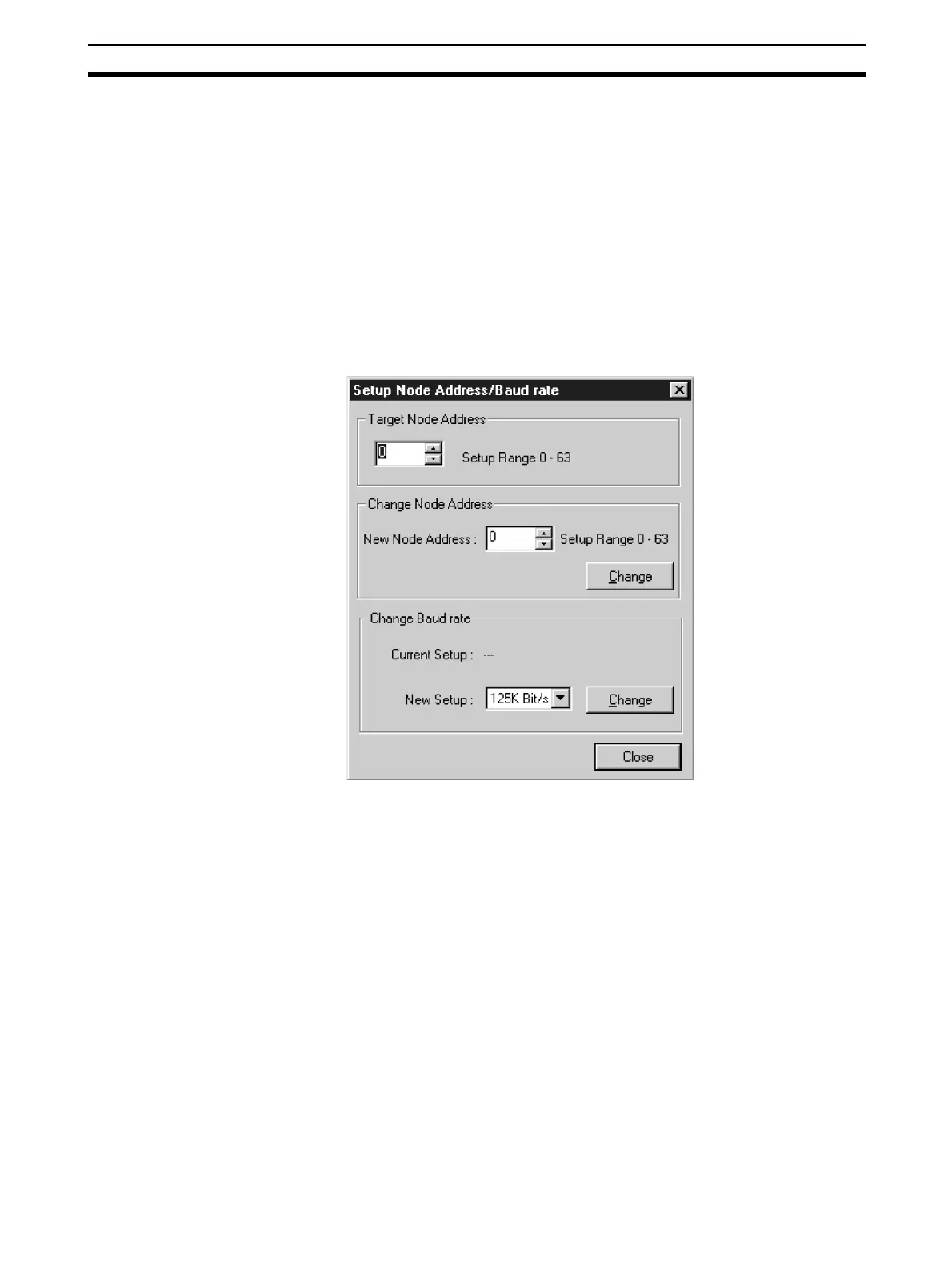
The following dialog box will be displayed.
5. Specify the present node address of the target ED Router in the Ta rg e t
Node Address Field.
6. To change the node address, specify a new node address in the New Node
Address Field and click the Change Button.
The node address of the ED Router will be changed.
7. To change the baud rate, select the rate in the New Baud Rate Field and
click the Change Button.
The baud rate of the ED Router will be changed.


 To Next Page