EasyManua.ls Logo

Omron SYSDRIVE 3G3JV - Page 49

Omron SYSDRIVE 3G3JV
72 pages
Print Icon
To Next Page IconTo Next Page
To Previous Page IconTo Previous Page
Loading...
3-9
Param-
eter
No.
(Regis-
ter No.
(Hex))
Name Description Set-
ting
range
Default
setting
Changes
during
opera-
tion
Memo
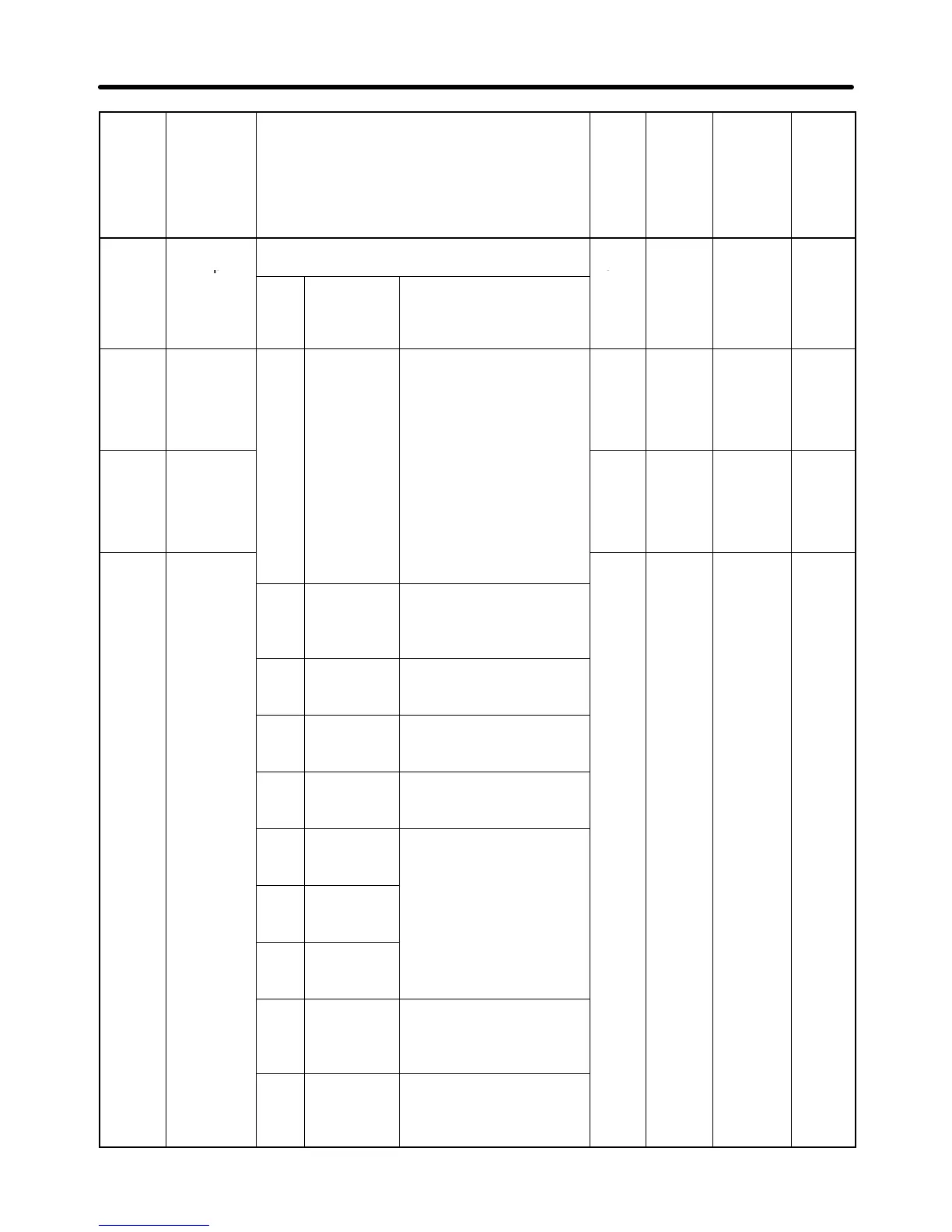
n36
(0124)
Multi-func-
tion input 1
Used to select the functions of multi-function
input terminals S2 through S5.
2 to 8,
10 to
2 No
(0124)
p
(Input ter-
minal S2)
Set
val-
ue
Function Description
0
22
n37
(0125)
Multi-func-
tion input 2
(Input ter-
minal S3)
0 Forward/
Reverse
rotation
command
3-wire sequence (to be
set in n37 only)
By setting n37 to 0, the
set value in n36 is ig-
nored and the following
setting are forcibly made
0, 2 to
8, 10
to 22
5 No
n38
(0126)
Multi-func-
tion input 3
(Input ter-
minal S4)
setting are forcibly made.
S1: RUN input (RUN
when ON)
S2: STOP input (STOP
when OFF)
S3: Forward/Reverse
t ti d (OFF
2 to 8,
10 to
22
3 No
n39
(0127)
Multi-func-
tion input 4
rotation command (OFF:
Forward; ON: Reverse)
2 to 8,
10 to
6 No
(0127)
tion
input
4
(Input ter-
minal S5)
2 Reverse/
Stop
Reverse rotation com-
mand in 2-wire sequence
(Reversed with the termi-
nal turned ON)
10
to
22,
34, 35
3 External
fault (NO)
ON: External fault (FPj
detection: j is a terminal
number)
4 External
fault (NC)
OFF: External fault (EFj
detection: j is a terminal
number)
5 Fault reset ON: Fault reset (disabled
while RUN command is
input)
6 Multi-step
speed ref-
erence 1
Signals to select frequen-
cy references 1 through
8.
7 Multi-step
speed ref-
erence 2
8 Multi-step
speed ref-
erence 3
10 Inching fre-
quency
command
ON: Inching frequency
command (taking prece-
dence over the multi-step
speed reference)
11 Accelera-
tion/Decel-
eration time
changeover
ON: Acceleration time 2
and deceleration time 2
are selected.
List of Parameters Chapter 3

Other manuals for Omron SYSDRIVE 3G3JV

Related product manuals