7
Connector Panels
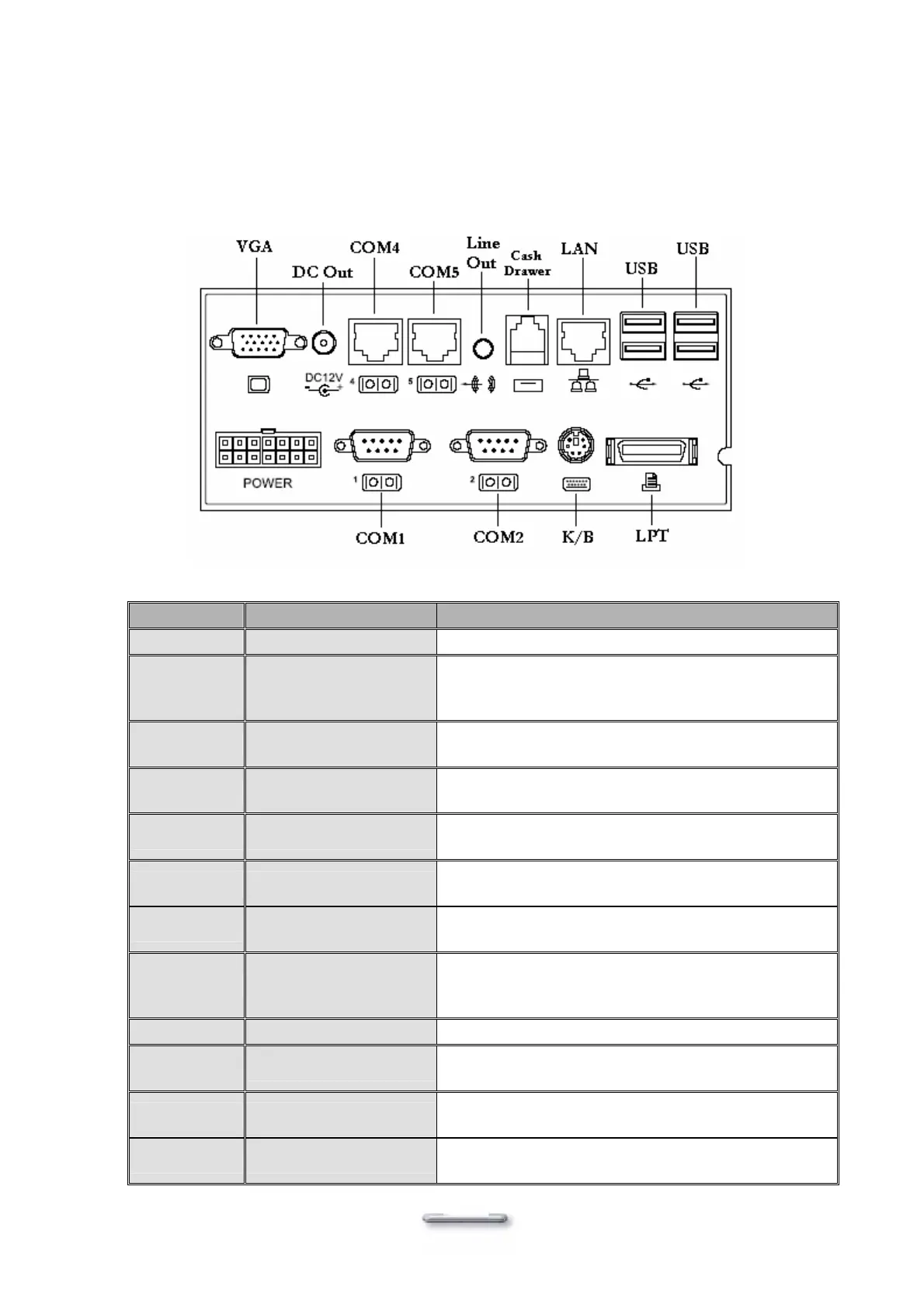
Primary Connector Panel
The primary connector panel is located at the bottom of the main unit base. To clearly see the
panel you must turn Model H700 upside down.
Note: This configuration is for Model H700 units that have been supplied with an integral second LCD panel.
I/O Port Connector Type Description
Power
DC Power Connector Connect the power supply to Model H700
COM1
COM2
DSUB Connector
The serial ports COM1/COM2 can be used to
connect serial devices such as a mouse or a
fax/modem
K/B
PS/2 Keyboard
Connector
The KBD port for an external keyboard
LPT1
26 PIN SCSI II
Connector
The parallel port LPT1 can be used to connect
parallel devices, such as a printer
EXT VGA
15 PIN VGA Connector
The Ext VGA port is used to attach the second
Panel display or CRT monitor
DC 12V Out
2 PIN Socket
For additional DC12V input device; Ex. 2
nd
panel
display
VFD/COM4
VFD/ COM4 RJ45
Connector
The VFD port is used to attach An RJ45 cable for
a VFD customer display.
COM5
RJ45 Connector
The serial port COM5 can be used to connect
serial devices such as a mouse or a VFD customer
display.
Line Out
Earphone Connector The audio port is for speakers.
Cash
Drawer
RJ11 Connector
Cash Drawer Connector, 12 V Actuation support
for solenoid.
LAN
LAN RJ45 Connector
The LAN port is used to hook Model H700 to a
local area network.
USB
USB
The USB (Universal Serial Bus) port can be used
to connect USB devices.


 To Next Page