EasyManua.ls Logo

One Touch H700 - User Manual

One Touch H700
68 pages
Print Icon
To Next Page IconTo Next Page
Loading...
M
M
o
o
d
d
e
e
l
l
H
H
7
7
0
0
0
0
U
U
s
s
e
e
r
r
M
M
a
a
n
n
u
u
a
a
l
l
PEB-3730 Main Board, 12.1 or 15 inch LCD’s

Table of Contents

Question and Answer IconNeed help?

Do you have a question about the One Touch H700 and is the answer not in the manual?

Summary

Chapter 1 Introduction

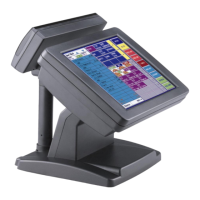
Model H700 Characteristics

Describes the key features and capabilities of the Model H700 system.

How to Use This Manual

Guides users on how to navigate and utilize the information within the user manual effectively.

A Quick Tour of Model H700

Provides a visual overview of the Model H700's controls, drives, connectors, and ports.

Packing Check List

Lists all the components that should be included with the Model H700 package upon delivery.

Dimensions 12.1

Displays the physical dimensions of the Model H700 with a 12.1-inch LCD.

Dimensions 15

Displays the physical dimensions of the Model H700 with a 15-inch LCD.

Chapter 2 Hardware Setup

Primary Connector Panel

Details the layout and function of the primary I/O ports on the main unit base.

Second Connector Panel

Describes the secondary connector panel located on the left side of the main unit.

Model H700 Assembly

Outlines the general steps for assembling the Model H700 system before making hardware changes.

Remove the rear neck plate

Instructs on safely removing the rear neck plate to access internal hardware.

Hard Disk Drive Installation

Provides step-by-step instructions for installing a hard disk drive into the Model H700.

Compact Flash Installation

Details the procedure for installing a Compact Flash card as secondary storage.

Magnetic Card Reader Installation

Guides on how to install the optional Magnetic Card Reader (MCR) accessory.

MCR Parameter Modification

Explains how to customize Magnetic Card Reader parameters using utility software.

VFD Customer Display Installation

Covers the installation process for the optional Vacuum Fluorescent Display (VFD) customer display.

Cash Drawer Installation

Provides instructions for connecting and installing a cash drawer to the Model H700.

Cash Drawer Activation

Explains how to activate and control cash drawers using the system's logic.

Optional second LCD Panel Display

Details the installation of an optional secondary LCD panel for extended display capabilities.

OSD Settings for second LCD Panel

Describes how to adjust display parameters for the secondary LCD panel using OSD controls.

BIOS Setup

Refers to the BIOS setup for the Model H700, directing users to a separate manual for details.

Chapter 3 Software Setup

Via Chipset Driver Installation for all Windows Operating Systems

Guides on installing chipset drivers for broad Windows compatibility.

VGA Driver Installation

Details the installation of graphics drivers for the Model H700's display capabilities.

LAN Driver Installation

Provides instructions for installing the network interface card (LAN) drivers.

Audio Driver Installation

Explains the process of installing audio drivers for sound output.

USB Driver Installation

Covers the installation of drivers for USB connectivity and devices.

ELO Touch Tools Installation

Details the installation of software for ELO touch screen functionality.

TouchKit Tools Installation

Guides on installing the TouchKit software for touch input management.

FIX COM PORT Tools Installation

Explains how to install tools to correct COM port enumeration anomalies in Windows XP.

Chapter 4 Specification

System Configuration

Lists the core hardware specifications of the Model H700 system.

Optional Features

Details additional features and optional hardware components for the Model H700.

I;O board Configuration

Provides an overview of the input/output board configurations and port layouts.

9000 PB0700 I;O Board Pin Definition

Specifies the pin assignments for the 9000PB0700 primary I/O board.

9000 PB0710 I;O Board Pin Definition

Details the pin definitions for the 9000PB0710 secondary I/O board.

9000 PB0230 I;O Board Pin Definition

Outlines the pin definitions for the 9000PB0230 third I/O board.

Chapter 5 Troubleshooting

Power is on, but no display

Offers solutions for issues where the system powers on but the display remains blank.

Cannot Detect HDD

Provides steps to resolve problems where the Hard Disk Drive is not recognized by the system.

Touch Panel does not Work

Offers guidance for troubleshooting when the touch panel input is unresponsive.

ELO Touch Panel can Not Calibrate Correctly

Details how to fix calibration issues with the ELO touch panel.

Second LCD Panel is not functioned properly

Provides solutions for problems with the secondary LCD panel's functionality.

Second Touch Screen is not functioned properly

Offers troubleshooting steps for a non-functional secondary touch screen.

PS;2 Keyboard is not functioned normally

Addresses issues where the PS/2 keyboard is not working as expected.

MCR is not functioned properly

Provides guidance for troubleshooting when the Magnetic Card Reader is not functioning.

VFD Display is not functioned properly

Offers solutions for problems related to the Vacuum Fluorescent Display (VFD) not working.

LAN is not functioned properly

Provides steps to resolve issues with the Local Area Network (LAN) connectivity.

COM1, COM2 and LPT1 are not functioned properly

Guides on troubleshooting issues with serial (COM) and parallel (LPT) ports.

Cash Drawer Port is not functioned properly

Offers solutions for problems related to the cash drawer port's functionality.

USB device is not functioned properly

Provides troubleshooting steps for when USB devices are not recognized or functioning.

Summary

Chapter 1 Introduction

Model H700 Characteristics

Describes the key features and capabilities of the Model H700 system.

How to Use This Manual

Guides users on how to navigate and utilize the information within the user manual effectively.

A Quick Tour of Model H700

Provides a visual overview of the Model H700's controls, drives, connectors, and ports.

Packing Check List

Lists all the components that should be included with the Model H700 package upon delivery.

Dimensions 12.1

Displays the physical dimensions of the Model H700 with a 12.1-inch LCD.

Dimensions 15

Displays the physical dimensions of the Model H700 with a 15-inch LCD.

Chapter 2 Hardware Setup

Primary Connector Panel

Details the layout and function of the primary I/O ports on the main unit base.

Second Connector Panel

Describes the secondary connector panel located on the left side of the main unit.

Model H700 Assembly

Outlines the general steps for assembling the Model H700 system before making hardware changes.

Remove the rear neck plate

Instructs on safely removing the rear neck plate to access internal hardware.

Hard Disk Drive Installation

Provides step-by-step instructions for installing a hard disk drive into the Model H700.

Compact Flash Installation

Details the procedure for installing a Compact Flash card as secondary storage.

Magnetic Card Reader Installation

Guides on how to install the optional Magnetic Card Reader (MCR) accessory.

MCR Parameter Modification

Explains how to customize Magnetic Card Reader parameters using utility software.

VFD Customer Display Installation

Covers the installation process for the optional Vacuum Fluorescent Display (VFD) customer display.

Cash Drawer Installation

Provides instructions for connecting and installing a cash drawer to the Model H700.

Cash Drawer Activation

Explains how to activate and control cash drawers using the system's logic.

Optional second LCD Panel Display

Details the installation of an optional secondary LCD panel for extended display capabilities.

OSD Settings for second LCD Panel

Describes how to adjust display parameters for the secondary LCD panel using OSD controls.

BIOS Setup

Refers to the BIOS setup for the Model H700, directing users to a separate manual for details.

Chapter 3 Software Setup

Via Chipset Driver Installation for all Windows Operating Systems

Guides on installing chipset drivers for broad Windows compatibility.

VGA Driver Installation

Details the installation of graphics drivers for the Model H700's display capabilities.

LAN Driver Installation

Provides instructions for installing the network interface card (LAN) drivers.

Audio Driver Installation

Explains the process of installing audio drivers for sound output.

USB Driver Installation

Covers the installation of drivers for USB connectivity and devices.

ELO Touch Tools Installation

Details the installation of software for ELO touch screen functionality.

TouchKit Tools Installation

Guides on installing the TouchKit software for touch input management.

FIX COM PORT Tools Installation

Explains how to install tools to correct COM port enumeration anomalies in Windows XP.

Chapter 4 Specification

System Configuration

Lists the core hardware specifications of the Model H700 system.

Optional Features

Details additional features and optional hardware components for the Model H700.

I;O board Configuration

Provides an overview of the input/output board configurations and port layouts.

9000 PB0700 I;O Board Pin Definition

Specifies the pin assignments for the 9000PB0700 primary I/O board.

9000 PB0710 I;O Board Pin Definition

Details the pin definitions for the 9000PB0710 secondary I/O board.

9000 PB0230 I;O Board Pin Definition

Outlines the pin definitions for the 9000PB0230 third I/O board.

Chapter 5 Troubleshooting

Power is on, but no display

Offers solutions for issues where the system powers on but the display remains blank.

Cannot Detect HDD

Provides steps to resolve problems where the Hard Disk Drive is not recognized by the system.

Touch Panel does not Work

Offers guidance for troubleshooting when the touch panel input is unresponsive.

ELO Touch Panel can Not Calibrate Correctly

Details how to fix calibration issues with the ELO touch panel.

Second LCD Panel is not functioned properly

Provides solutions for problems with the secondary LCD panel's functionality.

Second Touch Screen is not functioned properly

Offers troubleshooting steps for a non-functional secondary touch screen.

PS;2 Keyboard is not functioned normally

Addresses issues where the PS/2 keyboard is not working as expected.

MCR is not functioned properly

Provides guidance for troubleshooting when the Magnetic Card Reader is not functioning.

VFD Display is not functioned properly

Offers solutions for problems related to the Vacuum Fluorescent Display (VFD) not working.

LAN is not functioned properly

Provides steps to resolve issues with the Local Area Network (LAN) connectivity.

COM1, COM2 and LPT1 are not functioned properly

Guides on troubleshooting issues with serial (COM) and parallel (LPT) ports.

Cash Drawer Port is not functioned properly

Offers solutions for problems related to the cash drawer port's functionality.

USB device is not functioned properly

Provides troubleshooting steps for when USB devices are not recognized or functioning.

One Touch H700 Specifications

General IconGeneral
BrandOne Touch
ModelH700
CategoryControl Panel
LanguageEnglish