Setup and Installation
12 ONePlus UPS User Instruction Manual
1. Plug the ONePlus UPS into a properly wired AC
electrical outlet.
2. Plug the equipment to be protected into the UPS.
CAUTION:
Do not attach laser printers to the UPS.
A laser printer periodically draws significantly more
power during use and may overload the UPS.
3. Press the power switch ( ) on the front panel of
the UPS for 2 seconds to turn the unit ON.
The ONePlus performs a self-test when it is first
plugged in and turned on. After the self-test the unit
enters Normal-mode. If the alarm sounds or the UPS
alarm indicator stays on, see Table 4, “System Code
Status Chart,” on page 27.
NOTE:
The batteries charge to 90% capacity in
approximately 3 to 6 hours. However, it is
recommended that the batteries charge for 6 - 24
hours after installation or after long-term storage. If
long term storage is necessary, the batteries should
be charged every 6 months by plugging the UPS into
a power outlet for 24 hours.
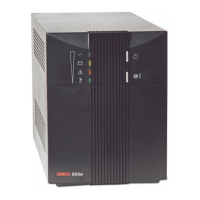
ONePlus Front Panel
The ONePlus front panel lights indicate status of the
unit and potential power problems. For alarm codes


 To Next Page