Setup and Installation
16 ONePlus UPS User Instruction Manual
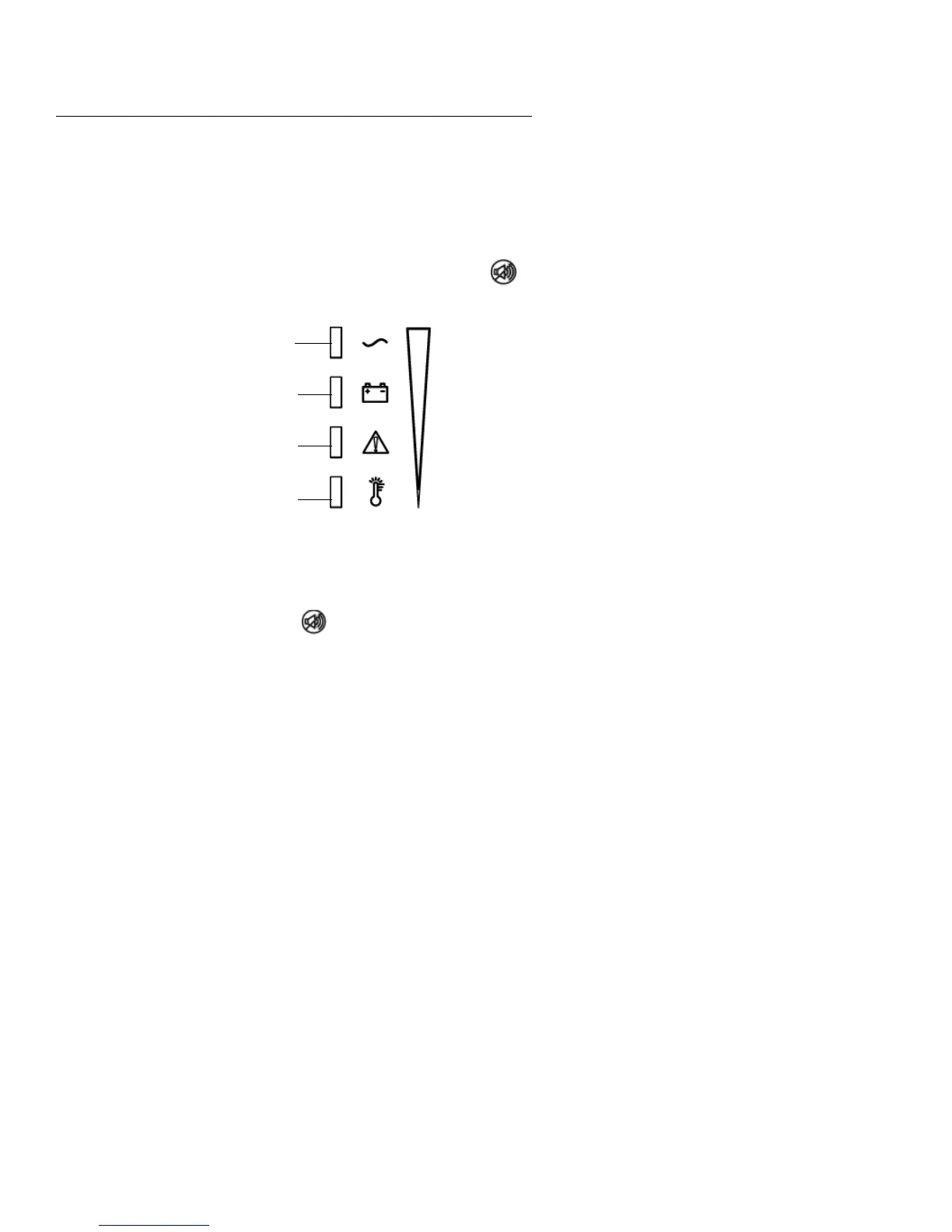
The front panel indicator lights serve four functions:
1. To indicate status of the UPS, whether operating
normally or in fault condition. See System Code
Status Chart on page 27 for details.
2. To indicate % of load connected to the UPS.
To determine % load, the UPS must be on AC
power, not on battery. Press and hold the
button until the indication lights illuminate,
indicating load % as follows:
fig. 7: Percentage of Load or Percentage of Remaining Runtime
Indicators
3. To indicate % of remaining runtime.
To determine % of remaining runtime, the UPS
must be on battery, not on AC power. Press and
hold the button until the indication lights
illuminate. See fig. 7 for determining% of
remaining runtime.
4. To indicate over temperature.
When illuminated, the unit has exceeded safe
operating temperatures. See Table 5,
“Troubleshooting,” on page 28.
Communications
With a communications cable and MopUPS
®
Express installed, MopUPS Express can exchange
data with the UPS. This power management software
polls the UPS for detailed information on the status
of the power environment. If a power emergency
occurs, the software initiates an orderly shutdown of
the equipment. The interface ports will send On
100%
75%
50%
25%


 To Next Page