Troubleshooting
28 ONePlus UPS User Instruction Manual
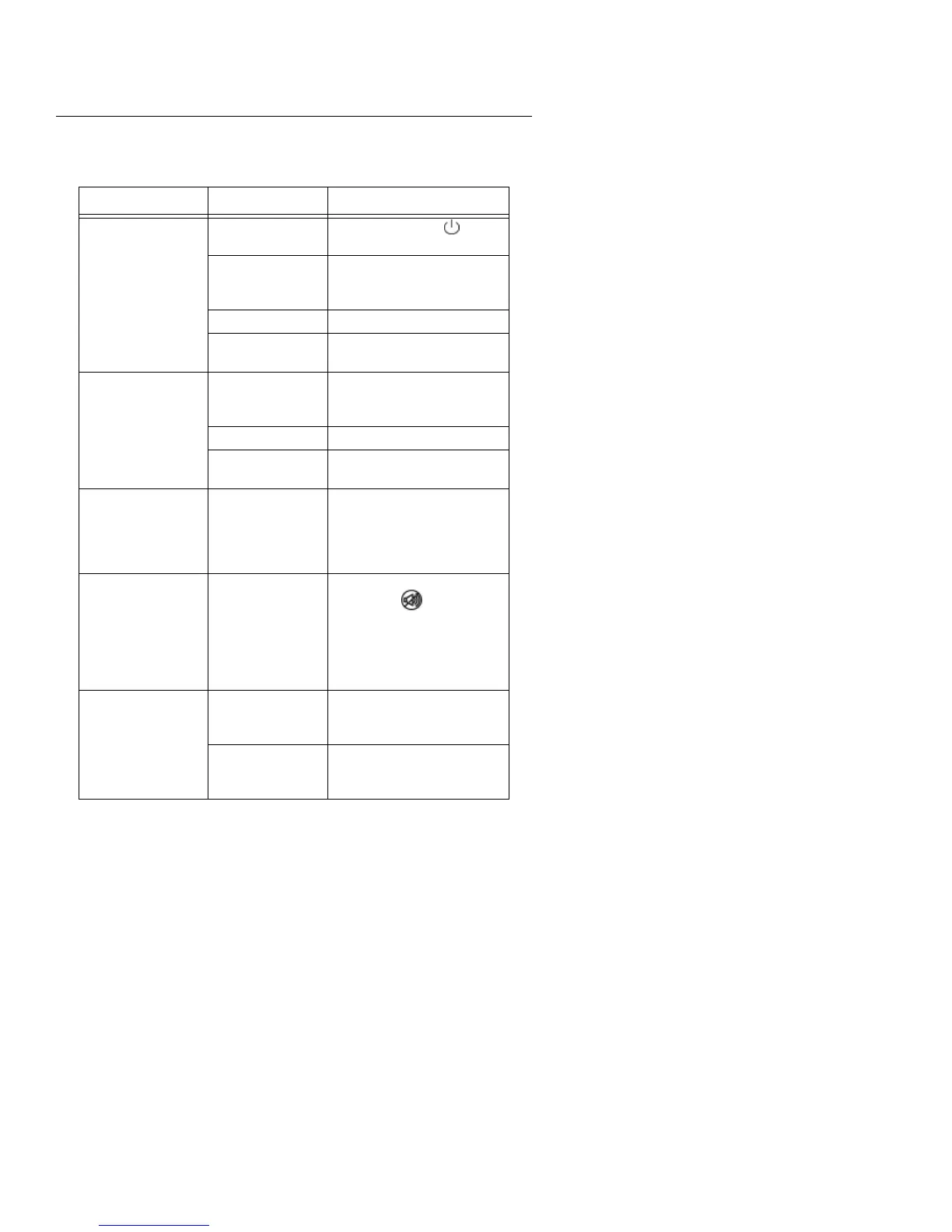
Table 5. Troubleshooting
Problem Possible Cause Solution
UPS will not turn ON
Front Panel Switch not
engaged.
Press the power switch ( ) for 2
seconds.
UPS’s input circuit
breaker tripped.
Reduce the load on the UPS by
unplugging the load and press the
circuit breaker in on the rear panel.
Unit not plugged in. Plug unit into wall outlet.
No batteries installed or
defective batteries.
Check for batteries or contact ONEAC
Technical Services for replacement.
UPS operates on battery
even with line voltage
present.
UPS’s input circuit
breaker tripped.
Reduce the load on the UPS by
unplugging the load and press the
circuit breaker in on the rear panel.
High or low line. Contact qualified electrician.
Out of frequency range.
Check for UPS compatibility with
power source.
Site Wiring Fault is ON.
Ground wire connection
does not exist.
Line and neutral wires
are reversed in the line
receptacle.
Contact qualified electrician.
(NOTE: the UPS operates while the
Site Wiring Fault is ON, but may not
provide rated noise and surge
suppression.)
Audible Alarm is sounding.
See Troubleshooting on
page 28 for Audible
Alarms codes and
resolutions.
To silence the alarm for an existing
fault, press the
button. If the
UPS status changes, the alarm will
sound again. The alarm will not silence
if there is a UPS fault, low battery
condition, or if the battery needs to be
replaced.
Fault LED is ON.
If yellow LED is blinking,
the battery needs to be
replaced.
Contact ONEAC for replacement. See
Battery Considerations on page 23.
If yellow LED is off or on
solid, there is an internal
UPS fault.
Contact ONEAC Technical Services.
See Technical Support on page 1.


 To Next Page