MANTA USER’S MANUAL
12
04
Use and ConfigUration of the eqUipment
4.1.3 battery charge
WARNING!
Always connect the charger to the wall outlet rst and then to the
battery.
It is extremely important to respect the colors when connecting the
cable to the battery. Reverse polarity could have some devastating
consequences for the battery.
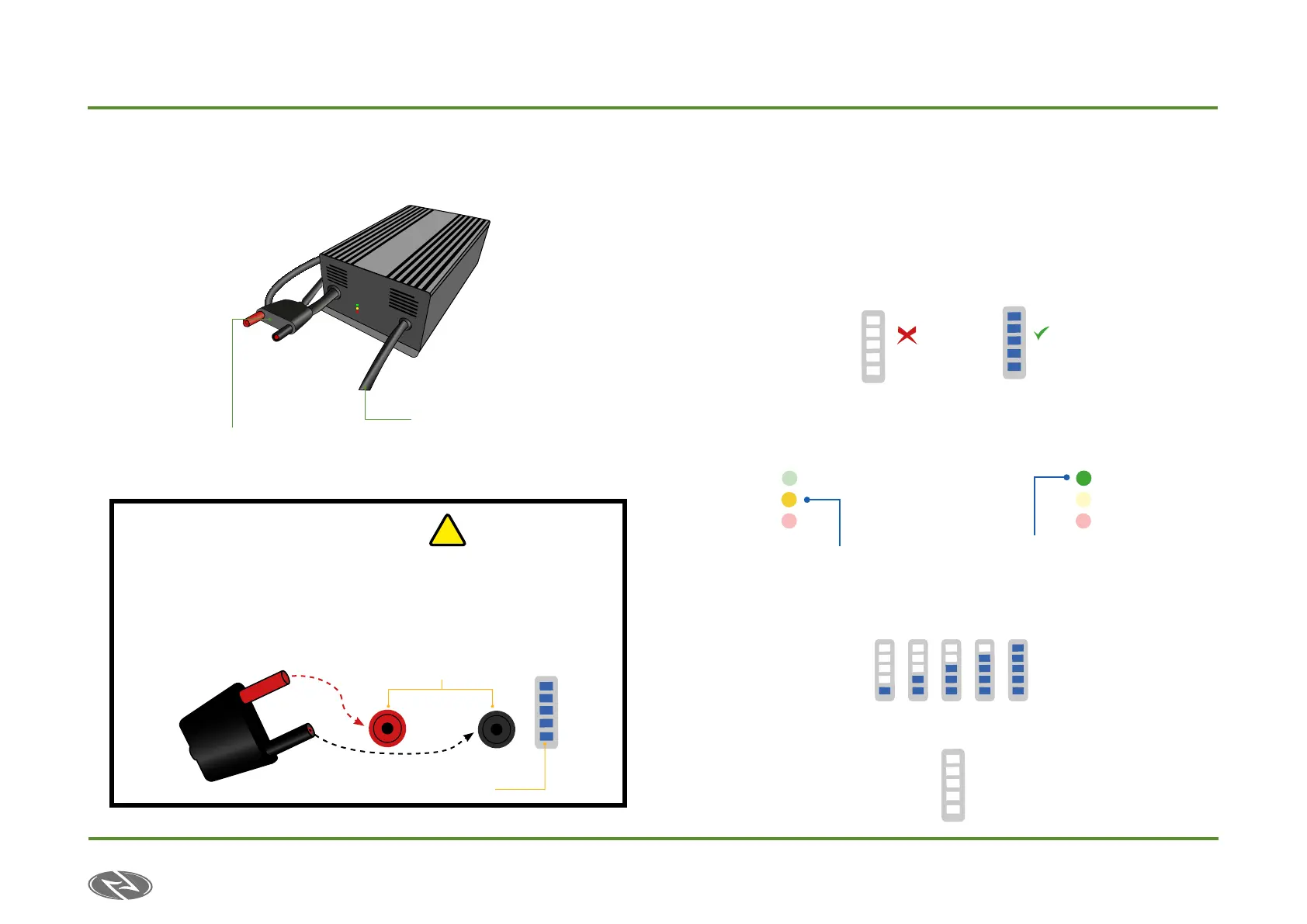
a)connection
1. In order to charge the battery it must be taken out from the board.
2. Insert the connector to the battery respecting the colors as shown in the
previous drawing (red with red and black with black).
3. When connecting the charger to the battery, The LEDs will
light up indicating a successful connection. In case of the
LEDs not lighting up, please make sure that the charger
is properly plugged to the wall outlet and to the battery.
4. Once the battery is connected, the display LED
indicator of the charger will light up indicating the charge
(img. A) until fully charging it, turning to green (img. B).
5. The LEDs in the battery will progressively light
up as the battery is being charged.
When the battery is fully charged the LEDs will turn off and you must
proceed to disconnect the battery.
!
Frontal View
AC Cable
DC Cable
Charging indicator
Connector body
Battery connectors
Static Yellow light indicates
normal charging
Green LED lights up when battery is
fully charged
¨A¨Charging
“B” Full charge


 To Next Page