25
Index to Parts and Controls
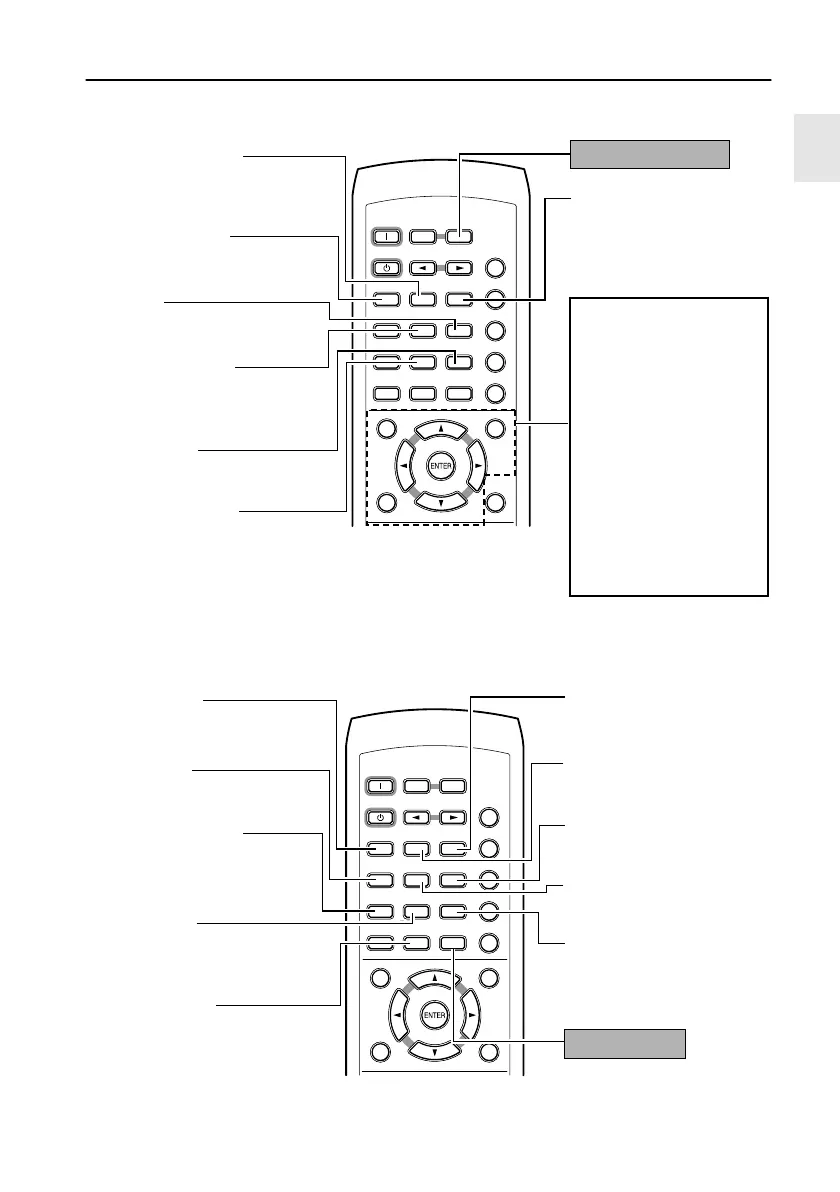
Press TV/SETUP to use these buttons (blue labels)
When you press the SHIFT button on the remote controller, the following functions
become accessible for 10 seconds.
TV/
SETUPTV/
SETUP
DISTANCEDISTANCE UPUP
TV MUTINGTV MUTING
TV
POWER
TV
POWER
TV
INPUT
TV
INPUT
DOWNDOWN
TV VOL
+
TV VOL
+
TV VOL
-
TV VOL
-
789
+
10 0
SHIFT
TV CH
-
TV CH
-
TV CH
+
TV CH
+
TEST TONESP SETUP CH SEL
T
-
D SETUP
ON
789
STANDBY
INPUT SELECTOR
RECEIVER
COND.MLAST M FUNC.M
ANGLEAUDIO SUBTITLE
T
-
D/
STLATE NIGHT
TOP MENU MENU
RETURN
DVD
SETUP
TIMER
CLEAR
PROGRAM
SEARCH
ACOUSTIC
CONTROL
SURROUND
RANDOM
--
/
---
MODE
123
456
CH SEL button
Selects a speaker for chang-
ing its output level.
TV operation buttons
To use these buttons, you
need to program the TV’s
remote control code. Refer to
page 119 for more informa-
tion.
TV POWER button
Tur ns on the TV.
TV MUTING button
Mutes the TV volume.
TV CH +/– buttons
Selects a TV channel.
TV VOL +/– buttons
Adjusts the TV volume.
TV INPUT button
Selects the TV input.
TEST TONE button
Outputs a test tone for setting
speaker levels.
SP SETUP button
Press to select the optimum
speaker configuration.
UP button
Selects a distance or level.
DISTANCE button
Sets a distance for each
speaker.
DOWN button
Selects a distance or level.
T-D SETUP button
Sets the angles between
the front speakers and the
viewing/listening position.
TV/SETUP button
TV/
SETUPTV/
SETUP
DISTANCEDISTANCE UPUP
TV MUTINGTV MUTING
TV
POWER
TV
POWER
TV
INPUT
TV
INPUT
DOWNDOWN
TV VOL
+
TV VOL
+
TV VOL
-
TV VOL
-
789
+
10 0
SHIFT
TV CH
-
TV CH
-
TV CH
+
TV CH
+
TEST TONESP SETUP CH SEL
T
-
D SETUP
ON
789
STANDBY
INPUT SELECTOR
RECEIVER
COND.MLAST M FUNC.M
ANGLEAUDIO SUBTITLE
T
-
D/
STLATE NIGHT
TOP MENU MENU
RETURN
DVD
SETUP
TIMER
CLEAR
PROGRAM
SEARCH
ACOUSTIC
CONTROL
SURROUND
RANDOM
--
/
---
MODE
123
456
LAST M button
DVD: Memorizes the point
at which to resume play-
back.
AUDIO button
DVD: Changes the audio
language.
LATE NIGHT button
Changes the dynamic
range for lower listening
volume.
T-D/ST button
Switches the listening mode
between “Stereo” and “The-
ater- Dimensional.”
RANDOM button
Starts Random playback.
FUNC. M button
DVD: Registers the items
for which you frequently
change the setting.
COND. M button
DVD: Memorizes the default
settings.
SUBTITLE button
DVD: Selects the subtitle
language.
ANGLE button
DVD: Selects the camera
angle.
SURROUND button
Selects the surround mode.
SHIFT button
L-DR7_E.book Page 25 Tuesday, December 24, 2002 3:10 PM


 To Next Page
 Loading...