114
Customizing the Function Settings
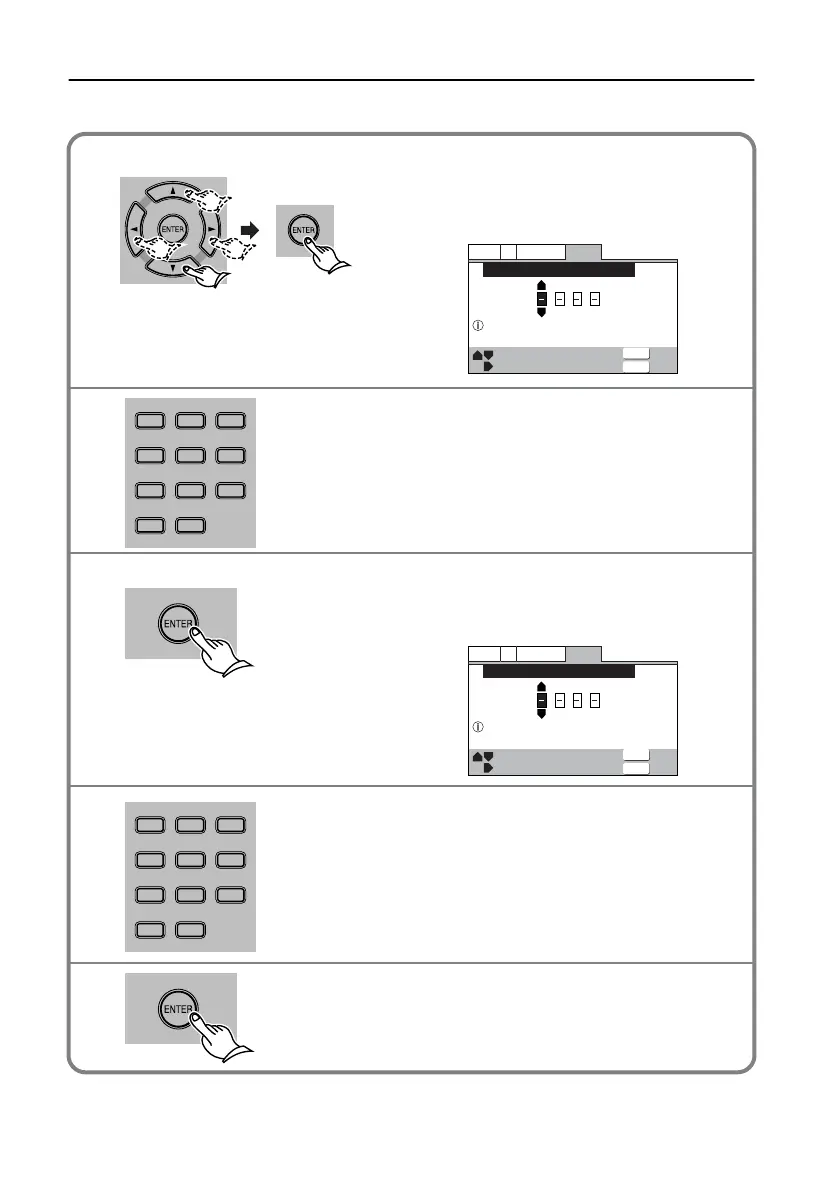
Changing the password
Select [Password] for [Parental Lock] on
the General page of the Setup window,
then press ENTER.
The unit displays the password entry window.
Enter your 4-digit password.
Press ENTER.
The unit displays the Register Code Number
window.
Enter a new 4-digit password.
Press ENTER.
The password has been changed.
General
V2
Language
Video1
Exit
+/–
Move
Return
Parental Lock: Register Code Number
Enter Code Number
ENTER
RETURN
General
V2
Language
Video1
Exit
+/–
Move
Return
Parental Lock: Register Code Number
Enter 4—Digit Code
ENTER
RETURN
1
2
3
DISTANCEDISTANCE UPUP
DOWNDOWN
789
+
10 0
TEST TONESP SETUP CH SEL
T
-
D SETUP
789
COND.MLAST M FUNC.M
ANGLEAUDIO SUBTITLE
T
-
D/
STLATE NIGHT SURROUND
RANDOM
--
/
---
123
456
4
DISTANCEDISTANCE UPUP
DOWNDOWN
789
+
10 0
TEST TONESP SETUP CH SEL
T
-
D SETUP
789
COND.MLAST M FUNC.M
ANGLEAUDIO SUBTITLE
T
-
D/
STLATE NIGHT SURROUND
RANDOM
--
/
---
123
456
5
L-DR7_E.book Page 114 Tuesday, December 24, 2002 3:10 PM


 To Next Page
 Loading...