91
Using the Timer Functions
■
Programming a timer
Before programming a timer for AM or FM
broadcast, first preset the desired station
(page 81).
Notes
• If the clock has not been set, you cannot pro-
gram a timer.
• If you do not operate the unit for more than 60
seconds while you are programming a timer,
the unit displays the standard screen.
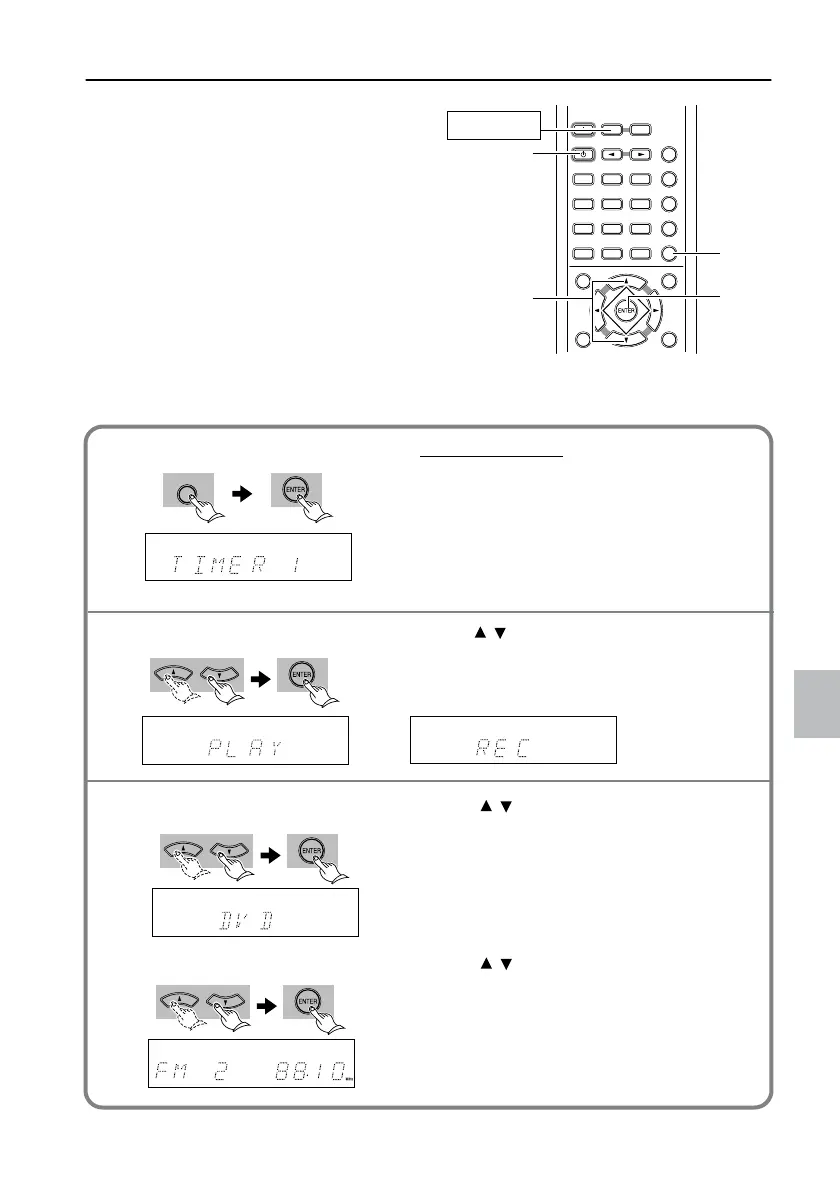
Only the remote controller buttons are operated in this procedure.
TV/
SETUPTV/
SETUP
DISTANCEDISTANCE UPUP
TV MUTINGTV MUTING
TV
POWER
TV
POWER
TV
INPUT
TV
INPUT
DOWNDOWN
TV VOL
+
TV VOL
+
TV VOL
-
TV VOL
-
789
+
10 0
SHIFT
TV CH
-
TV CH
-
TV CH
+
TV CH
+
TEST TONESP SETUP CH SEL
T
-
D SETUP
ON
789
STANDBY
INPUT SELECTOR
RECEIVER
COND.MLAST M FUNC.M
ANGLEAUDIO SUBTITLE
T
-
D/
STLATE NIGHT
TOP MENU MENU
RETURN
DVD
SETUP
TIMER
CLEAR
PROGRAM
SEARCH
ACOUSTIC
CONTROL
SURROUND
RANDOM
--
/
---
MODE
123
456
RECEIVER
1
1, 2,
3, 4,
5, 6
7
2, 3,
4, 5,
6
TIMER
Press RECEIVER on the remote control-
ler, then press TIMER repeatedly to select
the number of the timer you wish to set.
Select from Timer 1 - 4, then press ENTER.
Tip
• The TIMER indicator lights up in the upper-left
corner if a timer has been programmed.
Press to select Play or Rec Timer.
When the unit displays the desired timer, press
ENTER. With Rec Timer, recording will start on
a connected Onkyo MD or tape recorder.
Press to select a component to
start playing with the timer.
When the unit displays the desired component,
press ENTER.
For Rec Timer, you can select FM, AM, or TV.
Press to select a preset station
number.
When the unit displays the desired preset sta-
tion number, press ENTER.
1
2
Selecting a timer number
3
Selecting a type of timer
Selecting a component to play
If you have selected FM or AM
L-DR7_E.book Page 91 Tuesday, December 24, 2002 3:10 PM

 To Next Page
 Loading...