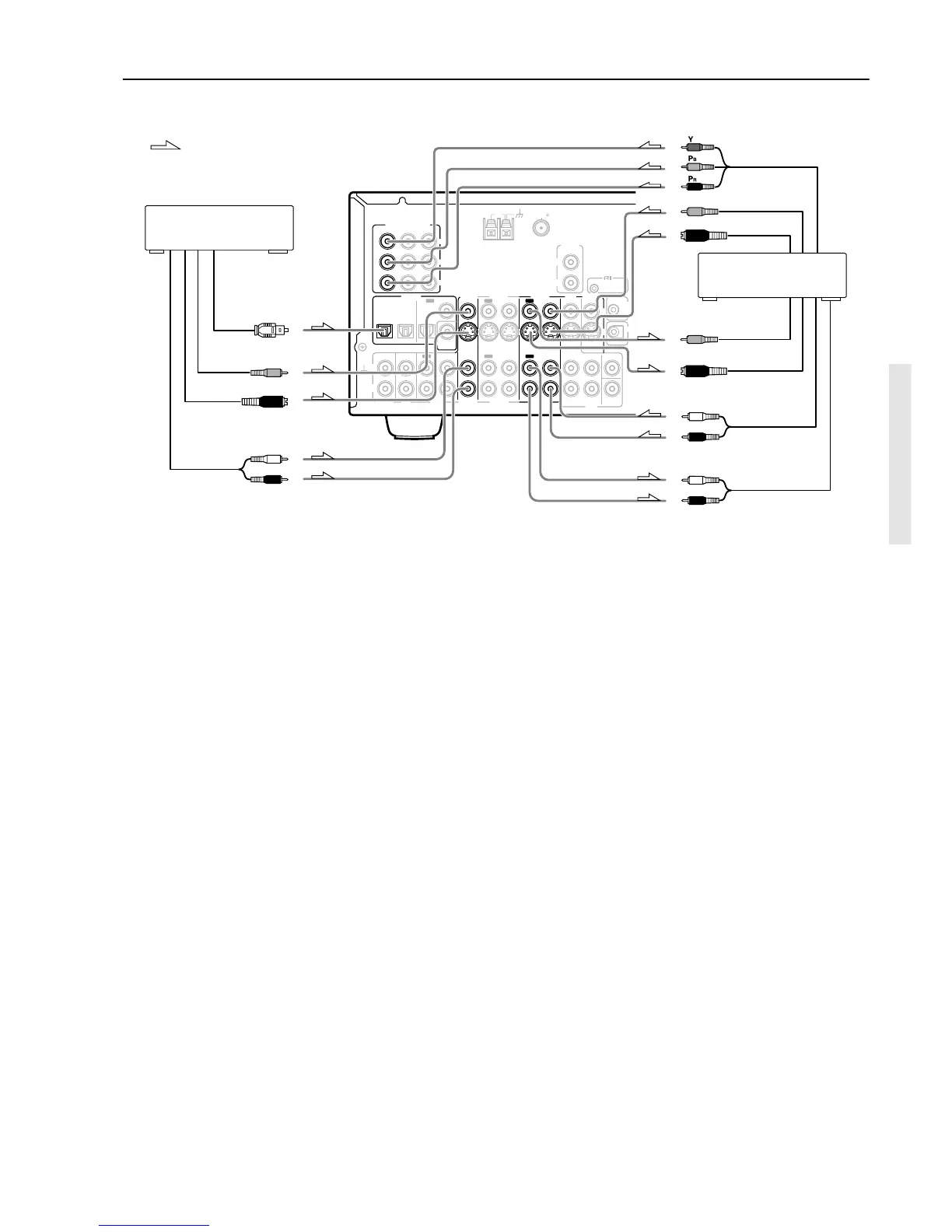
5. Connecting a video cassette recorder (VIDEO 1)
Using RCA video cables, connect the video output jack (composite)
of the video cassette recorder to the VIDEO 1 V IN jack of the TX-
SR701/701E/601/601E and connect the video input jack of the video
cassette recorder to the VIDEO 1 V OUT jack of the TX-SR701/
701E/601/601E. Or if the video cassette recorder has S video input
and output jacks, using S video cables, connect the S video output
jack of the video cassette recorder to the VIDEO 1 S IN jack of the
TX-SR701/701E/601/601E and connect the video input jack of the
video cassette recorder to the VIDEO 1 S OUT jack of the TX-
SR701/701E/601/601E. Or if the video cassette recorder has
component video outputs, connect them to the COMPONENT
VIDEO INPUT 1 or 2 jacks on the TX-SR701/701E/601/601E.
With the initial settings of the TX-SR701/701E/601/601E, the
VIDEO 1 input source is set for the COMPONENT VIDEO
INPUT 2 jacks.
If you connect the video cassette recorder to the COMPONENT
VIDEO INPUT 1 jacks, this must be changed at “Input Setup” →
“Component Video” (see page 53).
Using RCA audio cables, connect the audio output jacks of the
video cassette recorder to the VIDEO 1 IN audio jacks of the TX-
SR701/701E/601/601E and connect the audio input jacks of the
video cassette recorder to the VIDEO 1 OUT audio jacks of the TX-
SR701/701E/601/601E. Make sure that you properly connect the
left channels to the L jacks and the right channels to the R jacks.
If you are connecting a digital output device to the VIDEO 1 jack
instead of a VCR, connect it to either the DIGITAL IN COAX jack
or DIGITAL IN OPT jack depending on the type of connector on
the device.
With the initial settings of the TX-SR701/701E/601/601E,
nothing is allocated as the digital input source for VIDEO 1 (----).
If you connect the digital audio output, be sure to make the
appropriate changes at “Input Setup” → “Digital Input” (see page
52).
6. Connecting a satellite tuner, television, or settop box
(VIDEO 3)
Using an RCA video cable, connect the video output jack
(composite) of the device to the VIDEO 3 V IN jack of the TX-
SR701/701E/601/601E. Or if the device has an S video output jack,
connect it to the VIDEO 3 S IN jack of the TX-SR701/701E/601/
601E using an S video cable. Or if the device has component video
outputs, connect them to the COMPONENT VIDEO INPUT 1 or 2
jacks on the TX-SR701/701E/601/601E.
With the initial settings of the TX-SR701/701E/601/601E, the
VIDEO 3 input source is set for the COMPONENT VIDEO
INPUT 2 jacks.
If you connect the device to the COMPONENT VIDEO INPUT 1
jacks, this must be changed at “Input Setup” → “Component
Video” (see page 53).
Using an RCA audio cable, connect the audio output jack of the
device to the VIDEO 3 IN audio jacks of the TX-SR701/701E/601/
601E. Make sure that you properly connect the left channel to the L
jack and the right channel to the R jack.
If the device has a digital output, connect it to either the DIGITAL
IN COAXIAL jack or the DIGITAL IN OPTICAL jack of the TX-
SR701/701E/601/601E depending on the type of connector on the
device.
With the initial settings of the TX-SR701/701E/601/601E, the
VIDEO 3 input source is set for digital input at the OPTICAL 2
jack (OPT 2).
If the digital connection is made at a different jack, this must be
changed at “Input Setup” → “Digital Input” (see page 52).


 To Next Page