R
L
ZONE 2
LINE OUT
(MONITOR OUT)
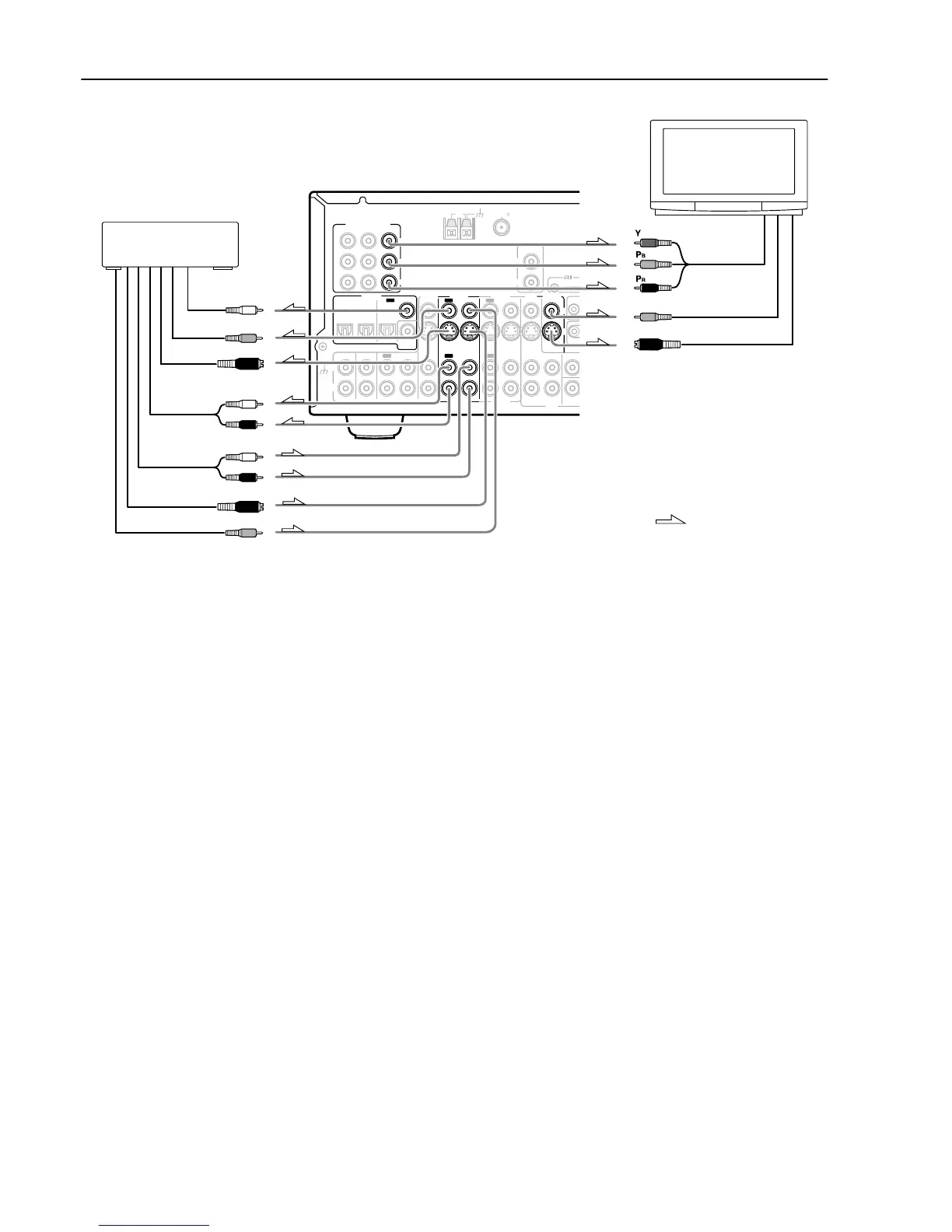
8. TV monitor or projector
: Signal flow
L (white)
R (red)
L (white)
R (red)
S Video output
Video output
Video input
S Video input
7. DVD recorder, other
digital video recording
device (VIDEO 2)
Digital audio
input (coaxial)
Video input
S Video input
Analog audio
input
Analog audio
output
Component
video input
TX-SR701/701E only
7. Connecting a DVD recorder or other digital video recording
device (VIDEO 2)
Using RCA video cables, connect the video output jack (composite)
of the device to the VIDEO 2 V IN jack of the TX-SR701/701E/
601/601E and connect the video input jack of the device to the
VIDEO 2 V OUT jack of the TX-SR701/701E/601/601E. Or if the
device has S video input and output jacks, using S video cables,
connect the S video output jack of the device to the VIDEO 2 S IN
jack of the TX-SR701/701E/601/601E and connect the video input
jack of the device to the VIDEO 2 S OUT jack of the TX-SR701/
701E/601/601E. Or if the device has component video outputs,
connect them to the COMPONENT VIDEO INPUT 1 or 2 jacks on
the TX-SR701/701E/601/601E.
With the initial settings of the TX-SR701/701E/601/601E, the
VIDEO 2 input source is set for the COMPONENT VIDEO
INPUT 2 jacks.
If you connect the device to the COMPONENT VIDEO INPUT 1
jacks, this must be changed at “Input Setup” → “Component
Video” (see page 53).
Using RCA audio cables, connect the audio output jacks of the
device to the VIDEO 2 IN audio jacks of the TX-SR701/701E/601/
601E and connect the audio input jacks of the device to the VIDEO
2 OUT audio jacks of the TX-SR701/701E/601/601E. Make sure
that you properly connect the left channels to the L jacks and the
right channels to the R jacks.
If the device has a digital output, connect it to either the DIGITAL
IN COAXIAL jack or the DIGITAL IN OPTICAL jack of the TX-
SR701/701E/601/601E depending on the type of connector on the
device.
With the initial settings of the TX-SR701/701E/601/601E,
nothing is allocated as the digital input source for VIDEO 2 (----).
If you connect the digital audio output, be sure to make the
appropriate changes at “Input Setup” → “Digital Input” (see page
52).
If the device has a digital input, connect it to the DIGITAL
OUTPUT jack of the TX-SR701/701E/601/601E for digital
recording of the signal from the digital input of the TX-SR701/
701E/601/601E.
Note:
The output from the DIGITAL OUT jack of the TX-SR701/701E/
601/601E is only the digital signal input to the DIGITAL IN jack.
8. Connecting a television monitor or projector (MONITOR
OUT)
The TX-SR701/701E/601/601E is equipped with a simple Y/C
separate circuit and simple Y/C mixed circuit. Since both the signal
from the S and V inputs are output to the MONITOR OUT S output,
if the television or projector is equipped with an S video input, it is
unnecessary to connect the video connectors. If it is equipped with
only a video input, connect it to the MONITOR OUT V output.
Using an RCA video cable, connect the video input jack
(composite) of the device to the MONITOR OUT V jack of the TX-
SR701/701E/601/601E. Or if the device has an S video input jack,
connect it to the MONITOR OUT S jack of the TX-SR701/701E/
601/601E using an S video cable. Or if the device has component
video inputs, connect them to the bank of COMPONENT VIDEO
OUTPUT jacks on the TX-SR701/701E/601/601E.
Note:
Note that the Setup Menu will only be displayed on the monitor
connected to MONITOR OUT (S or V) and not those connected to
the COMPONENT VIDEO OUTPUT jacks.


 To Next Page