10
Front & Rear Panels—Continued
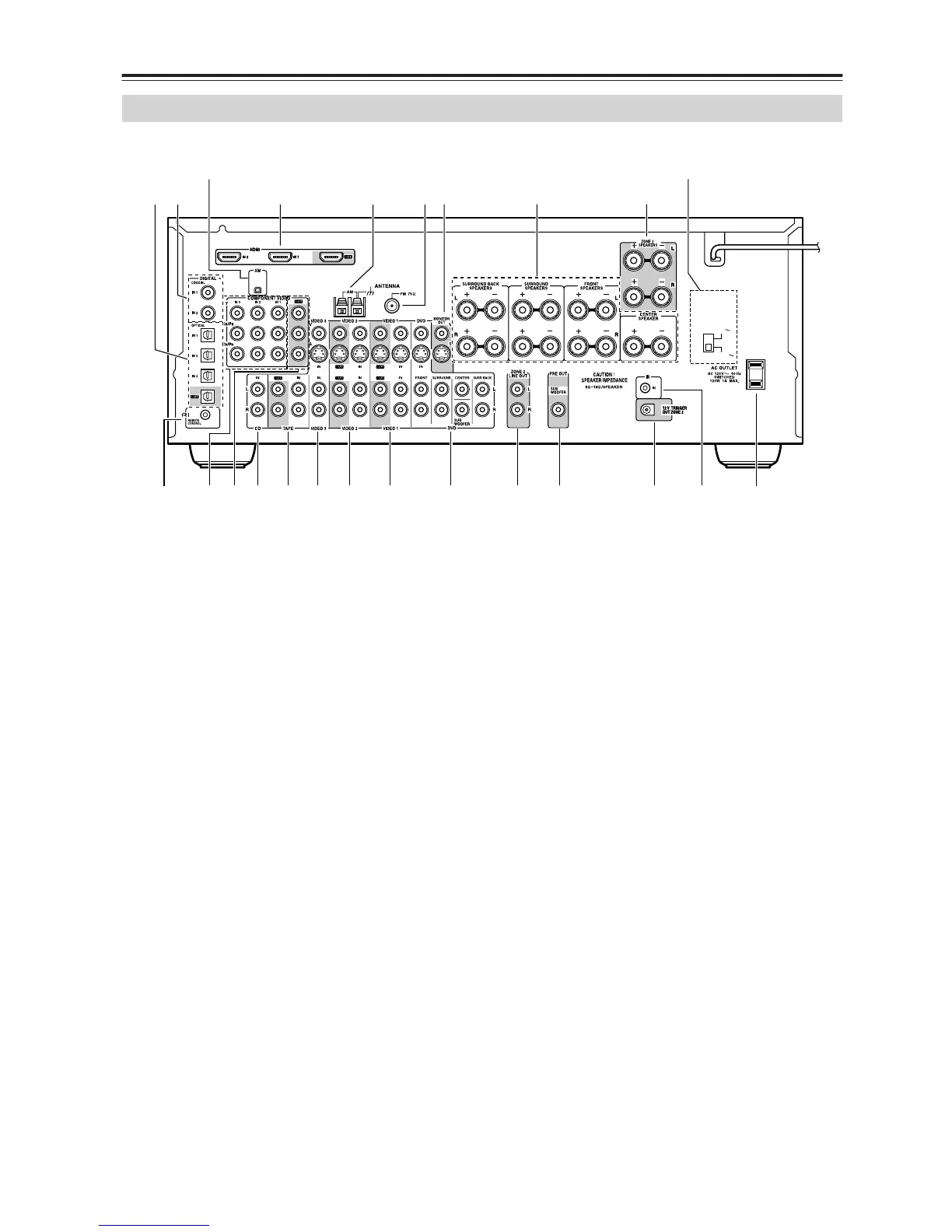
The page numbers in parentheses show where you can find the main explanation for each item.
A DIGITAL OPTICAL IN 1, 2, 3 and OUT
The optical digital audio inputs can be used to con-
nect CD and DVD players, and other components
with an optical digital audio output.
The optical output can be used connect a CD
recorder or other digital recorder with an optical
digital input.
B DIGITAL COAXIAL IN 1, 2
The coaxial digital audio inputs can be used to con-
nect CD and DVD players, and other components
with a coaxial digital audio output.
C XM antenna (on North American models)
This jack is for connecting an XM antenna, sold
separately (see page 56).
D HDMI IN 1, 2, and OUT
HDMI (High Definition Multimedia Interface) con-
nections carry digital audio and digital video.
The HDMI inputs are for connecting components
with HDMI outputs, such as DVD players.
The HDMI output is for connecting a TV or projec-
tor with an HDMI input.
E AM ANTENNA (21)
These push terminals are for connecting an AM
antenna.
F FM ANTENNA (21)
This jack is for connecting an FM antenna.
G MONITOR OUT
The S-Video or composite video jack should be
connected to a video input on your TV or projector.
H FRONT, CENTER, SURROUND &
SURROUND BACK SPEAKERS (20)
These terminal posts are for connecting your front,
center, surround, and surround back speakers.
I ZONE 2 SPEAKERS (79)
These terminals are for connecting speakers in
Zone 2.
J VOLTAGE SELECTOR (only some models)
This voltage selector provides compatibility with
power systems around the world (see page 3).
K AC OUTLET
This switched AC outlet can be used to supply
power to other AV components. The type of outlet
depends on the country in which you purchased
your AV receiver.
L IR IN (82)
If you want to use the remote controller to control
the AV receiver from Zone 2, or if the AV receiver is
installed in a cabinet and the line of sight between
the AV receiver and the remote controller is
obstructed, a commercially available IR receiver
can be connected here.
M 12V TRIGGER OUT ZONE 2 (81)
This output can be connected to the 12-volt trigger
input on a power amplifier in Zone 2. When Zone 2
is turned on, a 12-volt trigger signal is output.
N PRE OUT SUBWOOFER (19)
The SUBWOOFER jack is for connecting a pow-
ered subwoofer.
Rear Panel
MUVSRQPON
G
L
9
K
1B
C
D65
T
H
MN
J
VOLTAGE
SELECTOR
120V
220-240V
(North American models only)
(Only some models)



 To Next Page