11.7.2Zoommodes
1. Press key in screen.
2. Choose and then press key to select.
3. Choose and then press key. The following window will
appear.
4. Choose
[MENU] SOUNDER
Sonar menu [ENT]
Zoom mode [ENT]
"Marker Zoom" "Bottom lock" "Bottom zoom"
[ENT]
, or as desired then
press key to finish.
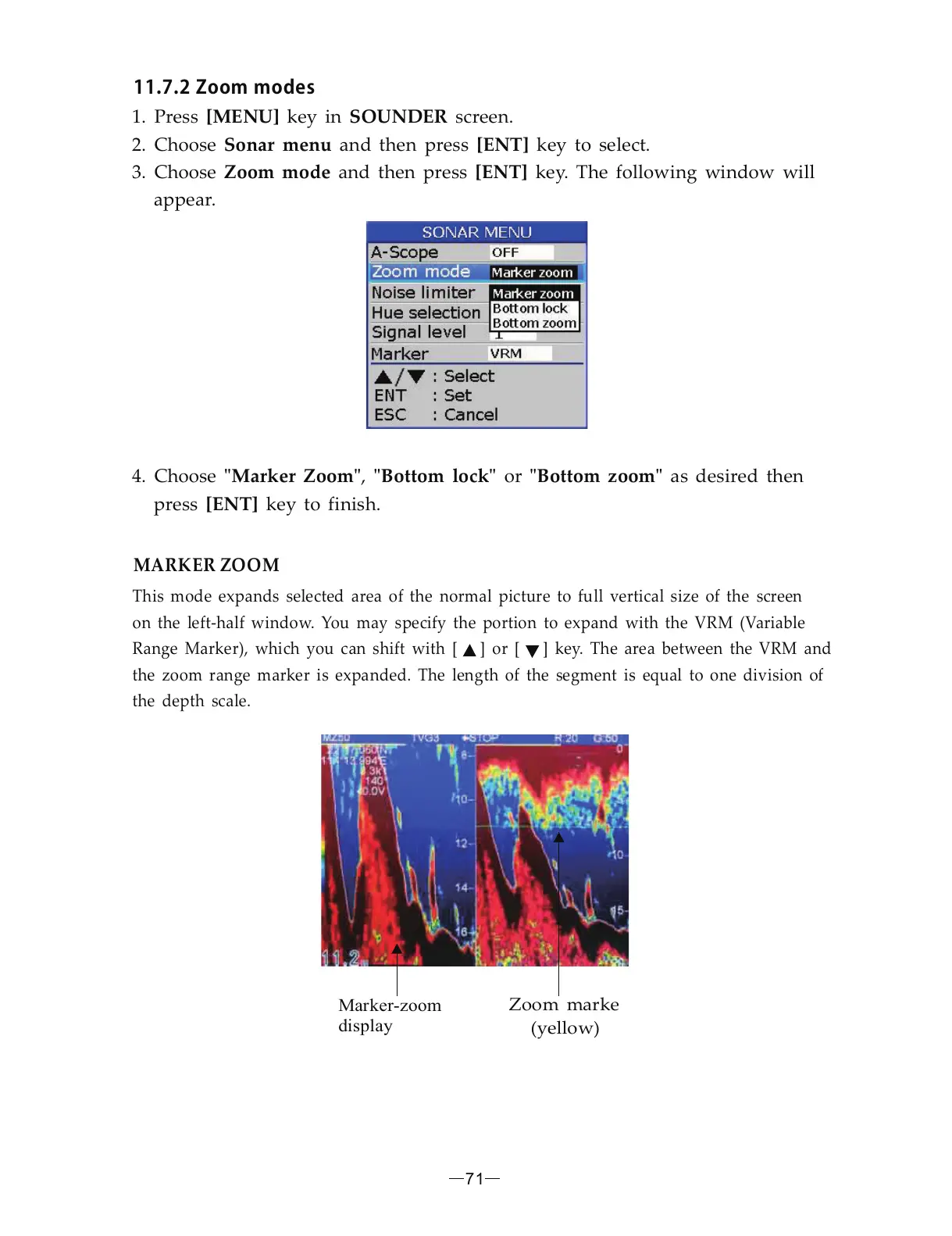
This mode expands selected area of the normal picture to full vertical size of the screen
on the left-half window. You may specify the portion to expand with the VRM (Variable
Range Marker), which you can shift with [ ] or [ ] key. The area between the VRM and
the zoom range marker is expanded. The length of the segment is equal to one division of
the depth scale.
MARKER ZOOM
71
Marker-zoom
display
Zoom marke
(yellow)


 To Next Page