Connecting your Fax
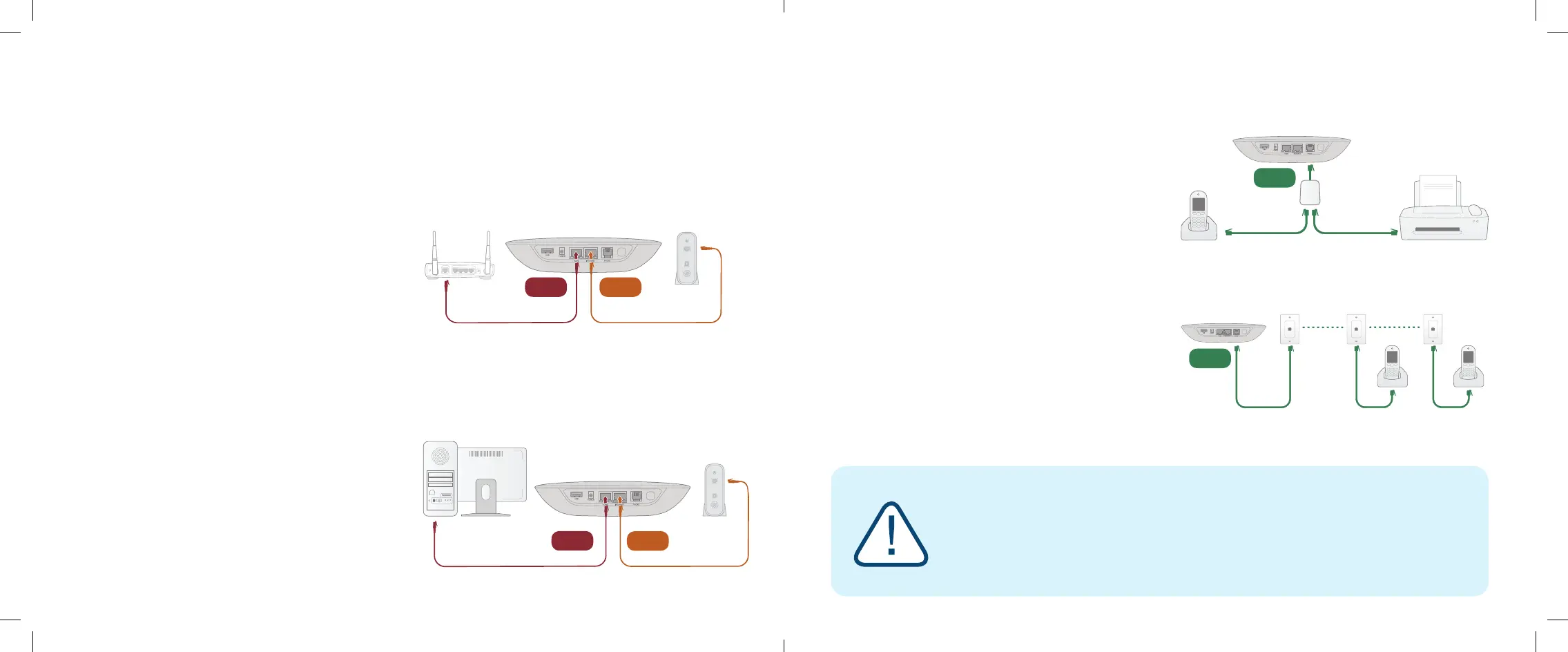
A standard phone splitter can be used to connect
more than one device to the PHONE port.
To learn more, visit: www.ooma.com/fax
Connecting Your Phone Jacks
You can link the Ooma Telo to the phone jacks in your
home, allowing you to connect phones in multiple rooms.
Fax and Home Wiring Setup Options
The Ooma Telo is exible enough to work in almost any home network and with a variety of devices.
Review the following options to see if any of them apply to you.
This setup allows Ooma to prioritize your phone calls
over other network trac.
Find the Ethernet cable that connects your modem to
your router. Unplug the modem end and plug into the
HOME port of the Telo.
Use the included Ethernet cable and connect the
INTERNET port of the Telo to your modem.
Reboot your modem and router.
If you only have one computer and it is connected to
your modem, use this option.
Find the Ethernet cable that connects your modem to
your computer. Unplug the modem end and plug it into
the HOME port of the Telo.
Use the included Ethernet cable and connect the
INTERNET port of the Telo to your modem.
Reboot your modem and computer.
Alternative Ethernet Setup Options
NOTE: Option A is required to use Ooma Internet
Security, as Internet trac needs to pass through
the Telo in order to be ltered.
18 19
Ooma Telo
Ooma Telo
Phone Fax, DVR, or STB
Phone Phone
Phone
Splitter
Modem
Computer
Ooma Telo
INTERNET
HOME
PHONE
PHONE
ModemRouter Ooma Telo
HOME INTERNET
Option A: Install Telo between modem and router (best voice quality)
Option B: Install Telo between modem and PC
IMPORTANT: The PHONE port on the back of your Ooma Telo is not designed or certied
for connecting to your phone company’s wiring, whether through the phone jacks in your
home or otherwise. To avoid the risk of re and/or electrical shock, you must rst completely
disconnect the phone company’s wiring outside of your house from the phone wiring inside of
your house. Do not plug your Ooma Telo into your phone jacks before doing this. Please visit
ooma.com/homedistribution before you proceed with connecting your Telo in this manner.
Ooma-Telo-Air-QSG_EN-FR 700-0192-100-Jan2018-R2.indd 18-19 1/31/18 2:36 PM



 To Next Page