Quick Reference
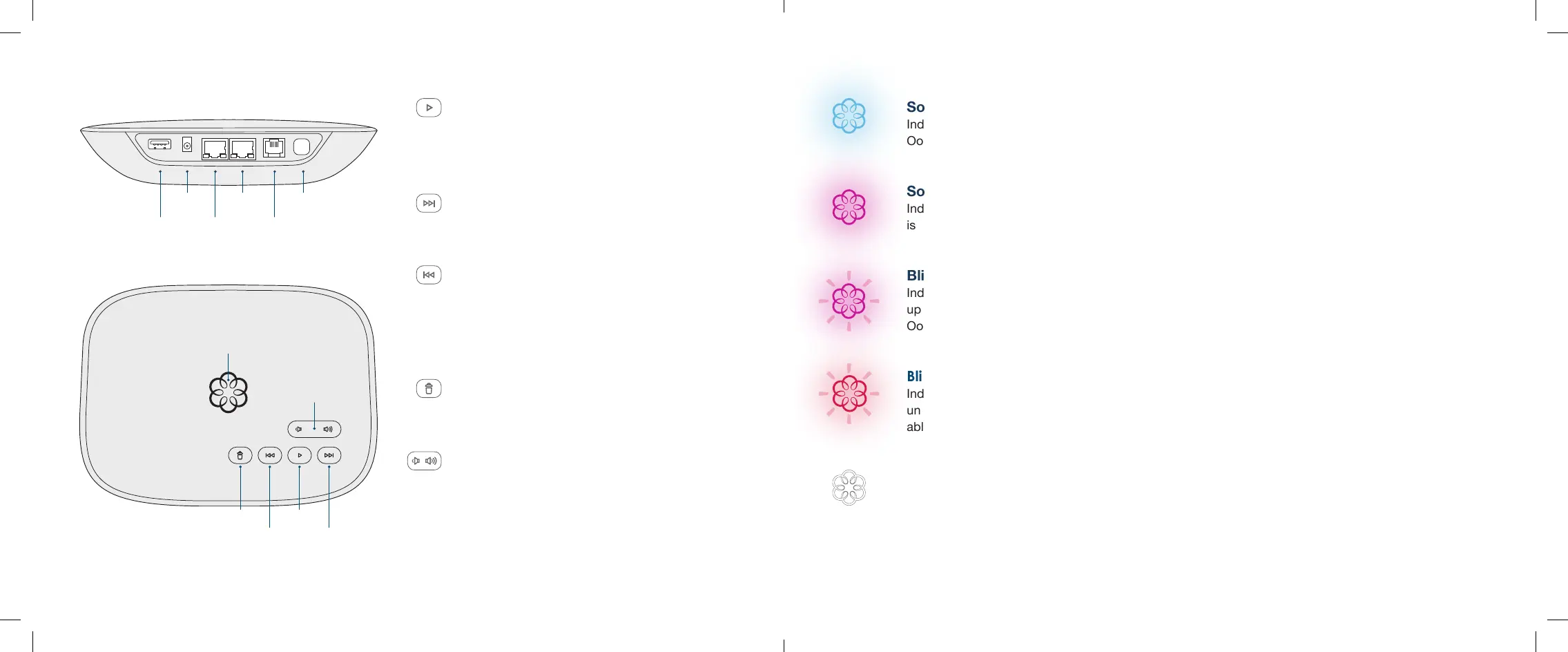
Fast
Forward
Delete
Rewind
Play
System
Status
USB
POWER
HOME
INTERNET
PHONE
Page
Key
Play Key
Press to hear your voicemail messages.
Press again to stop playback. Key will blink when
there are new messages.
Fast Forward Key
During voicemail playback, press to skip to the next
message. Press and hold to toggle Do Not Disturb.
Rewind Key
During voicemail playback, press once to replay
the current message, and twice to skip to the
previous message.
Press to adjust brightness of the status light.
Delete Key
During voicemail playback, press to delete
current message.
Volume Adjustment Key
Press to adjust the volume level.
Page Key (on rear of Telo)
Press to locate your Ooma handsets.
Press-and-hold for three seconds to register
a new cordless Ooma device such as an
HD2 Handset or Linx.
12 13
Volume
Solid Blue System Status
Indicates your Ooma service is working. You will hear the
Ooma dialtone and all services are operational.
Solid Purple System Status
Indicates your Ooma service is working and Do Not Disturb
is enabled. All incoming calls will be directed to voicemail.
Blinking Purple System Status
Indicates your Ooma Telo is downloading a software
upgrade. All services are unavailable. Do not unplug your
Ooma Telo when it is in this state.
Blinking Red System Status
Indicates your Ooma service is not working. All services are
unavailable. You will not hear any dialtone and will not be
able to make or receive calls.
White System Status
Indicates your Ooma Telo is not powered on or that
brightness is turned all the way down.
Ooma-Telo-Air-QSG_EN-FR 700-0192-100-Jan2018-R2.indd 12-13 1/31/18 2:36 PM



 To Next Page