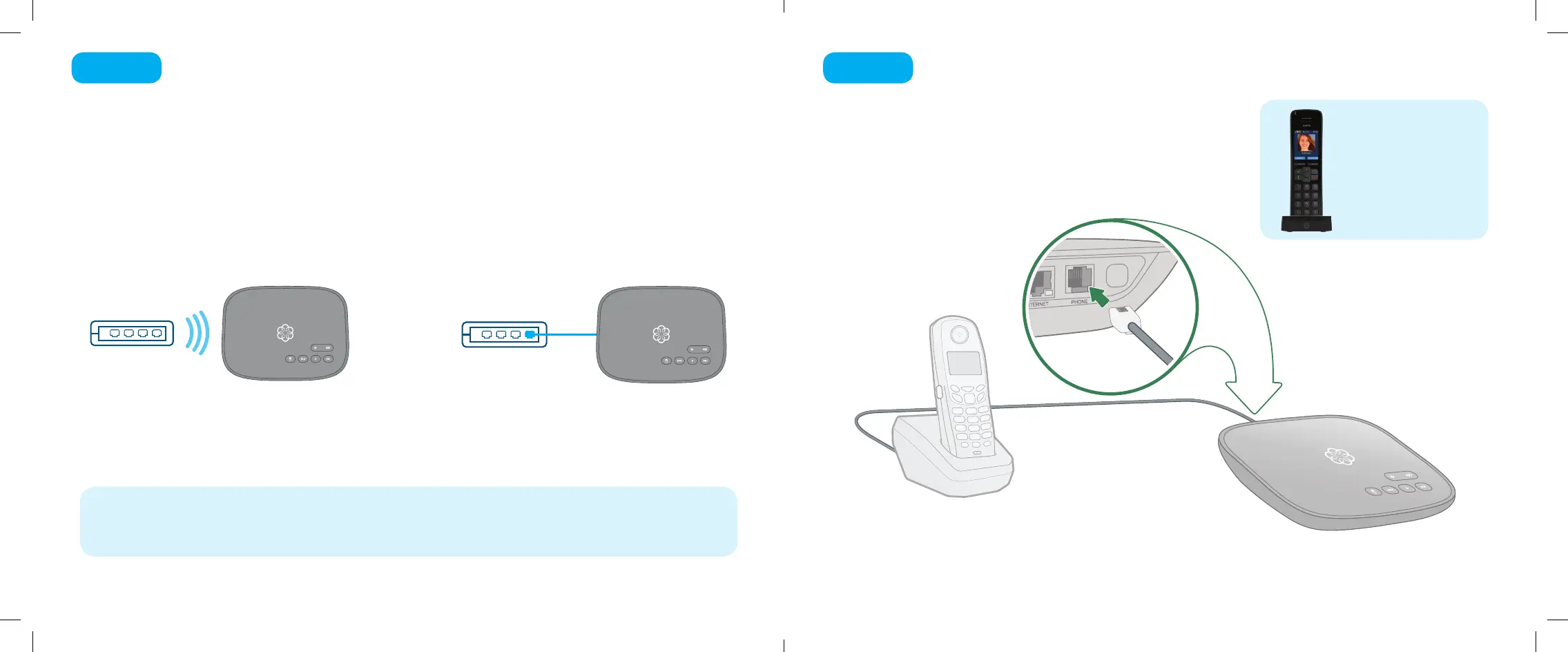
The Ooma Setup app contains instructions that will guide you through connecting
to the Internet. You can connect it to the Internet in two dierent ways:
If you need additional assistance, you can nd alternate instructions for Wi-Fi setup on page 16
of this booklet. Instructions for Ethernet setup can be found on pages 17 and 18.
Connect your Telo Air to the Internet
Step 3
6 7
Wi-Fi connection
OR
Ethernet connection
Using an existing corded or cordless phone, plug the
other end of the cord into the PHONE port.
Connect a Phone
Step 4
If you have purchased
on Ooma HD2 or HD3
handset bundle, see
the separate guide for
instructions to set it up.
Corded or
Cordless Phone
Ooma-Telo-Air-QSG_EN-FR 700-0192-100-Jan2018-R2.indd 6-7 1/31/18 2:36 PM



 To Next Page