16 OPAL-RT Technologies OP5700 User Manual
Installation
Cabling Instructions
CONNECT THE USBA TO USBB CABLE
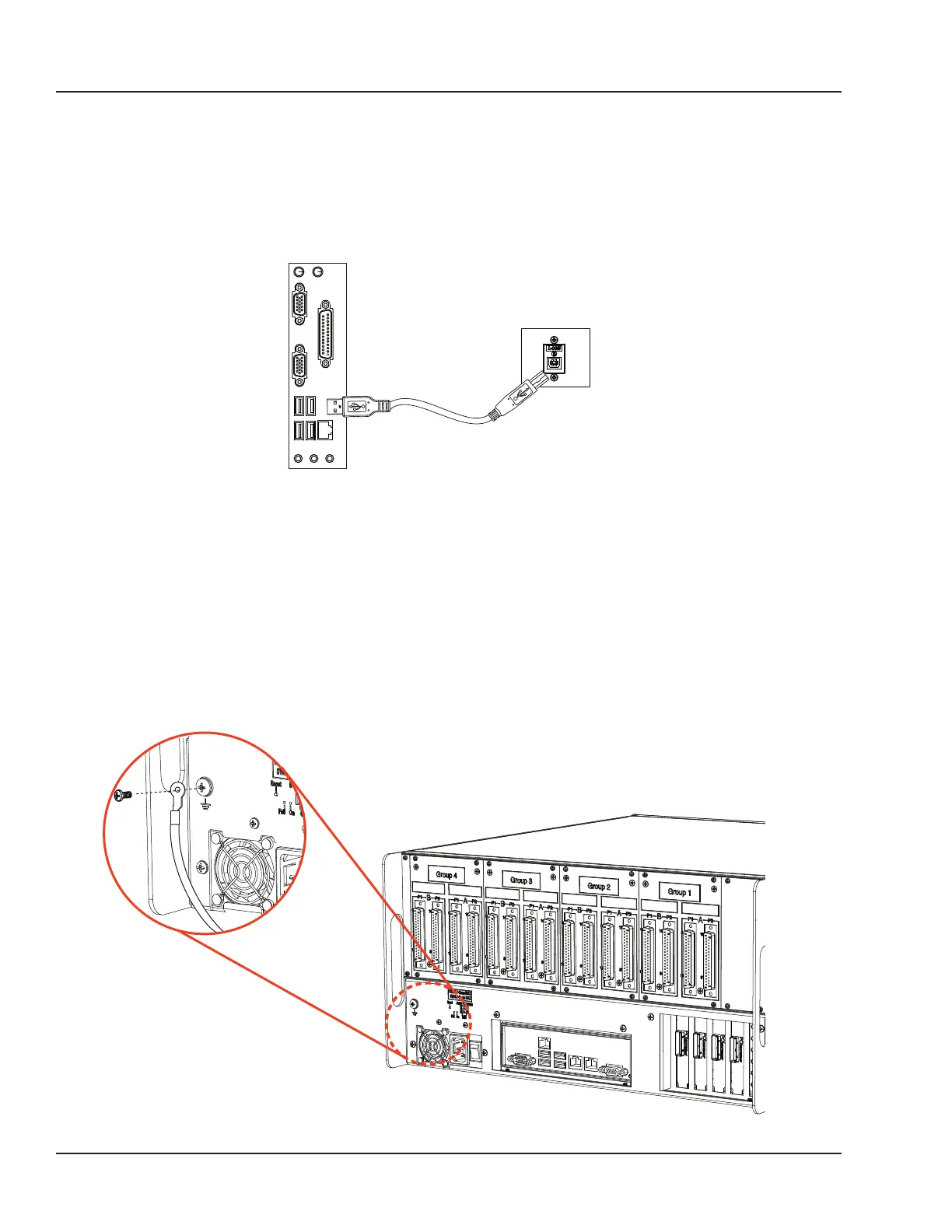
The USB(A)-USB(B) cable provides the connection required to flash the FPGA using the JTAG port,
when programming has been lost or damaged. Contact Technical Support for all FPGA programming
issues.
Connect one end to a Windows PC USB port and the other end to the USB JTAG port on the OPAL-RT
simulator, then follow the technical support representative’s instructions to flash the FPGA.
Windows PC
USB Ports
Simulator USB
JTAG Port
Figure 7: Connecting USB cable for FPGA programming
CONNECTING THE GROUND SCREW
You must connect a grounding cable from the OP5700 ground screw to ensure that it terminates
securely in a ground. Proper grounding will help to prevent electric shocks, protect the OP5700 from
voltage spikes (from a variety of causes, including lightning strikes), and provide increased immunity
from EMI by lowering noise levels and emissions.
• Select a flat braided grounding strap of adequate length (as short as possible provides best
protection), with ring terminals on each end.
• Attach one ring terminal to the ground screw on the OP5700 (shown in Figure 8).
• Attach the other ring terminal to the rack using a nut and lockwasher.
Figure 8: Connecting the OP5700 to the ground



 To Next Page