EasyManua.ls Logo

Openpath Core Series - Wiring to Wiegand Devices on Core Series Smart Hubs

Openpath Core Series
36 pages
Print Icon
To Next Page IconTo Next Page
To Previous Page IconTo Previous Page
Loading...
WIRING TO WIEGAND DEVICES ON CORE SERIES SMART HUBS
The
extra
Auxiliary
I/Os
on
the
4-Port
and
8-Port
Boards
are
helpful
for
wiring
Wiegand
Devices,
however
any
I/O
pair
may
be
used
(for
example,
I/O
1-2).
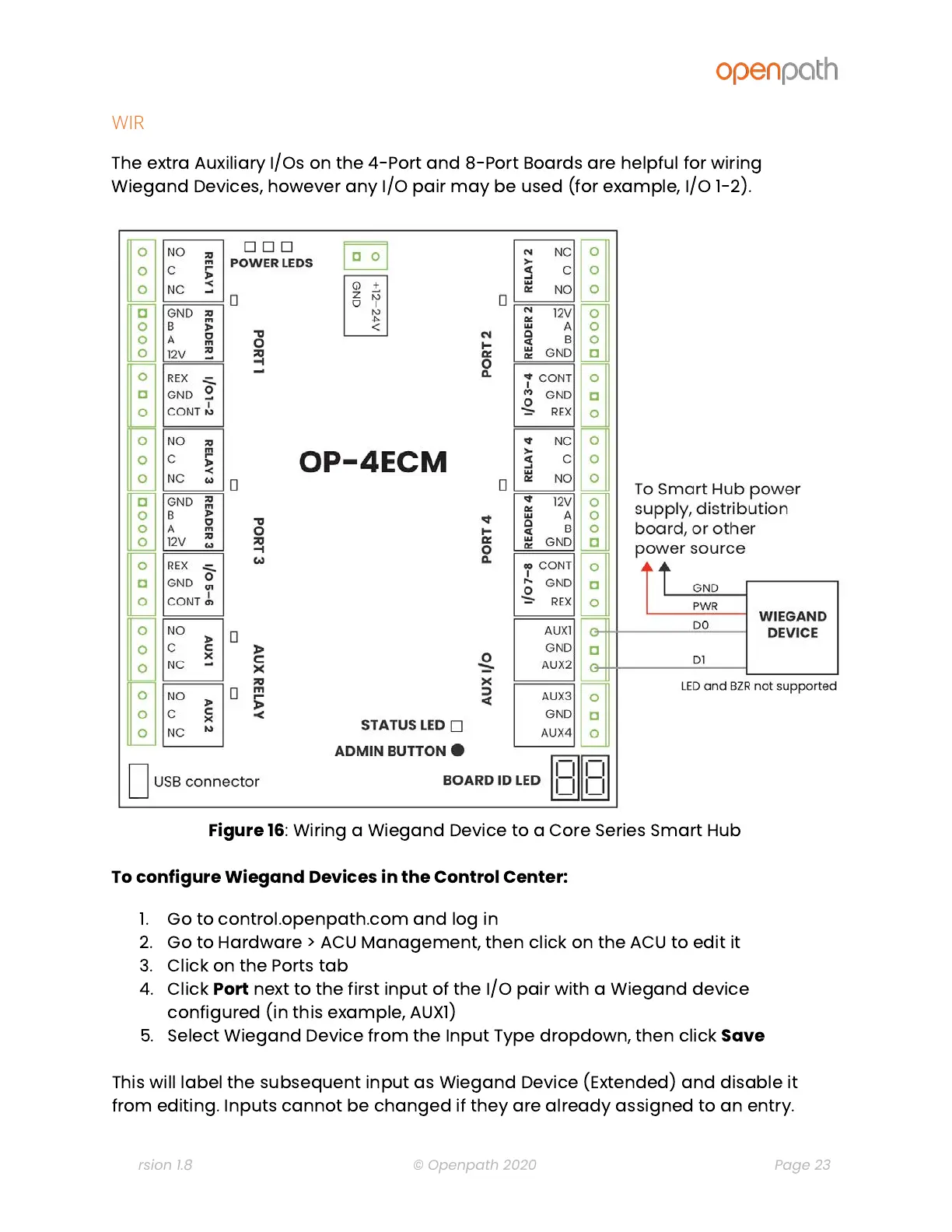
Figure
16
:
Wiring
a
Wiegand
Device
to
a
Core
Series
Smart
Hub
To
configure
Wiegand
Devices
in
the
Control
Center:
1. Go
to
control.openpath.com
and
log
in
2. Go
to
Hardware
>
ACU
Management,
then
click
on
the
ACU
to
edit
it
3. Click
on
the
Ports
tab
4. Click
Port
next
to
the
first
input
of
the
I/O
pair
with
a
Wiegand
device
configured
(in
this
example,
AUX1)
5. Select
Wiegand
Device
from
the
Input
Type
dropdown,
then
click
Save
This
will
label
the
subsequent
input
as
Wiegand
Device
(Extended)
and
disable
it
from
editing.
Inputs
cannot
be
changed
if
they
are
already
assigned
to
an
entry.
Version 1.8
© Openpath 2020
Page 23