EasyManua.ls Logo

OpenVox WGW1002 - General SMS Settings; SMS Sender Options

OpenVox WGW1002
63 pages
Print Icon
To Next Page IconTo Next Page
To Previous Page IconTo Previous Page
Loading...
WGW1002 User Manual
OpenVox Communication Co.Ltd
35
Set the Caller ID
Name to
What caller ID name would you like to set before sending this call to the
endpoint.
Set the Caller ID
Number to
What caller number would you like to set before sending this call to the
endpoint.
Forward Number
What destination number will you dial?
This is very useful when you have a transfer call.
Failover Call
Through Number
The gateway will attempt to send the call out each of these in the order
you specify.
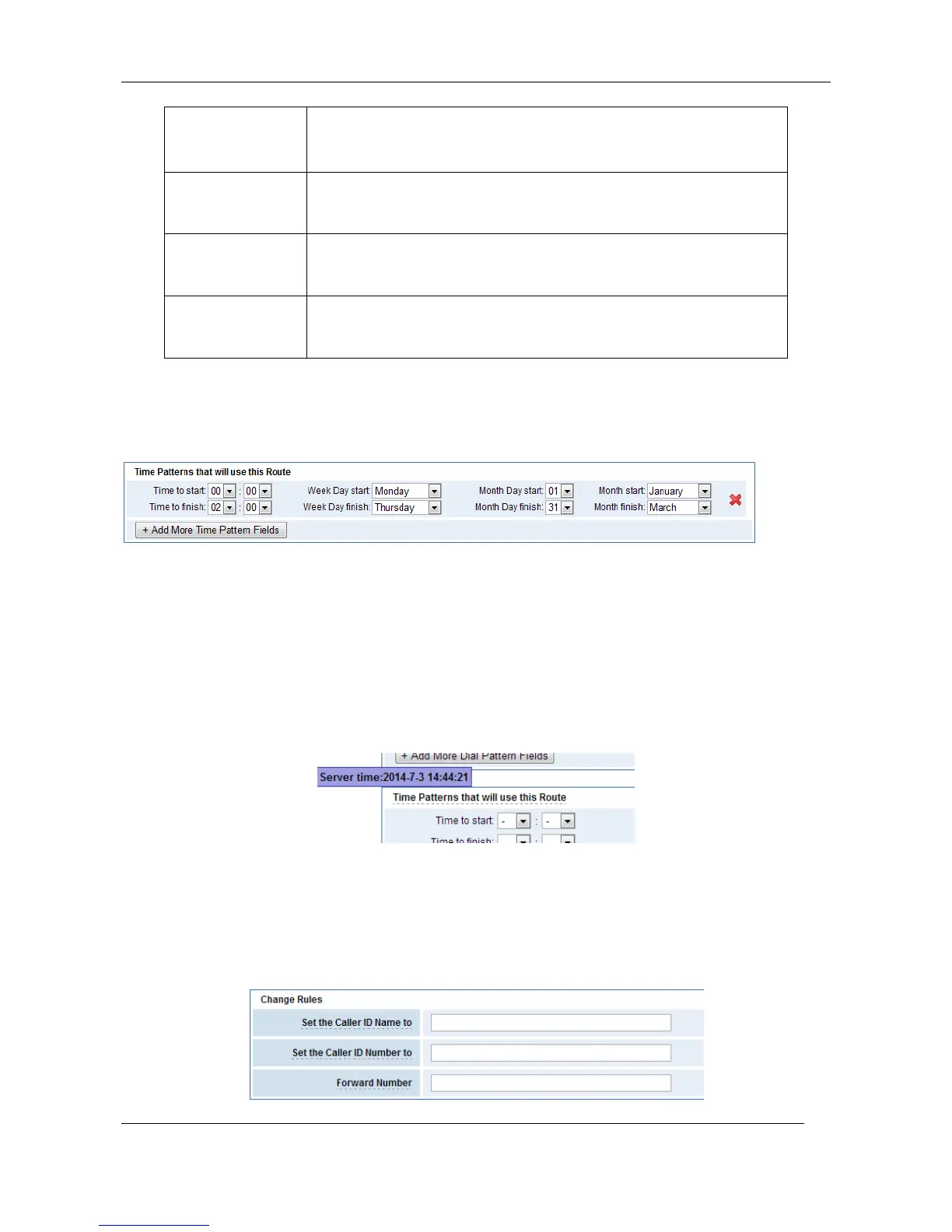
You can create various time routes and use these time conditions to limit some specific calls.
Figure 5-1-3 Time Patterns that will use this Route
If you configure like this, then from January to March, from the first day to the last day of these
months, from Monday to Thursday, from 00:00 to 02:00, during this time (meet all above time
conditions), all calls will follow this route. And the time will synchronize with your Sever time.
Figure 5-1-4 Time Reference
You set your caller ID name and caller number as you like before sending a call to the endpoint. You
can also configure forward number when you have a transfer call.
Figure 5-1-5 Change Rules


Other manuals for OpenVox WGW1002

Related product manuals