INSTALLATION
16
Alternate Audio Connections
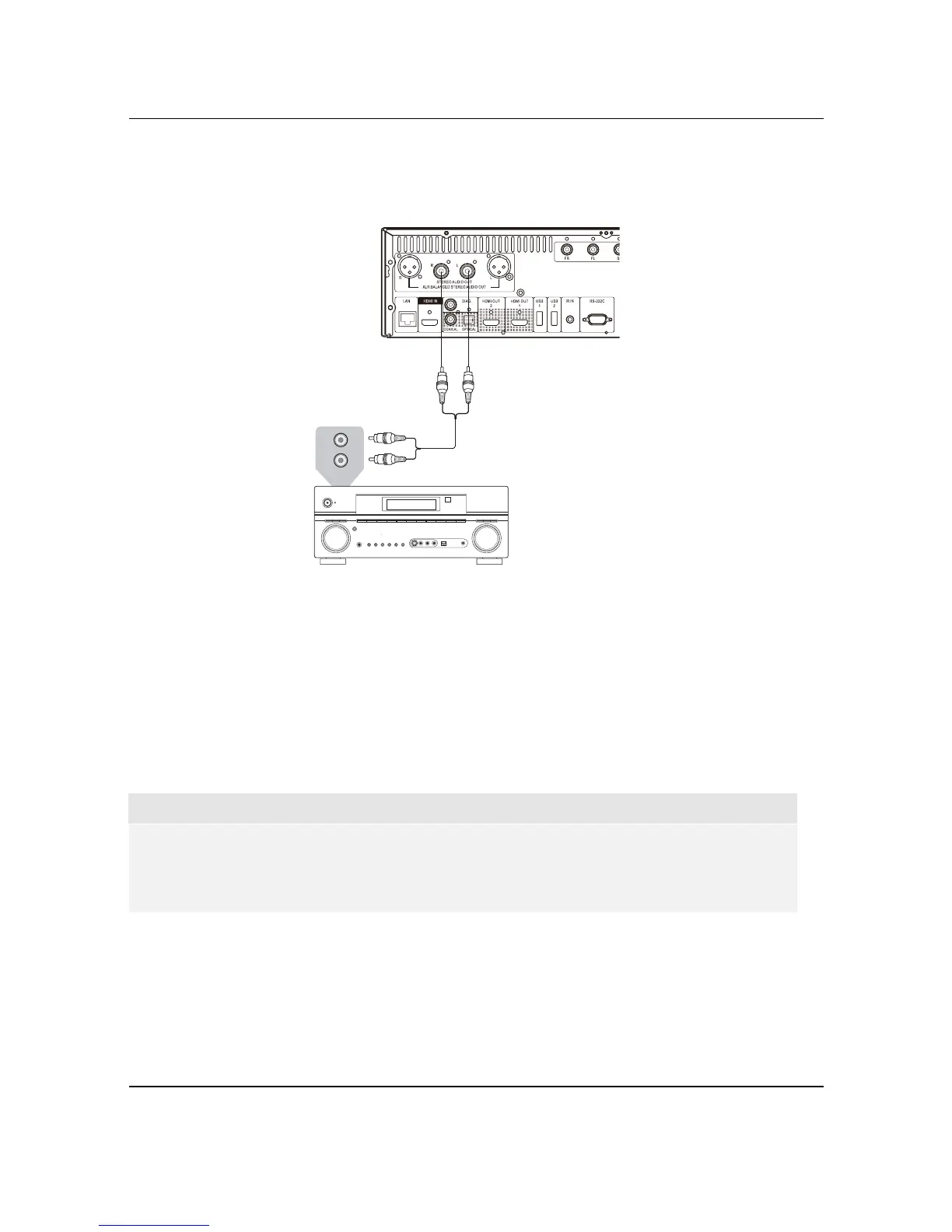
Connecting to a Stereo Audio System though RCA-style Cable
Rear Panel
Audio Interconnect Cable
AUD
IO/VI
D
EO M
U
LTI -
CHANN
EL
R
E
C
EIVE
R
Stereo or Surround Audio System
AUDIO IN
L
R
x If your audio system offers only stereo audio inputs, or if you would like to connect a dedicated stereo
audio system in addition to the surround audio system which is already connected to the HDMI, coaxial
or optical output, you can connect the dedicated stereo audio system to the STEREO AUDIO OUT
terminals of the
player.
x
Two sets of dedicated stereo audio outputs are available on the BDP-105: the RCA-style connectors
and the XLR balanced connectors (shown in the next page). Preference should be given to the XLR
connectors since they may provide better noise rejection and signal integrity (refer to page 17 for more
information).
NOTE
x
The STEREO AUDIO OUT terminals automatically down-mix the multi-channel audio source
into the stereo signals. However, STEREO AUDIO OUT will NOT be affected by the “Down mix”
modes and other speaker settings in the Audio Processing of Setup Menu (described on page
70).



 To Next Page