28
CLEANING THE TAPE-
HANDLING PARTS
Dirt, dust or particles of the tape’s
coating can accumulate on the tape
heads and other parts that the tape
touches. This can greatly reduce the
cassette player’s performance. To
prevent noise and poor high-
frequency response, clean the cas-
sette player’s tape-handling parts after
every 20 hours of use. Your local Ra-
dioShack store sells a wide selection
of cassette deck cleaning supplies.
1. Turn off the system, then unplug
its power cord.
2. Press . The cassette com-
partment door opens.
3. Press on the deck to expose
the tape-handling parts.
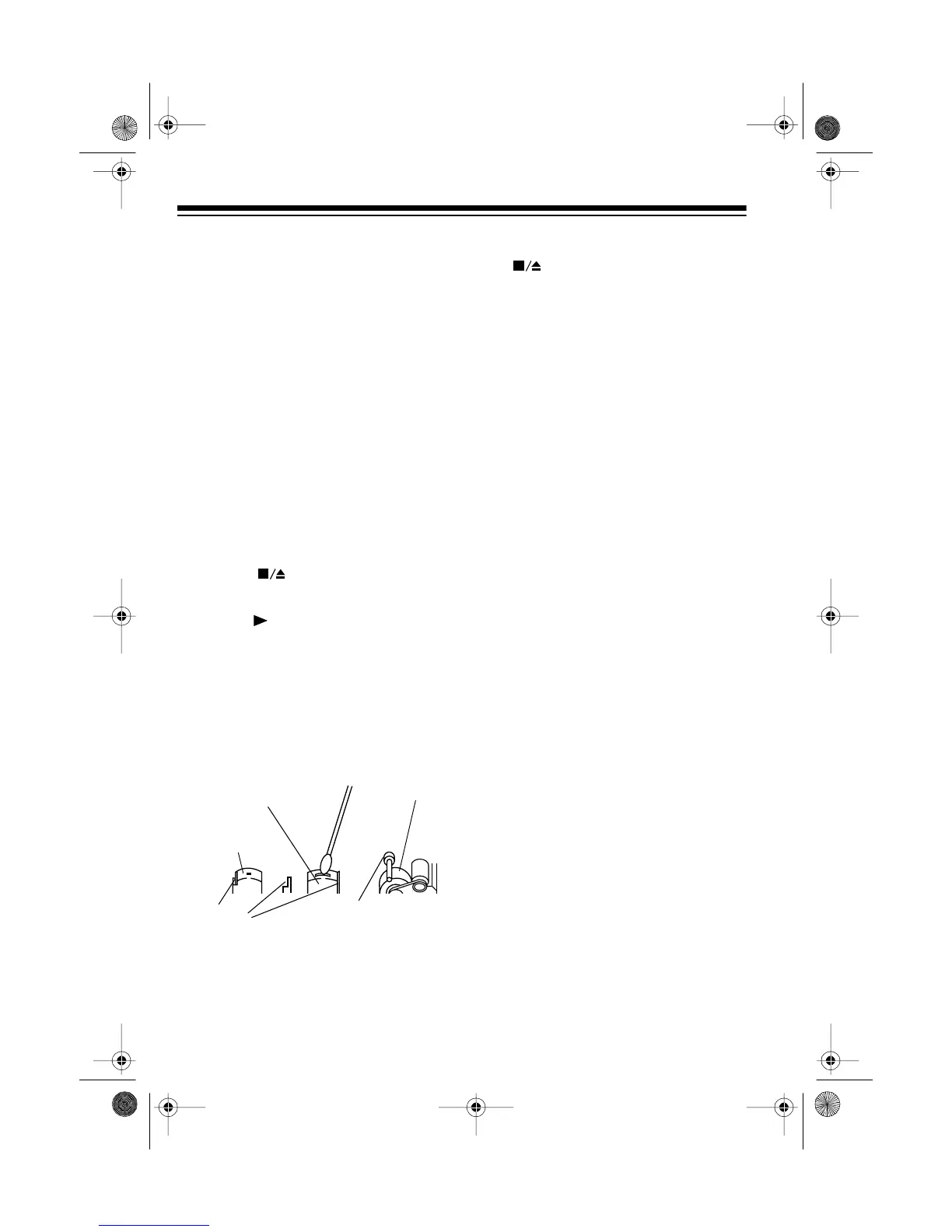
4. Use a cotton swab dipped in de-
natured alcohol or tape head
cleaning solution to gently clean
the record/playback head, pinch
roller, capstan, tape guides, and
erase head.
5. When you finish cleaning, press
to release the play mecha-
nism, then close the cassette
compartment door and reconnect
power.
RESETTING THE
SYSTEM
If the System 746 is not working prop-
erly, reset it to delete all programmed
play sequences, memory tuning set-
tings, timer sequences, and the time.
To reset the system, insert a pointed
object (such as a straightened paper
clip) into the
RESET
hole on the back
of the system.
Record/Playback
Pinch Roller
Capstan
Erase Head
Tape
Guides
Head
illustration
13-1294.fm Page 28 Wednesday, July 14, 1999 7:01 PM



 To Next Page