4.24. ETHERNET A input 10 Mb,
ACT and LINK LED indicators
10 Mb: Indicates the speed of the IP network
connected to the ETHERNET A input. If the LED is
lit, it indicates a speed of 10 Mb. If unlit, it
indicates a network speed of 100 Mb (use of a
transmission speed of 100 Mbps is highly
recommended).
ACT: ACTIVITY indicator. It lights when data is
being sent or received through the ETHERNET A
input.
LINK: When lit, it indicates the connection of the
ETHERNET A input with the HUB or SWITCH.
4.25. ETHERNET B input 10 Mb,
ACT and LINK LED indicators
These serve the same purpose as the ETHERNET
A indicators, applied in this case to the
ETHERNET B input.
4.26. ETHERNET A connector
RJ45 type connector. Used for connection to the
IP network. Cat 5 STP cable must be used for its
connection.
4.27. ETHERNET B connector
RJ45 type connector. Used, in a redundant
network, as a secondary connection to the IP
network. Cat 5 STP cable must be used for its
connection.
If the connection to ETH A fails, the amplifier
automatically switches to this B connection, so
that the PA system continues to operate.
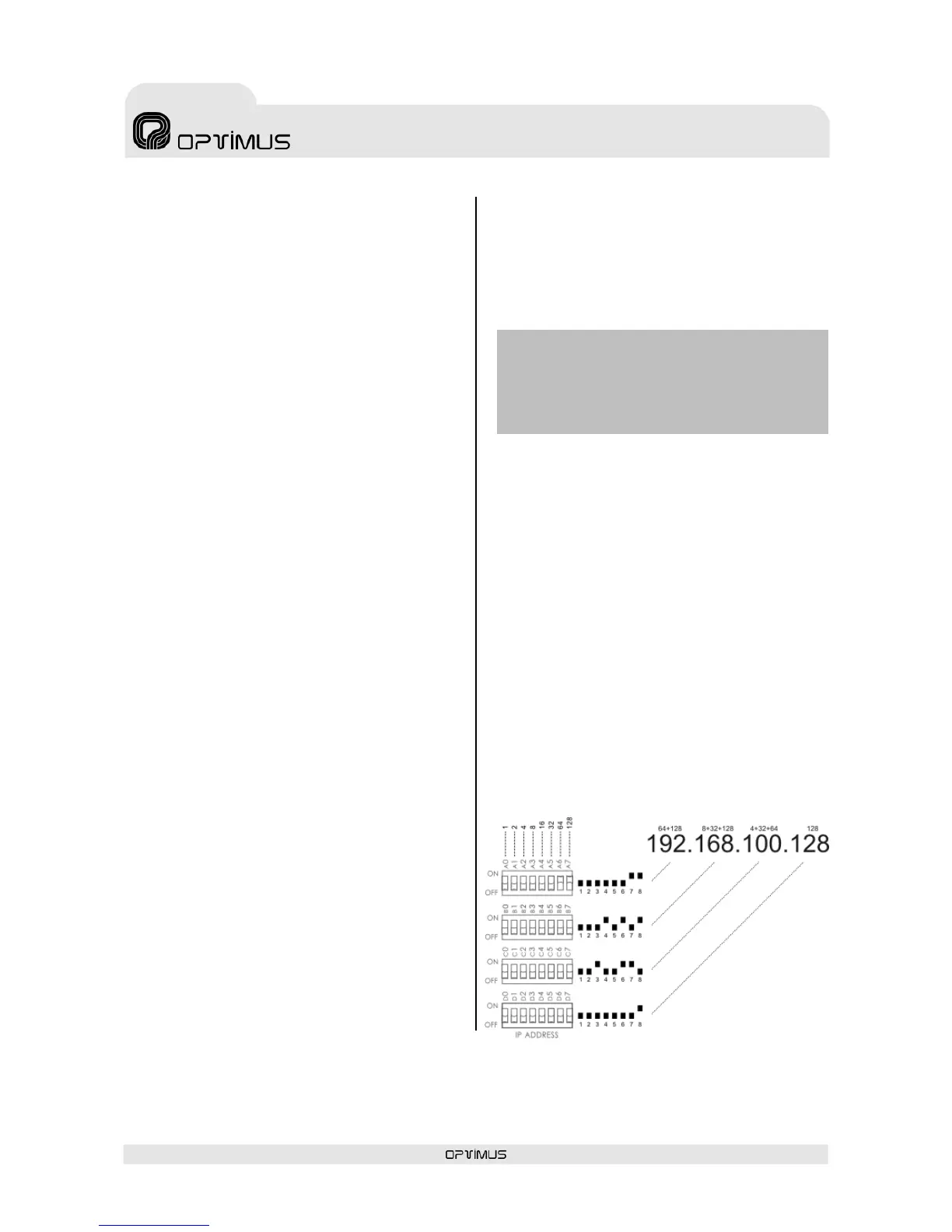
4.28. IP ADDRESS DIP switches
The IP address of the amplifier is configured
through these 4 DIP switches. This address
identifies the amplifier in the network, and so
each unit must have a unique IP address.
An IP address is represented by means of a 32-
bit binary number. The IP addresses are
expressed as decimal notation numbers: the 32
bits of the address are divided into four octets
(an octet is a group of 8 bits). In the amplifier,
each octet is represented by A0 to A7 for the first
octet, B0 to B7 for the second octet, C0 to C7 for
the third octet, and D0 to D7 for the fourth octet.
In an octet, each bit can have the value 0 (DIP
switch OFF) or 1 (DIP switch ON). In order to
obtain the decimal value of the octet, the decimal
values of each bit that is in the ON position must
be added up (from left to right: 1, 2, 4, 8, 16,
32, 64 and 128).
Figure 14 shows an example in which the IP
address 192.168.100.128 is configured.
Table I shows all the DIP switch combinations
from 0 to 255.


 To Next Page