*N.B.:
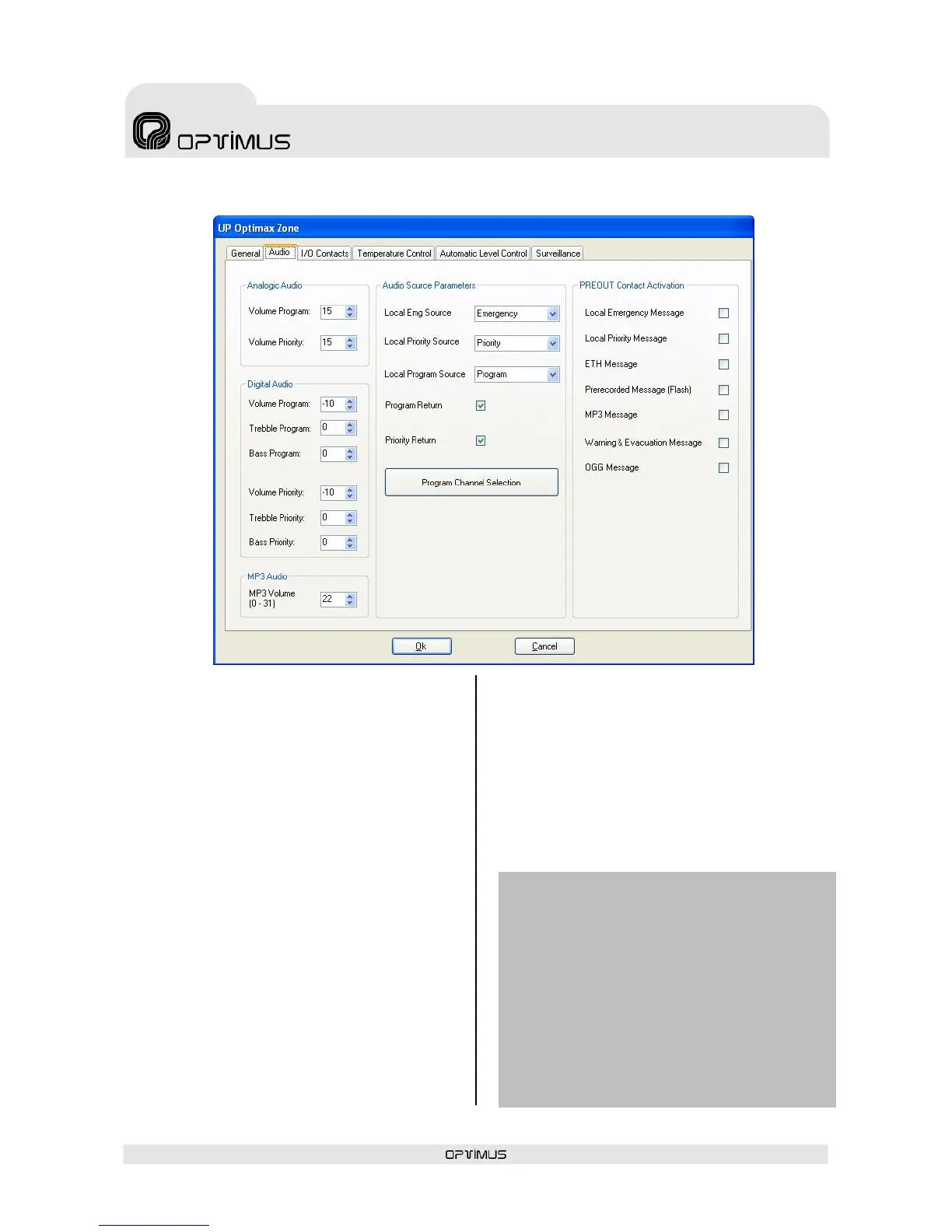
The Analog Audio and Digital Audio volume controls
(1) to (8) are only operative if the software is P.A.
Manager version SCF-01.
If the software is SCM-01, the modification of these
volumes must be performed from the operator
screen. P.A. Manager SCM-01 also allows the user to
configure a graphic equaliser and a parametric
equaliser for each digital zone. To configure these,
refer to section 8. Operations from the P.A.
Manager Software.
6.2.2. Configuration of the Audio tab
(1) Analog Audio. Volume Program*
Volume of the analog program channel (audio
signal of the PROGRAM INPUT). Values between 0
(volume off) and 32 (maximum volume).
(2) Analog Audio. Volume Priority*
Volume of the analog priority channel (audio
signal of the PRIORITY INPUT). Values between 0
(volume off) and 32 (maximum volume).
(3) Digital Audio. Volume Program*
Volume of the program digital signal. Values
between -20 (volume off) and 0 (maximum
volume).
(4) Digital Audio. Treble Program*
Treble control for the program digital signal.
Values between -20 and +20 (equivalent to ±10
dB).
(5) Digital Audio. Bass Program*
Bass control for the program digital signal.
Values between -20 and +20 (equivalent to ±10
dB).
(6) Digital Audio. Volume Priority*
Volume of the priority digital signal. Values
between -20 (volume off) and 0 (maximum
volume).
(7) Digital Audio. Treble Priority*
Treble control for the priority digital signal.
Values between -20 and +20 (equivalent to ±10
dB).
(8) Digital Audio. Bass Priority*
Bass control for the priority digital signal. Values
between -20 and +20 (equivalent to ±10 dB).


 To Next Page