8.3. Activation and setting of the
parametric equaliser
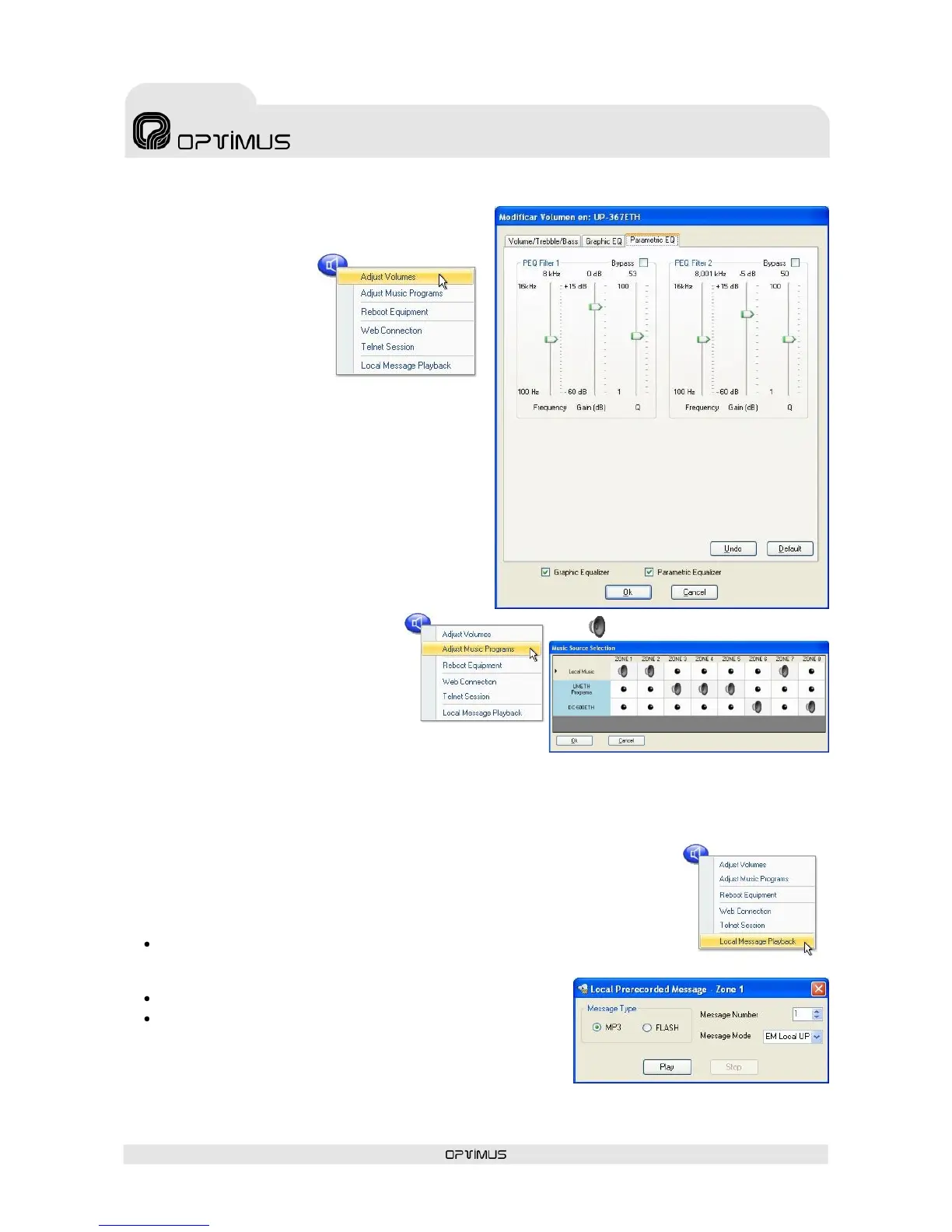
1. Right click with the
mouse on the zone
selection button and
select the option
Adjust Volumes (1).
2. Tick the Parametric
Equaliser check box
(2).
3. Click on the Parametric EQ tab (3).
4. Uncheck the Bypass check box (4) of the filter
that you wish to configure.
5. Configure the parameters of the equaliser and
click on OK (5).
8.4. Assigning the music program
to the zone
1. Right click with the mouse on the
zone selection button and select the
option Adjust Music Programs
(1).
A table appears in which each of the
rows represents a music program
and each of the columns represents
a zone.
The number of rows and columns depends on the number
of zones and music sources in each installation. Click on
the program/zone intersections to assign the music program to this particular zone.
2. Click on OK (2).
8.5. Playback of a local pre-recorded message
1. Right click with the mouse button on the zone and select Local Message
Playback(1).
2. Configure the parameters of the message:
Message type: The digital amplifier has two internal memories in which files
can be stored for subsequent use as local pre-recorded messages: MP3
circuit Flash Memory and Coldfire Flash Memory.
Message Number: Number of the message.
Message Mode: Priority of the message.
3. Click on the button Play (2) to activate message playback.
To stop the message, click on the button Stop (3).


 To Next Page