(5*) On power units that perform backup amplifier functions (configured as Zone number “0”), the
option Same as faulty UP appears. When this option is enabled, the contact will perform the same
function as the function configured for the same contact number of the power unit that is replaced.
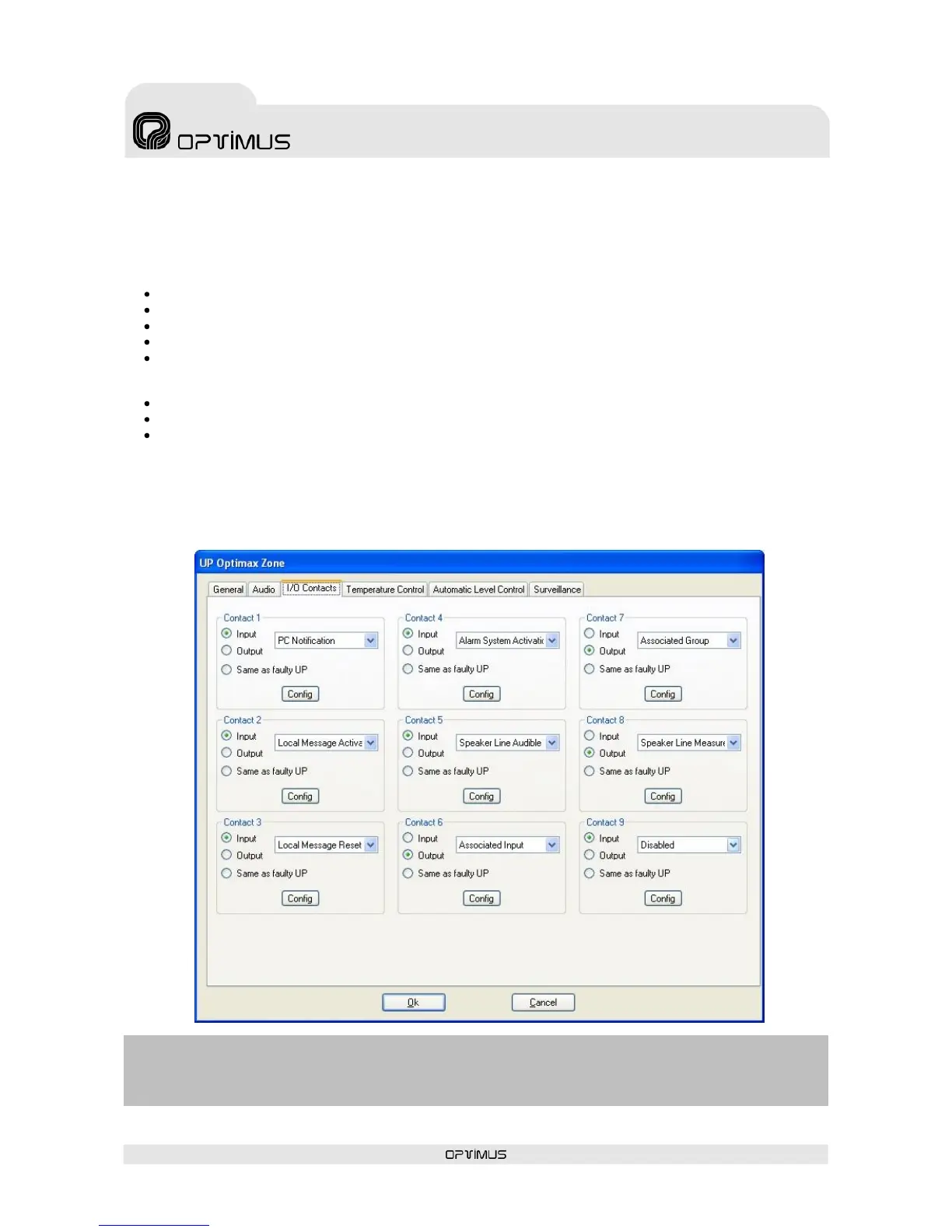
6.2.3. Configuration of the I/O Contacts (Input/Output Contacts) tab
Clicking on this tab opens a section in which each of the 9 contacts on the amplifier rear strip can be
configured as input or output contacts.
The contacts configured as Input have the following functionalities:
PC Notification
Activation of Local Message
Local Message Reset
Activation of Alarm System
Activation of Loudspeaker Line measurement with audible frequency
The contacts configured as Output have the following functionalities:
Associated Input
Associated Group
Indication of Loudspeaker Line measurement
To configure them, proceed as follows:
1. Select Input (1) or Output (2) of the contact that you wish to configure.
2. Open the drop-down menu (3) and select the function of the contact.
3. Click on the button Config. (4) to configure the function selected.


 To Next Page