(9) Send “Heart beat” every (n) seconds
Frequency with which the unit sends a heart
beat signal to the multicast group. This signal
informs the other equipment units in the
installation that the system is operating
perfectly.
(10) Keys Blocked
When this option is activated, the volume control
keys on the front of the amplifier are locked.
(11) Local Manager (12) Global Manager
Defines whether the amplifier is to function as a
priority manager of the Optimax system, either
locally at PA Area level or globally for the
installation, and establishes the priority of this
management with respect to other equipment
units (1 = maximum priority). See the Notes on
Local and Global Co-ordinators on the next page.
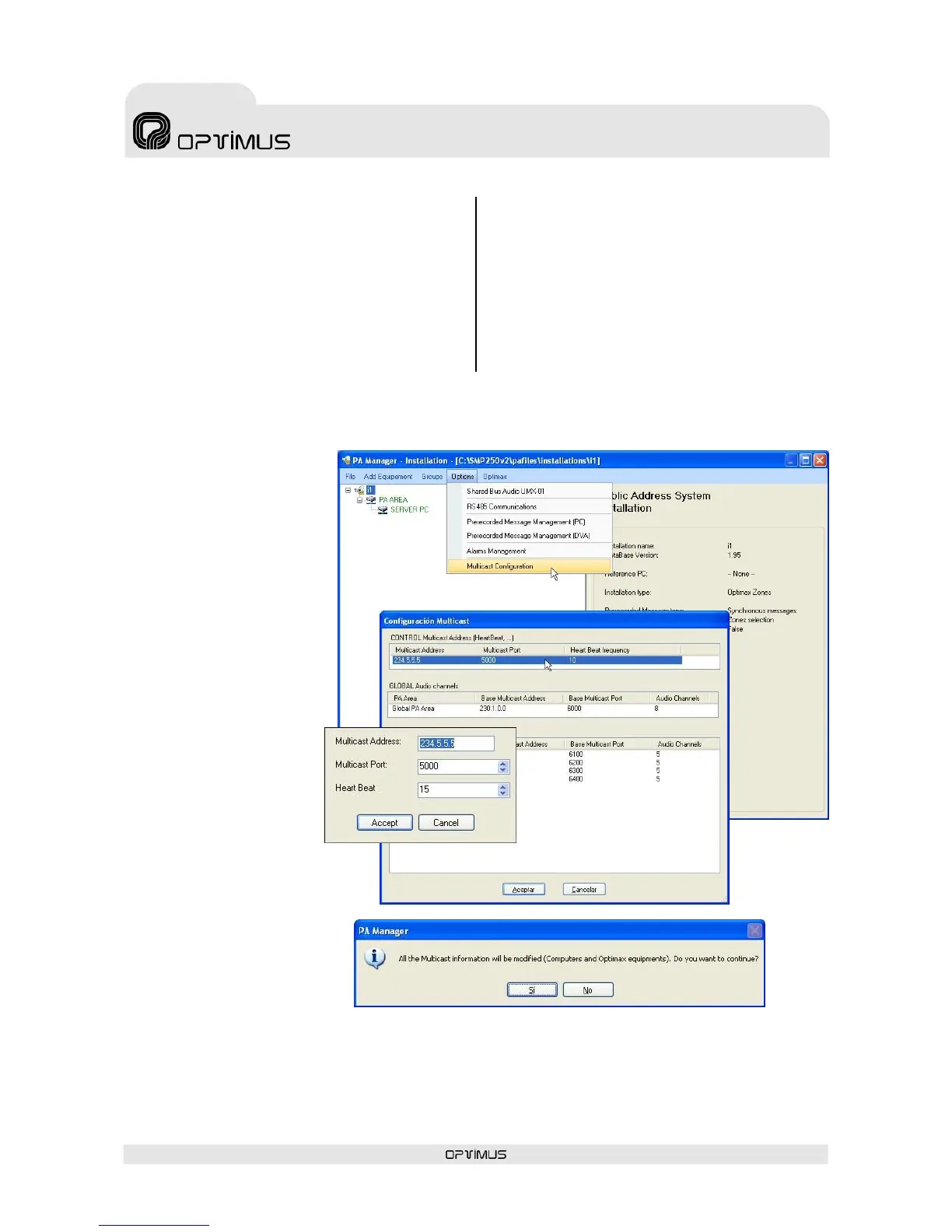
Information about the multicast configuration on Optimax equipment
It is possible to modify the
multicast configuration of all the
equipment units in the installation
simultaneously. To do so:
1. From the installation screen,
open the Options menu and
select Multicast
Configuration.
2. A window with the
configurations of the
multicast group appears.
Double click on the data item
that you wish to change.
3. Modify the value and click on
Accept.
4. Confirm the change by
clicking on Yes.
5. Close the Multicast configuration window by clicking on Accept.
ATTENTION: The values that are modified from the multicast configuration window affect all the equipment units in the
multicast group of the installation.


 To Next Page