EN-16
Connection
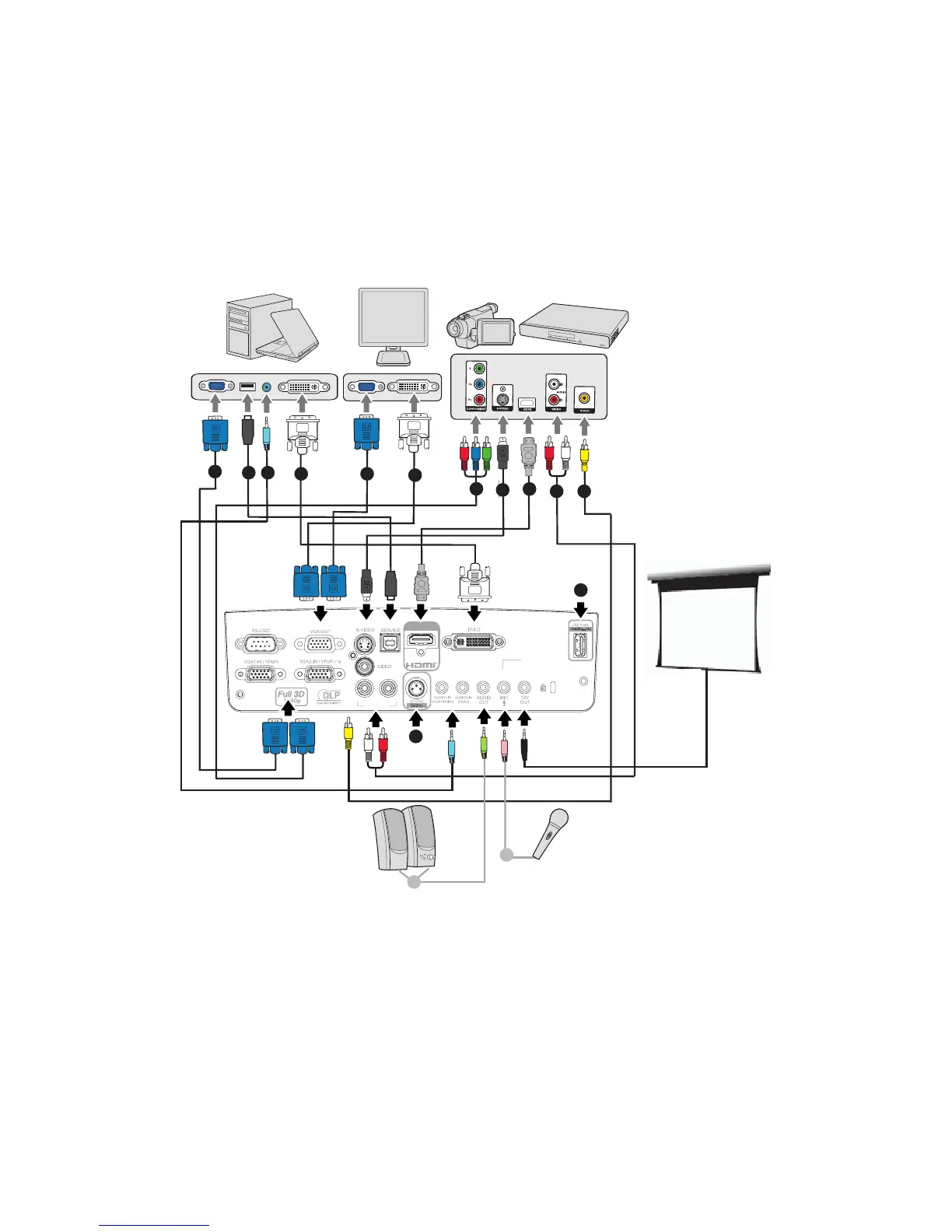
When connecting a signal source to the projector, be sure to:
1. Turn all equipment off before making any connections.
2. Use the correct signal cables for each source.
3. Ensure the cables are firmly inserted.
1. .................................................................. *VGA cable (D-Sub to D-Sub)
2. .................................................................. *USB cable (B type to A type)
3. .............................................................................................*Audio cable
4. ............................................................................................*DVI-D cable
5. ............................................................................... *VGA to DVI-A cable
6. ....................................................... *VGA (D-Sub) to HDTV (RCA) cable
7. .........................................................................................*S-Video cable
8. .............................................................................................*HDMI cable
RL
(S-VIDEO/VIDEO)
HDMI 1
AUDIO3-IN
1
3
4
1
5
6
7
8
9
10
2
11
13
3
12


 To Next Page