EN-9
Using the Product
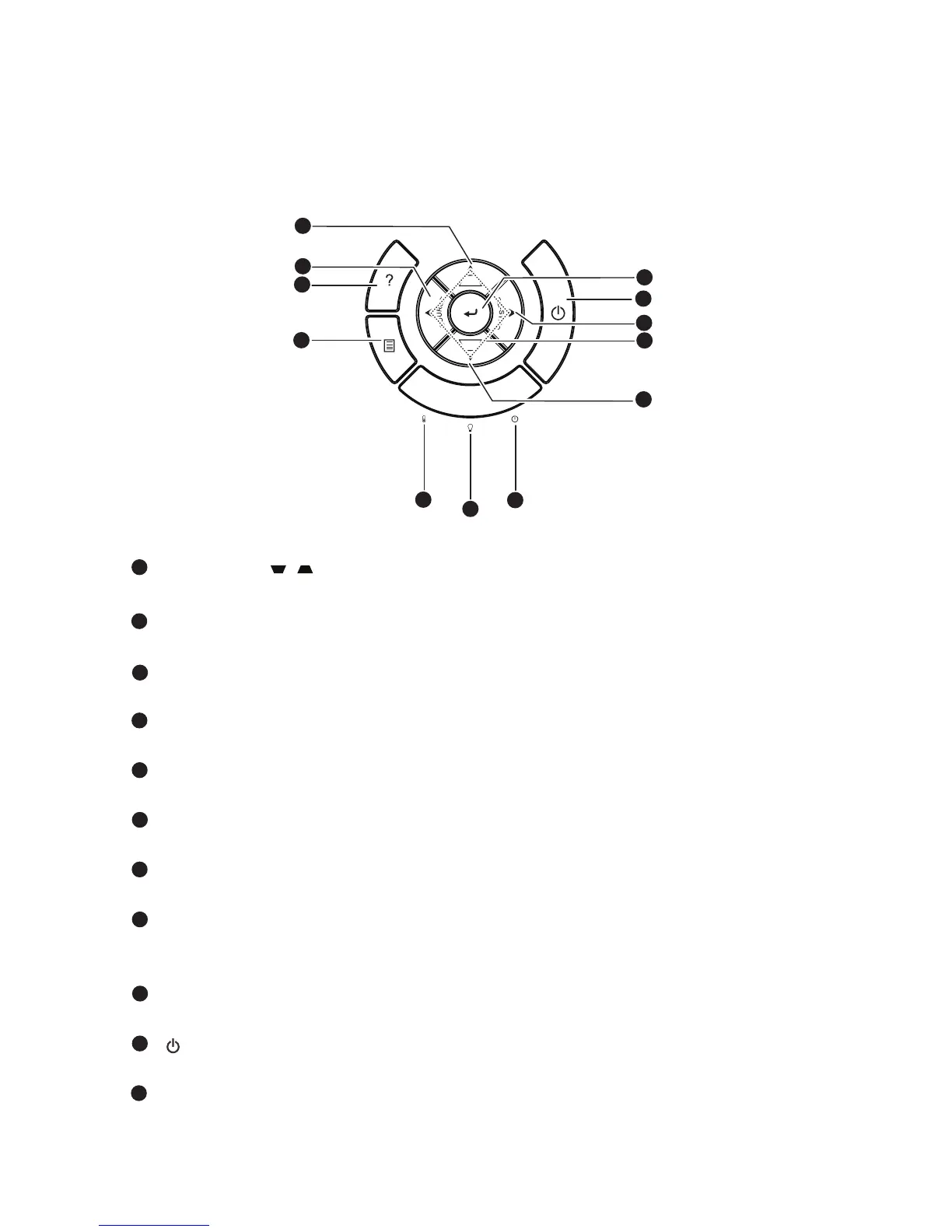
Control Panel
Keystone ( / )
Manually correct distorted images resulting from an angled projection.
SOURCE
Switch between input signals.
HELP
Display Help menu.
MENU
Display or exit the on-screen display menus.
TEMP (Temp LED indicator)
Refer to “LED Indicator Messages” on page 61.
LAMP (Lamp LED indicator)
Refer to “LED Indicator Messages” on page 61.
POWER (Power LED indicator)
Refer to “LED Indicator Messages” on page 61.
Four directional buttons
Use four directional buttons to select items or make adjustments to your
selection.
Re-SYNC
Automatically synchronize the projector to the input source.
Power
Turn the projector on or off.
ENTER
Confirm your item selection.
8
9
10
11
1
1
2
3
4
5
6
7
1
2
3
4
5
6
7
8
9
10
11



 To Next Page