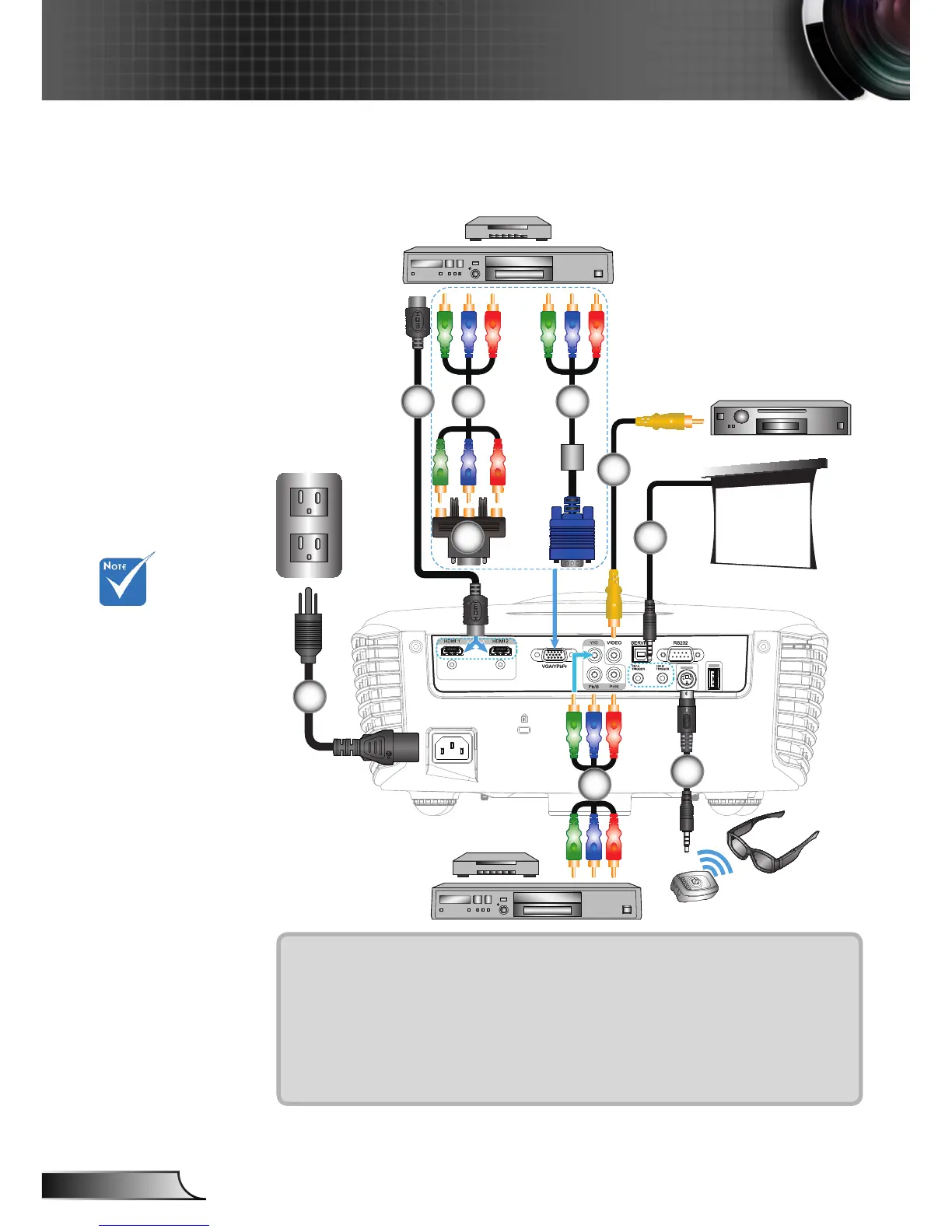
Connect to Video Sources
1....................................................................................................Power Cord
2..................................................................................................*HDMI Cable
3........................................................................................*VGA/RCA Adaptor
4.............................................................................*3 RCA Component Cable
5...........................................................................................*VGA/RCA Cable
6................................................................................*Composite Video Cable
7................................................................................................ *12V DC Jack
8...........................................................................................*3D Emitter cable
Composite Video Output
DVD Player, Set-top Box,
HDTV receiver
1
2 4
Due to the
difference in ap-
plications for each
country, some
regions may have
different acces-
sories.
For more detailed
information about
connecting to the
3D emitter and 3D
glasses, please
refer to their
user’s guides.
Use high speed
HDMI cable to
connect Blu-ray
3D player.
(*) Optional Ac-
cessory
3
6
3D Glasses
7
8
DVD Player, Set-top Box,
HDTV receiver
+12V Output
4
5



 To Next Page