Delta Elec. Inc. EP7155i & EP1691i
Company Confidential Optoma_______________________ Delta____________
12
2010/01/11
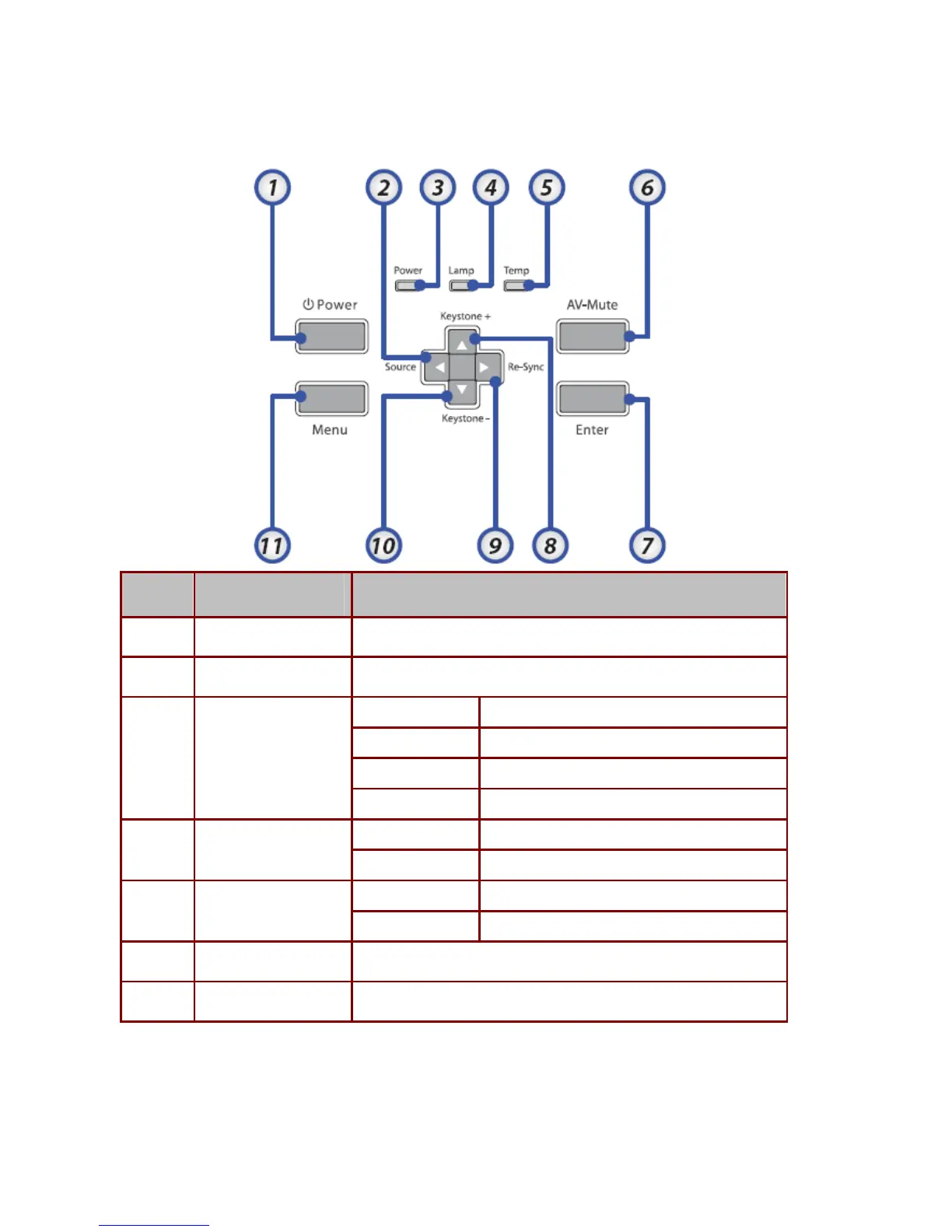
2-8. Key Pad -- Top view - On-screen Display (OSD) buttons and LEDS
ITEM LABEL DESCRIPTION
1.
Power Turns the projector On or Off
2.
◄/Source (Left arrow) Select the input device, Navigates and changes settings in the OSD
on LED Green still on
stand-by mode LED Flashing Green off 2.5s / on 1s
Warming up mode LED Flashing Green off 2.5s / on 1s
3.
Power LED
Off (cooling down) LED Flashing Green 10s => LED Green off
On Lamp not ready—do not press the power button
4.
Lamp LED
Off Lamp is in normal state
On System over temperature
5.
Temp LED
Off Normal state
6.
AV-Mute Display blank and audio mute
7.
Enter Enter key for the OSD menu



 To Next Page