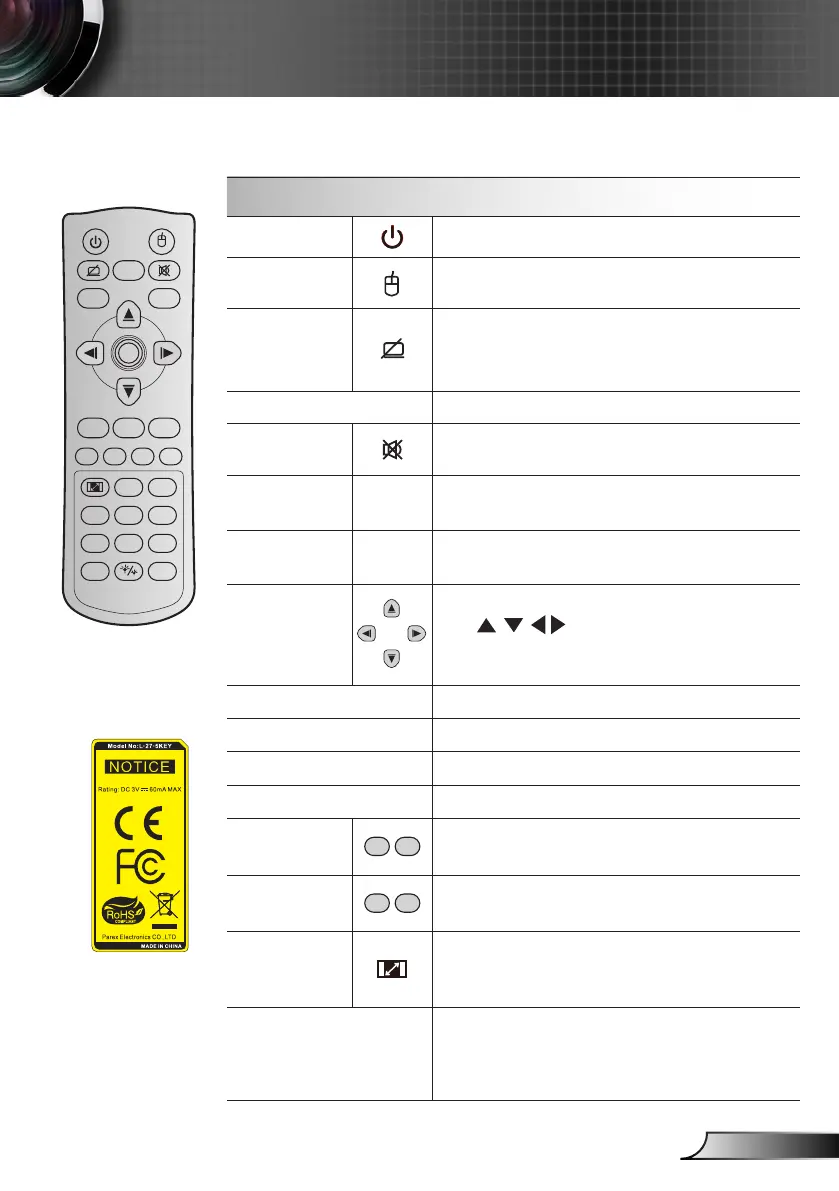
Remote Control
Using the Remote Control
Power
Press to turn on / off the projector.
Switch
Press to switch the USB mouse on / off.
Display
blank /
audio mute
Press to hide / unhide the screen picture
and turn off / on audio.
Freeze
Press to freeze the projector image.
Mute
Press to momentarily turn off / on the audio.
Mouse left
click
L
Use as mouse left click.
Mouse right
click
R
Use as mouse right click.
Four
directional
select keys
Use to select items or make
adjustments to your selection.
Enter
Conrm your item selection.
Page -
Press to page down.
Laser
Use as laser pointer.
Page +
Press to page up.
Keystone
Press to adjust image distortion caused by
tilting the projector.
Volume
Press to adjust to increase / decrease the
volume.
Aspect ratio
/ 1
Press to change aspect ratio of a dis- `
played image.
Use as numberic keypad number “1”. `
Menu / 2
Press to display or exit the on-screen `
display menus for projector.
Use as numberic keypad number “2”. `
Freeze
Power Switch
L
R
Keystone Volume
Page
-
-
+
-
+
1 2
Menu
3
3D
4
HDMI
5
VGA
6
Video
7
User1
8
User2
9
User3
Source
0
Resync
Page+Laser
Enter



 To Next Page