EasyManua.ls Logo

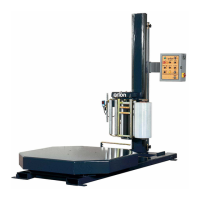
Orion FLEX HPA - User Manual

Orion FLEX HPA
166 pages
Print Icon
To Next Page IconTo Next Page
Loading...
FLEX
STRETCHWRAPPER
MANUAL
Models
RTA, RTD, HPA, HPD, LPA, LPD
Revision Date - February 15, 2016
Machine Manual
Revision 3.0
To Navigate Contents:
In Acrobat Choose View> Navigation Panes >
Make sure Bookmarks are Checked
(May vary slightly depending on your version of Acrobat)
4750 County Road 13 NE
Alexandria, MN 56308
Phone: (901) 888-4170
Toll Free: (800) 333-6556
FAX: (901) 365-1071

Table of Contents

Questions and Answers

  • A
    Amber WilliamsAug 14, 2025
    What to do if the Orion Stretch Wrapping Systems control panel has no power and the E-stop is flashing?
    • R
      Ryan CainAug 14, 2025
      If the control panel has no power and the E-stop is flashing, it indicates that the E-Stop circuit is activated, safety photocells are not aligned, the wiring in the E-stop circuit is compromised or components in the E-Stop circuit have failed. You can try the E-Stop reset sequence: 1. Reset all safety features (close carriage door, latch carriage safety switch bar [RT only]). 2. Pull the E-Stop to the OUT position. 3. Press the Green Start Button. 4. Press the Cycle Reset button on the screen. If the issue persists, re-align photocells with their respective reflectors, then perform an E-Stop Reset. If the issue still persists, refer to the electrical schematic for wiring layout and wire numbers.
  • S
    Shawn WelchAug 25, 2025
    What causes the Orion Stretch Wrapping Systems carriage to jam at the top of the mast and not move?
    • M
      Martin HancockAug 25, 2025
      If the carriage is jammed at the top of the mast and won't move, it could be due to: * The carriage bottom travel switch did not activate correctly, possibly sticking. Check switch by manually activating (wiggling) the roller tip. If the switch does not activate and release it's input on the PLC correctly, replace the switch. The belt will need to be removed and re-wound correctly. The carriage will need to be brought down manually. * The carriage bottom travel striker is set too low for switch to activate properly. Raise the bottom limit striker so that the carriage travel switch activates it's PLC input before the carriage physically hits the machine's framework. The belt will need to be removed and re-wound correctly. The carriage will need to be brought down manually.
  • H
    Holly HarrisAug 31, 2025
    How do I resolve the issue of no power feed in my Orion FLEX HPA Stretch Wrapping Systems?
    • K
      Kristina ReynoldsAug 31, 2025
      If there's no power feed, it could be due to: * No control power/E-Stop condition. Perform E-Stop reset sequence: Reset all safety features (close carriage door, latch carriage safety switch bar [RT only]), pull E-Stop to the OUT position, press Green Start Button, and press Cycle Reset button on screen. * Incorrect film threading. Compare film with threading diagram on top of carriage. Re-thread film carriage. * Incorrect VFD parameter settings. Review the parameter settings in the VFD. Refer to the supplied VFD Manual for procedure. Refer to the VFD manual and the Orion parameter settings sheet supplied with the machine for maximum frequency settings.
  • B
    Brenda MorrisonSep 6, 2025
    What causes stored values to revert to zero on Orion FLEX HPA Stretch Wrapping Systems?
    • X
      xgraySep 6, 2025
      Stored values may revert to zero or unusable settings due to a high voltage spike or voltage brownout below 100 VAC. Remove all household extension cords, move the machine to a different power outlet, and have an electrician verify the site power supply.
  • J
    Jonathan DaySep 10, 2025
    Why doesn't the turntable stop in the correct position on my Orion FLEX HPA Stretch Wrapping Systems?
    • J
      Justin WoodardSep 10, 2025
      The turntable or tower may not stop in the correct position if: * The turntable end of cycle positioning counter value is set incorrectly. In this case you should refer to the factory default settings value list. * The Slow Down Position for Tower / Turntable Timer is adjusted too high. In this case you should refer to the factory default settings value list. * Table / Tower preset speeds are set incorrectly. In this case you should refer to the factory default settings value list. * Table / Tower deceleration value is set incorrectly. In this case you should refer to the factory default settings value list. * There is a component failure. Check error message on the Table / Tower VFD display. Refer to the supplied VFD user manual for error message. Replace if needed.
  • C
    Connie KingNov 16, 2025
    Why won't the turntable or tower rotate on my Orion FLEX HPA?
    • A
      Anne BrownNov 16, 2025
      The turntable or tower may not rotate due to several reasons: * No control Power / E-Stop Condition. In this case the E-Stop button is Flashing or Green Start button is not illuminated. Perform E-Stop Reset (pull E-Stop button to the out position then press the Green Start button so that it is Illuminated. Press Cycle reset on the Touchscreen.) * The machine is in Cycle Pause. Observe the Cycle Pause Icon on the Run Screen. If it is illuminated, the machine is in a Pause state. Press Resume to resume wrapping. * VFD parameter settings are incorrect. Review the parameter settings in the VFD. Refer to the supplied VFD Manual for procedure. Refer to the VFD manual and the Orion parameter settings sheet supplied with the machine for maximum frequency settings. * Blown Fuse. Locate Tab...
  • A
    Alexa DavisNov 20, 2025
    Why is the film breaking inside the carriage of my Orion FLEX HPA Stretch Wrapping Systems?
    • K
      Kimberly JoyceNov 20, 2025
      Film breakage inside the carriage, usually between the rubber stretch rollers, can occur for several reasons: * Incorrect gauge/type of film. The film used should be able to stretch effectively 280% at ambient temperatures. Remove any film that does not comply with the machine's requirements or, change the stretch sprocket on the machine to stretch below the film's fatigue value. * Damaged film. Observe the edges and sides of the roll for damage from handling. Replace improper film with film in good condition. * Incorrectly wound film. Look for heavy, raised stripes along the feed axis of the film, known as "gauge banding". Replace improper film with film in good condition. * Damaged or incorrectly sized film core. The film core should fit the machine's film mandrels. Replace impr...
  • U
    uparrishNov 27, 2025
    Why does the Orion Stretch Wrapping Systems film break between the last aluminum roller and the load?
    • D
      Danielle ReyesNov 27, 2025
      Film breaking between the last aluminum roller and the load can be due to: * Film tension set too high. Lower the film tension value at the touch- screen. * Incorrect Zero or Gain settings for the hall effect (Film Feed Trigger). Observe the feedback value of the hall effect located on the touchscreen. Re-set the ZERO and GAIN values according to the film feed setup instructions in the manual. ZERO setting should be a value of at least ten above the hall effect feedback value to operate properly. * Tension spring too heavy. Replace the standard tension spring with the light duty tension spring (supplied with the machine). * Film roll sets too low in relation to the feed rollers. Adjust the bottom film mandrel to allow the bottom edge of the film to run correctly on the trailing ru...

Summary

Introduction and Safety

Safety

Emphasizes cautious operation, awareness of automatic functions, and the importance of safety.

System Safety Recommendations

General precautions for personnel operating or maintaining automated equipment, focusing on safeguards.

Hazard Messages

Defines DANGER, WARNING, and CAUTION messages to alert users to potential risks.

Operation Safety

Safety precautions for personnel operating the Flex Stretchwrapper, ensuring safe working conditions.

Maintenance Safety

Safety precautions for personnel performing maintenance or service on the Flex Stretchwrapper.

Lockout and Tagout Recommendations

Procedures for locking out and tagging out power sources to prevent hazards during maintenance.

Installation and First Time Power Up

Guidance on unpacking, inspecting, and initially powering up the stretch wrapper.

Machine Installation

Guidance on connecting power and ensuring the machine is on a level surface for proper installation.

System Description

Machine Specifications

Details the technical specifications of the machine, including utilities and power requirements.

System Operation

Operating Procedures

General procedures for operating the stretch wrapper, including starting and shutting down.

How to Start and Shut Down Your Wrapping System

Step-by-step guide for safely starting and stopping the stretch wrapper operation.

Carriage Obstacle Detect Error Recovery

Procedure to recover from obstacle detection errors, involving brake release and limit switch alignment.

Loading The Film

Instructions for loading film rolls onto the carriage, ensuring correct surface and thread.

Troubleshooting

Troubleshooting

A chart detailing common problems, possible causes, and solutions for the stretch wrapper.

Turntable; Tower Rotation

Troubleshooting issues related to turntable or tower rotation, including stopping position.

Turntable; Tower Will Not Stop In The Correct Position.

Addresses problems where the turntable/tower fails to stop accurately at the end of a cycle.

Turntable; Tower Rotates Inconsistently-(Table; Tower Turns With A Jerking Motion)

Troubleshooting inconsistent or jerky rotation of the turntable/tower.

Turntable; Tower Will Not Rotate

Diagnoses issues where the turntable or tower fails to rotate at all.

Carriage Lift (Up & Down)

Troubleshooting problems with the carriage lift moving up or down in manual or auto modes.

Carriage Will Not Move Up Or Down (In Auto Wrap Cycle Only-but Works Fine In Manual Mode).

Diagnoses carriage lift issues occurring only in auto mode, not manual mode.

Carriage Is Jammed At The Top Of The Mast.

Addresses issues where the carriage is jammed at the top of the mast and won't move.

Film Feed; Stretch Functions No Power Feed

Troubleshooting issues related to film feed or stretch functions not receiving power.

Film Feed Runs Or Creeps Continuously

Diagnoses problems where the film feed operates or creeps continuously.

Film Breakage Issues

Covers problems related to film breakage, both within the carriage and between rollers.

Film Is Breaking Between The Last Aluminum Roller And The Load

Troubleshooting film breakage occurring between the last aluminum roller and the load.

Film Cutter; Brush Arm Not Operating Properly

Troubleshooting issues with the film cutter or brush arm not operating correctly.

Film Cutter Not Cutting Film

Diagnoses problems where the film cutter fails to cut the film properly.

Maintenance

Maintenance

General information and guidelines for machine maintenance under normal working conditions.

Preventative Maintenance Schedule

Outlines PM intervals based on usage and provides schedules for standard series machines.

Orion FLEX HPA Specifications

General IconGeneral
BrandOrion
ModelFLEX HPA
CategoryStretch Wrapping Systems
LanguageEnglish

Related product manuals