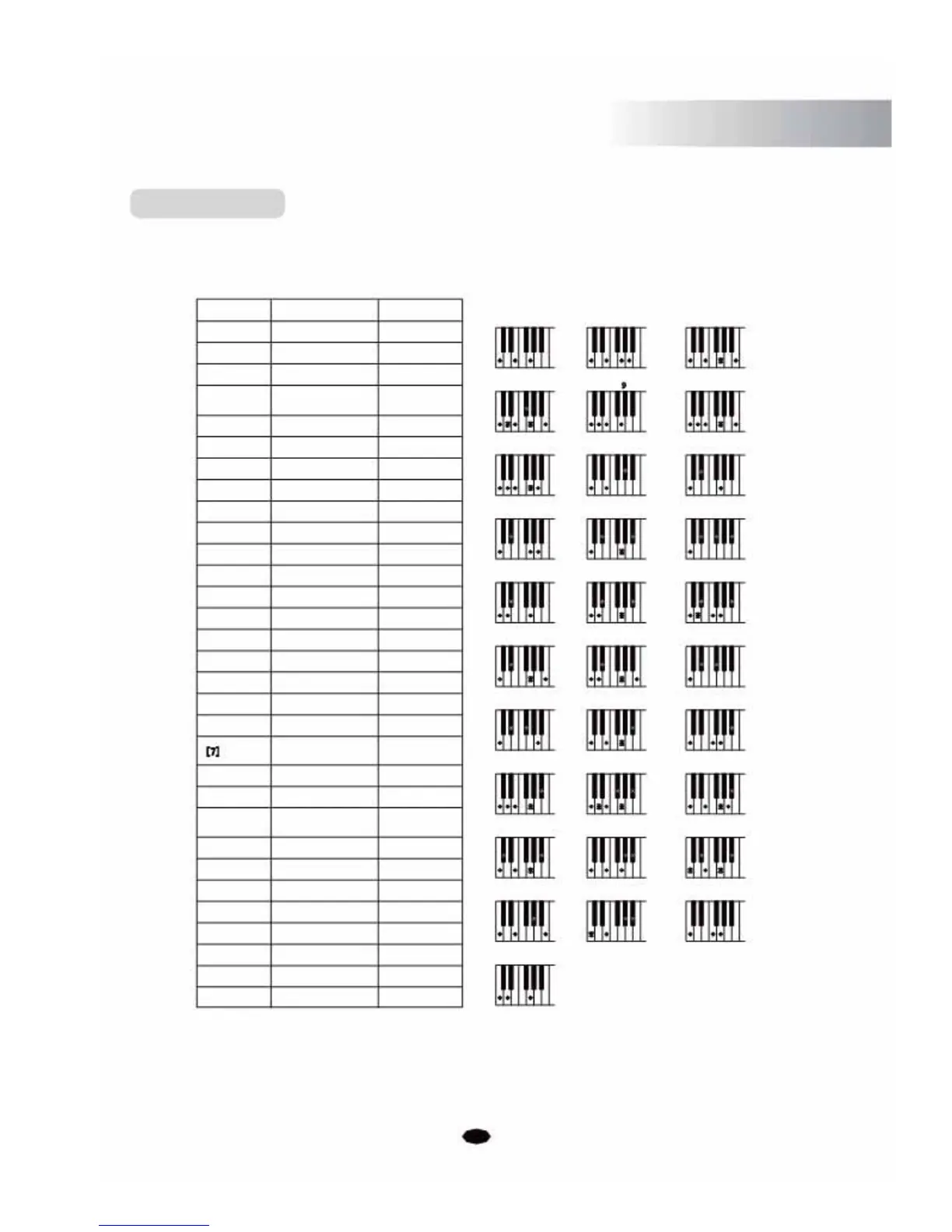
to supply your own chords for the Auto Accompaniment feature. The instrument will detect the
following chord types:
Example for C chords
Name
[M]
[6]
[M7]
[M7(#11)]
[(9)]
[M(9)]
[6(9)]
[aug]
NormalVoicing Display
1-3-5
C
1 -(3)-5-6 C 6
1 -3-(5)-7 or 1 -(3)-5-7
CM7
1-(2)-3-# 4-(5)-7 or #
CM7( 11)
1-2-3-# 4 -(5)-7
1-2-3-5
C(9)
1-2-3-(5)-7
CM7(9)
1-2-3-(5)-6
C6(9)
1-3-#5
Caug
C
CM
7
C 69
C
6
CM 7
#11
CMadd CM 9
Caug Cm
[m] 1 -b3-5
[m6] 1-b 3-5-6
[m7] 1-b 3-(5)-b7
[m7b5]
1-
b
3-
b
5-
b
7
[m(9)]
1-2-
b
3-5
[m7(9)]
1-2-
b
3 -(5)-
b
7
[m7(11)] 1-(2)-b
3 -4-5-(
b
7 )
[mM7]
1-
b
3 -(5)-7
[mM(9)]
1-2-
b
3 -(5)-7
[dim]
1-
b
3-
b
5
[dim7]
1-
b
3-
b
5-6
1-3-(5)-b
7 or
1-(3)-5-
b
7
Cm
Cm6
Cm7
Cm7 5 b
Cm(9)
Cm7(9)
Cm7(11)
CmM7
CmM7(9)
Cdim
Cdim7
C7
Cm6 Cm7 Cm7 b 5
C9 Cm9 Cm11
CmM7 CmM9 Cdim
Cdim7 C7 C7sus4
#11
[7sus4]
[7(9)]
[7(#11)]
1-4-(5)-
b7
C7sus4
1-2-3-(5)-b 7
C7(9)
1-(2)-3-# 4-(5)-b 7or
b C7( # 11)
C
7
9
C 7 C7 13
b9 b13 # 9
[7(13)]
[7(b9)]
[7(b13)]
[7(#9)]
[M7aug]
[7aug]
[sus4]
[1+2+5]
1-2-3-
#4 -(5)-7
1-3-(5)-6-b 7
C7(13)
1-
b
2 -3-(5)-
b
7
C7(b 9)
1- 3-5-
b
6-
b 7
C7(
b
13)
1-
#
2 -3-(5)-
b
7
C7(# 9)
1-(3)-#5-7
CM7aug
1-3-
#
5-
b
7
C7aug
1-4-5
Csus4
1-2-5 C
C7 C7 C7
CM7aug C7aug Csus4
C1+2+5
This instrument will be able to detect certain chord inversions, however because some chords can be
named differently depending on the inversion, certain chords such as m7, m7 b5, 6, m6, sus4, aug, dim7,
6(9), m7(11), 1+2+5 need to be played in the root position to correctly produce the desired chord. (An
example of this is a chord A minor 7 shares the same notes as a C6th chord, the difference being the
order of the note positions).
35



 To Next Page