EasyManua.ls Logo

Otto Bock ActiGait - User Manual

Otto Bock ActiGait
69 pages
Print Icon
To Next Page IconTo Next Page
Loading...
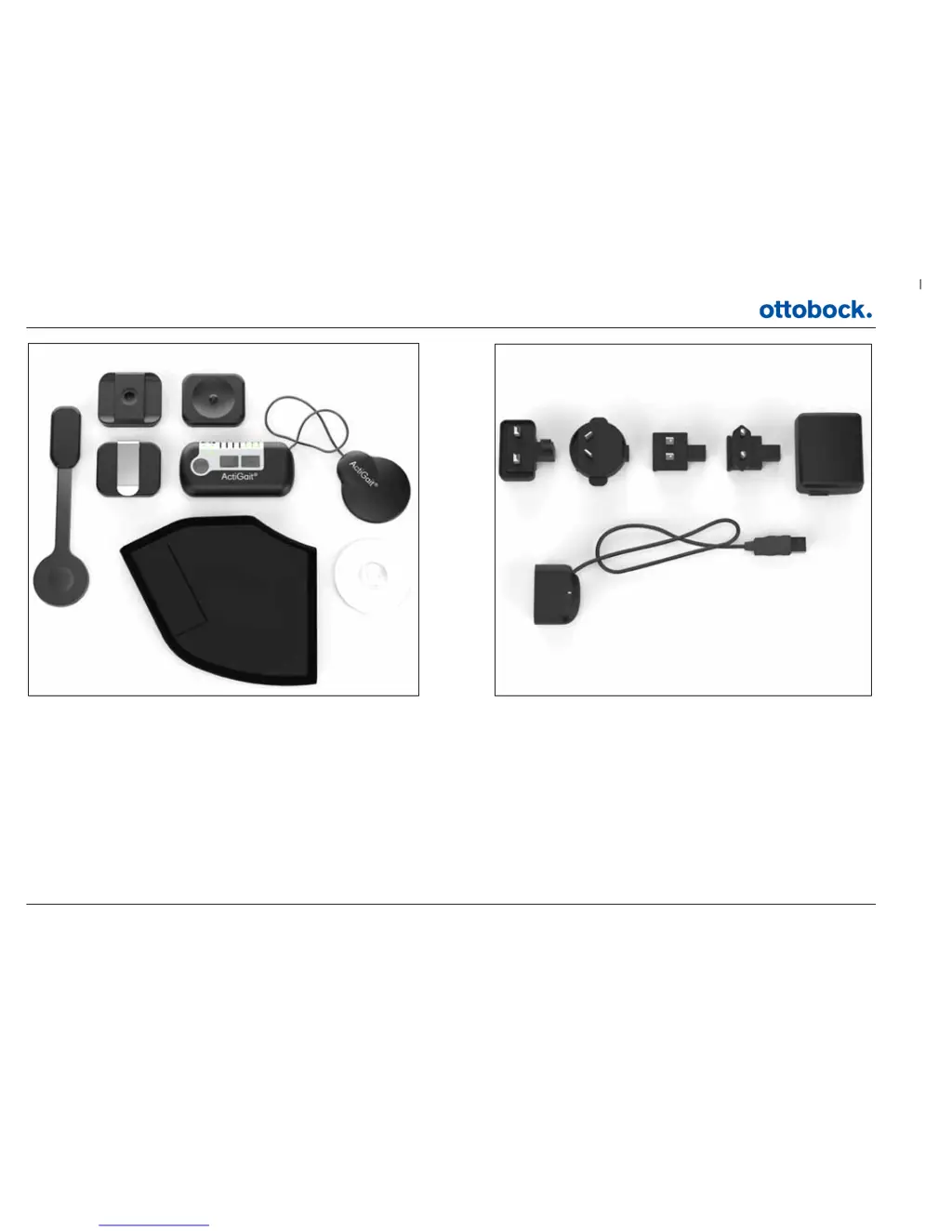
1
2 3
4 5 6
7 8
1: ActiGait® Heel Switch
2: ActiGait® Belt Loop
3: ActiGait® Body Clip
4: ActiGait® Belt Clip
5: ActiGait® Control Unit
6: ActiGait® Antenna
7: ActiGait® Heel Sock
8: ActiGait® Antenna Fixture
9: ActiGait® Charger (model FW7711/0.7) incl. plugs
10: ActiGait® Charger Cable
9a 9b 9c 9d
9
10

Table of Contents

Questions and Answers

  • R
    Ryan GomezAug 2, 2025
    How to fix Otto Bock Fitness Equipment when I do not get a foot lift at every step?
    • G
      Grace JamesAug 2, 2025
      If you're not getting a foot lift at every step with your Otto Bock Fitness Equipment, ensure the Control Unit is switched on. Also, check that the stimulation intensity is high enough. Verify the Antenna is correctly placed in the Antenna Fixture above the Implant and that the Antenna cable is intact without sharp bends. Confirm the Heel Switch is correctly placed under your heel inside the Heel Sock and check the connection between the Heel Switch and the Control Unit. Test the Heel Switch by pressing it with your fingers. If the Control Unit doesn't respond with light/audio signals, check the battery status of the Heel Switch and Control Unit, repeat pairing, or replace the Heel Switch. If the Control Unit does respond, check that the Antenna plug is properly connected.
  • T
    troy14Aug 7, 2025
    Why do my muscles hurt when I walk using Otto Bock ActiGait?
    • M
      Melissa WellsAug 7, 2025
      If your muscles hurt when you walk using Otto Bock Fitness Equipment, it could be due to training-induced muscle soreness, especially if you've increased your walking or just started using the equipment. Ensure you get enough rest for muscle recovery. Also, make sure the stimulation intensity isn't too high. If it's already at the minimum, your stimulation needs may have changed, so contact your clinician for reprogramming.
  • D
    danielwoodAug 12, 2025
    What to do if I do not get a sufficient foot lift when walking with Otto Bock ActiGait?
    • L
      Lance ParkerAug 12, 2025
      If you're not getting a sufficient foot lift while walking with your Otto Bock Fitness Equipment, ensure the stimulation intensity is high enough. If it's already at the maximum level, your stimulation needs may have changed since your last clinic visit. In this case, contact your clinician for reprogramming of your ActiGait®.
  • M
    Mary WheelerAug 17, 2025
    Why is my foot lifted too much when walking with Otto Bock ActiGait?
    • J
      james78Aug 17, 2025
      If your foot is lifted too much when walking with Otto Bock Fitness Equipment, ensure the stimulation intensity is low enough. If it's already at the minimum, your need for stimulation may have changed since your last visit to the clinic. Contact your clinician for reprogramming of your ActiGait®.
  • K
    kbrooksAug 22, 2025
    What to do if I get unwanted stimulation when not walking with Otto Bock ActiGait Fitness Equipment?
    • S
      smithabigailAug 22, 2025
      If you experience unwanted stimulation when you are not walking while using Otto Bock Fitness Equipment, adjust the position of the Heel Switch, ensuring it only activates when you stand on it.
  • B
    bwarrenAug 27, 2025
    What to do if my muscles and/or joints hurt even when I am not walking using Otto Bock Fitness Equipment?
    • M
      Matthew ChavezAug 27, 2025
      If your muscles and/or joints hurt, even when you are not walking, while using Otto Bock Fitness Equipment, reduce the stimulation intensity and/or walk less until the pain decreases. Make sure to get enough rest so that your muscles have time to recover. If the pain continues, contact your clinician.

Summary

1. Introduction

2. Intended Use

2.1 Medical Purpose

The ActiGait® is used for treatment in patients with drop foot following an upper motor neuron lesion.

2.2 Application

The ActiGait® system is a partially implantable device that activates lower leg muscles during walking for drop foot treatment.

2.3 Qualification of Clinician

User selection, setup, and adjustment are performed by qualified clinicians like doctors or physiotherapists.

2.4 Follow up Schedule

Recommended follow-ups are 1-3 weeks post-implantation, with further check-ups during the first 6 months.

3. Indications;Contraindications

3.1 Indications

Suitable for stroke patients with drop foot, characterized by lack of normal heel contact during gait.

3.2 Contraindications

Excludes individuals with peripheral nerve damage, uncontrolled diabetes, or poorly controlled epilepsy.

4. Warnings and Precautions

4.1 Safety precautions

Neurodan A/S is responsible for safety if repairs are done by appointed personnel and used per manual.

4.2 Warnings

The ActiGait® is for drop foot treatment; stimulating other nerves carries risks.

4.3 General cautions

Avoid extreme pressure, water immersion, and use in explosive environments due to potential damage or interference.

4.4 Potential Risks;Side effects

Risks include infection, nerve damage, anticoagulation issues, and device malfunction.

5. Service Information

5.1 Scope of Delivery

Details the included ActiGait® system parts and necessary accessories for maintenance.

5.2 Service

Instructions for checking equipment for damage and contacting support for issues.

6. Description of the ActiGait

6.1 The ActiGait Implant

Describes the implant's components: stimulator body, cuff electrode, and cable, activated by external power.

6.2 The ActiGait

Illustrates and describes external components: Control Unit, Antenna, Heel Switch, etc.

7. How ActiGait works

7.1 The Control Unit

Explains the Control Unit's function, buttons, and light indicators for system status.

7.2 Putting On the Control Unit

Details methods for wearing the Control Unit using Belt Clip, Belt Loop, or Body Clip fixtures.

7.3 Putting On the Antenna Fixture

Provides guidelines for securely attaching the Antenna Fixture to the skin.

7.4 Putting On the Antenna

Explains how to attach the Antenna to the fixture and connect it to the Control Unit.

7.5 The Heel Switch

Describes the Heel Switch's role in sending foot position information to the Control Unit.

7.6 The Charger

Explains how to charge the ActiGait® Control Unit using the provided charger and cable.

7.7 Audio Signals and Warnings

Details the warning signals and audio signals from the Control Unit and their meanings.

7.1 The Control Unit

7.1.1 The On;Off Button

Explains how to switch the ActiGait® Control Unit on and off by pressing the dedicated button.

7.1.2 Stimulation Intensity Buttons

Details how to adjust stimulation intensity up or down using the '+' and '-' buttons on the Control Unit.

7.1.3 The Mute Button

Explains how to access and use the mute button to control audio signals from the Control Unit.

7.1.4 The Pairing Button

Describes the process of pairing the Control Unit with the Heel Switch to ensure secure communication.

7.1.5 Control Unit Battery Indicator

Explains the meaning of the battery indicator light colors on the Control Unit for power status.

7.1.6 Heel Switch Battery Indicator

Details how the Heel Switch battery indicator on the Control Unit shows the remaining power.

7.1.7 Training Mode Indicator

Explains the function of the Training Mode indicator and how to use the mode.

7.1.8 Mute Indicator

Shows the different mute settings and how the mute indicator reflects the current setting.

7.1.9 Stimulation Intensity Indicators

Explains the row of light indicators showing the current stimulation intensity level on the Control Unit.

7.2 Putting On the Control Unit

7.2.1 The Belt Clip

Details how to attach the Control Unit to clothing or pockets using the Belt Clip.

7.2.2 The Belt Loop

Explains how to carry the Control Unit on your waist using the Belt Loop when wearing a belt.

7.2.3 The Body Clip

Describes how to discreetly carry the Control Unit underneath clothing using the Body Clip with the Antenna Fixture.

7.3 Putting On the Antenna Fixture

7.4 Putting On the Antenna

7.5 The Heel Switch

7.5.1 The Heel Sock

Explains how to use the provided Heel Sock to keep the Heel Switch securely in place on the foot.

7.5.2 Heel Switch Feedback

Details how the Control Unit provides feedback (beep and flashing light) for Heel Switch activation.

7.6 The Charger

7.6.1 Charging the Control Unit

Details the process of connecting the charger and cable to charge the Control Unit battery.

7.6.2 Travel Kit for Charger

Describes the travel kit included with the charger, featuring different wall plugs for various countries.

7.7 Audio Signals and Warnings

7.7.1 Warnings

Explains warnings related to low power, antenna disconnection, and the required response.

7.7.2 Audio Signals

Details the various audio signals used by the Control Unit for different functions like intensity adjustment or feedback.

8. Lights and Audio Signals

8.1 How to Interpret the Light Indicators

Provides a guide to understanding the different light indicators on the Control Unit and their meanings.

8.2 How to Interpret the Audio Signals

Explains how to interpret the various audio signals from the Control Unit, often in combination with light signals.

9. Troubleshooting for ActiGait

10. Warranty

11. Expected lifetime

12. Cleaning, Storage and Disposal

12.1 Cleaning

Instructions on how to clean the various parts of the ActiGait® system.

12.2 Storage

Guidelines for storing the ActiGait® equipment, including temperature and battery charging intervals.

12.3 Disposal

Provides instructions on how to properly dispose of ActiGait® components according to regulations.

13. Available Articles

14. Technical Data

14.1 ActiGait Control Unit

Provides detailed technical specifications for the ActiGait® Control Unit.

14.2 ActiGait Belt Clip

Lists the technical specifications for the ActiGait® Belt Clip, including dimensions and mass.

14.3 ActiGait Belt Loop

Lists the technical specifications for the ActiGait® Belt Loop, including dimensions and mass.

14.4 ActiGait Body Clip

Lists the technical specifications for the ActiGait® Body Clip, including dimensions and mass.

14.5 ActiGait Antenna

Provides technical specifications for the ActiGait® Antenna, including dimensions and operating frequency.

14.6 ActiGait Antenna Fixture

Lists technical specifications for the ActiGait® Antenna Fixture, including dimensions and storage temperature.

14.7 ActiGait Heel Switch

Provides technical specifications for the ActiGait® Heel Switch, including dimensions and battery type.

14.8 ActiGait Heel Sock

Lists sizes and washing directions for the ActiGait® Heel Sock.

14.9 ActiGait Charger Cable

Provides technical specifications for the ActiGait® Charger Cable, including voltage and current.

14.10 ActiGait Charger

Lists technical specifications for the ActiGait® Charger, including input voltage and EMC compliance.

14.11 ActiGait Implant

Provides detailed technical specifications for the ActiGait® Implant, including dimensions and pulse shape.

14.11.1 X-Ray Identification

Explains the X-ray tag on the Implant and its format for identifying manufacturer and year.

15. Classification

16. List of symbols

16.1 Ingress Protection

Defines the IP classification marking on ActiGait® parts regarding protection against water and particles.

17. Declaration of Conformity

Otto Bock ActiGait Specifications

General IconGeneral
BrandOtto Bock
ModelActiGait
CategoryFitness Equipment
LanguageEnglish