17
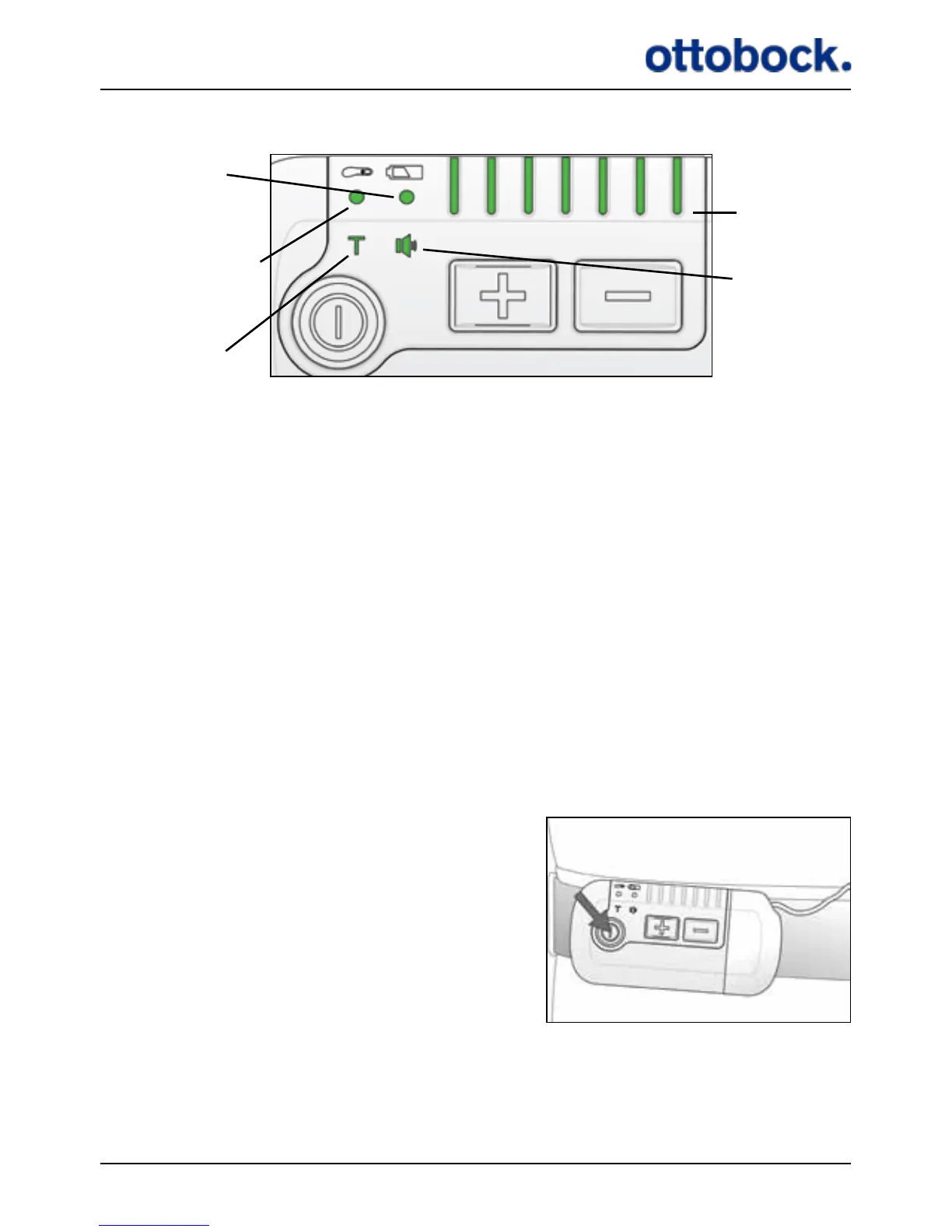
Figure 6: The light indicators on the Control Unit
Control Unit
battery indicator
Training mode
indicator
Mute indicator
Stimulation
intensity
indicators
Heel Switch battery
indicator/Heel Switch
Feedback indicator
The light indicators are described in the following sections:
• Control Unit battery indicator: Section 7.1.5 on page 22.
• Heel Switch battery indicator/Heel Switch Feedback indicator: Section 7.1.6 on
page 23, and section 7.5.2 on page 37
• Training mode indicator: Section 7.1.7 on page 25
• Stimulation intensity indicators: Section 7.1.2 on page 18
• Mute indicator: Section 7.1.8 on page 27, page 36
7.1.1 The On/Off Button
The on/o button is used for switching the ActiGait® Control Unit on and o. You
must press the on/o button for at least 1.5 seconds to activate it.
Press the on/o button for at least 1.5 seconds
to switch the Control Unit on or o.


 To Next Page