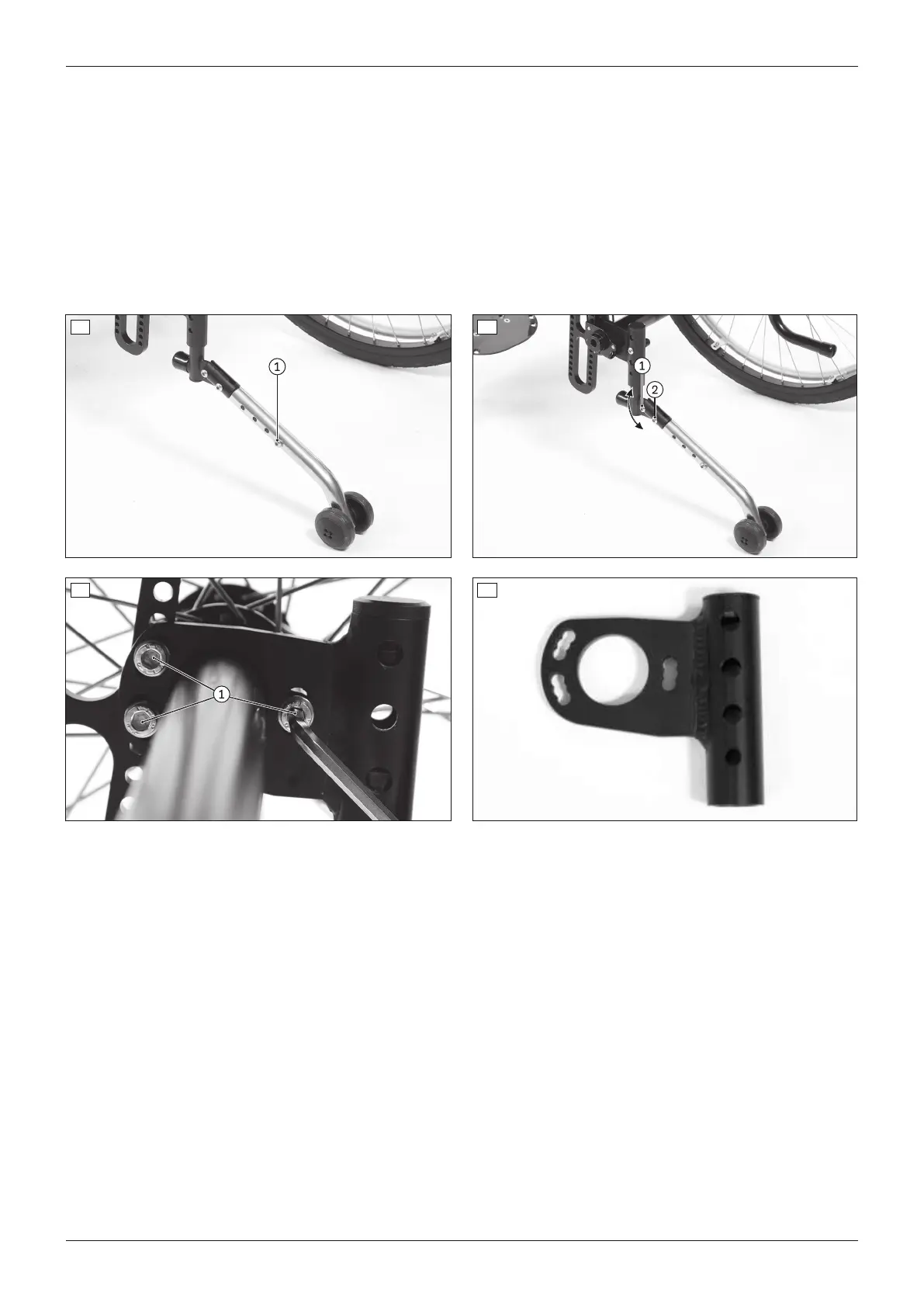
Adjusting the angle of the pivot arm ‒ option 1
1) Remove the Allen head screw between the anti-tipper tube and the angle adjuster (see fig.59, item1).
2) Loosen the second Allen head screw on the angle adjuster (see fig.59, item2).
3) Set the angle of the pivot arm.
4) Bolt down the pivot arm. The max. distance between the anti-tipper rollers and floor is 50mm (##04182).
Adjusting the angle of the accessory mount ‒ option 2
1) Remove the 3 Allen head screws between the accessory mount and the clamping flange (see fig.60, item1).
2) Set the angle of the accessory mount (3 settings at intervals of 10°: see fig.61).
3) Tighten the accessory mount to 10Nm. The max. distance between the anti-tipper rollers and floor is 50mm
(##04182).
58 59
60 61
6.9.2 Installing and adjusting the tip-assist
The tip-assist can be installed on the accessory mount in the installation position provided (see fig.62, item1).
1) Press the spring on the tip-assist (see fig.62, item2).
2) Insert the tip-assist into the accessory mount (see fig.62, item1).
3) Allow the spring to lock in.
27Ventus
Settings














 To Next Page