18
OutBack Power Systems Inc.
STATUS SCREEN
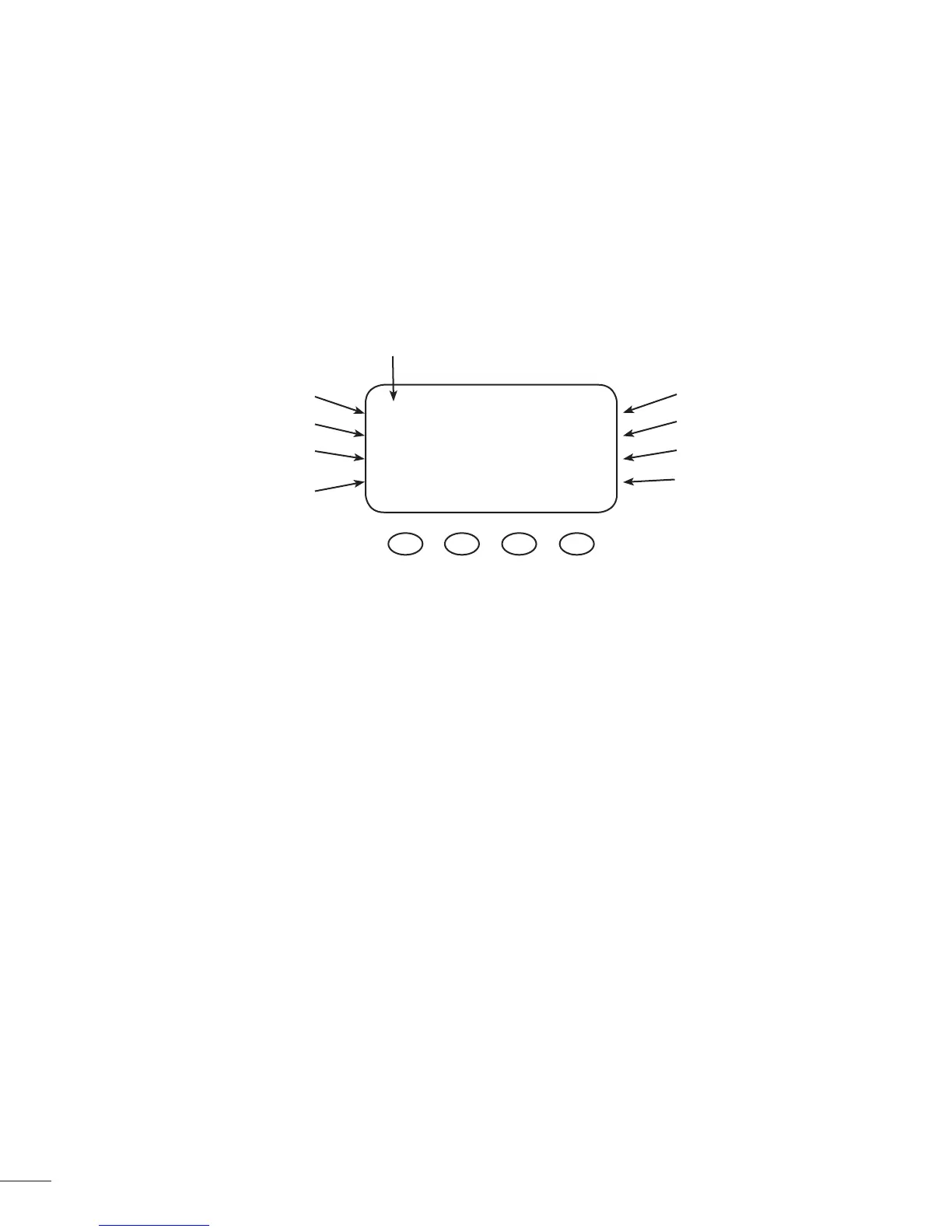
The STATUS Screen displays system information. See page 67 for detailed information of the dif-
ferent Operational Modes. The optional OutBack MATE displays MX STATUS screens for convenient
distant viewing from the installation location of the MX60. Please see page 71 to view the MX
screens displayed on the MATE.
The PV voltage will slowly rise to the battery
voltage level even when the PV breaker
is o – this is normal as the PV capacitor
charges up.
PV Input Voltage
PV Input Current
Instantaneous Watts
Daily accumulated
kiloWatt Hours
Battery voltage
Output current
Aux. Status (ON or OFF)
Operational Mode
NOTES
• Pressing the rst soft key opens the MAIN Menu screen.
• Pressing soft key #2 toggles between Amp Hours and kW Hours displays.
PV 005 V Bat 12.5 V
00.0 A 00.0 A
Watts 0000 Aux Off
kWHrs 00.0 Sleeping



 To Next Page