OvisLink
- 11
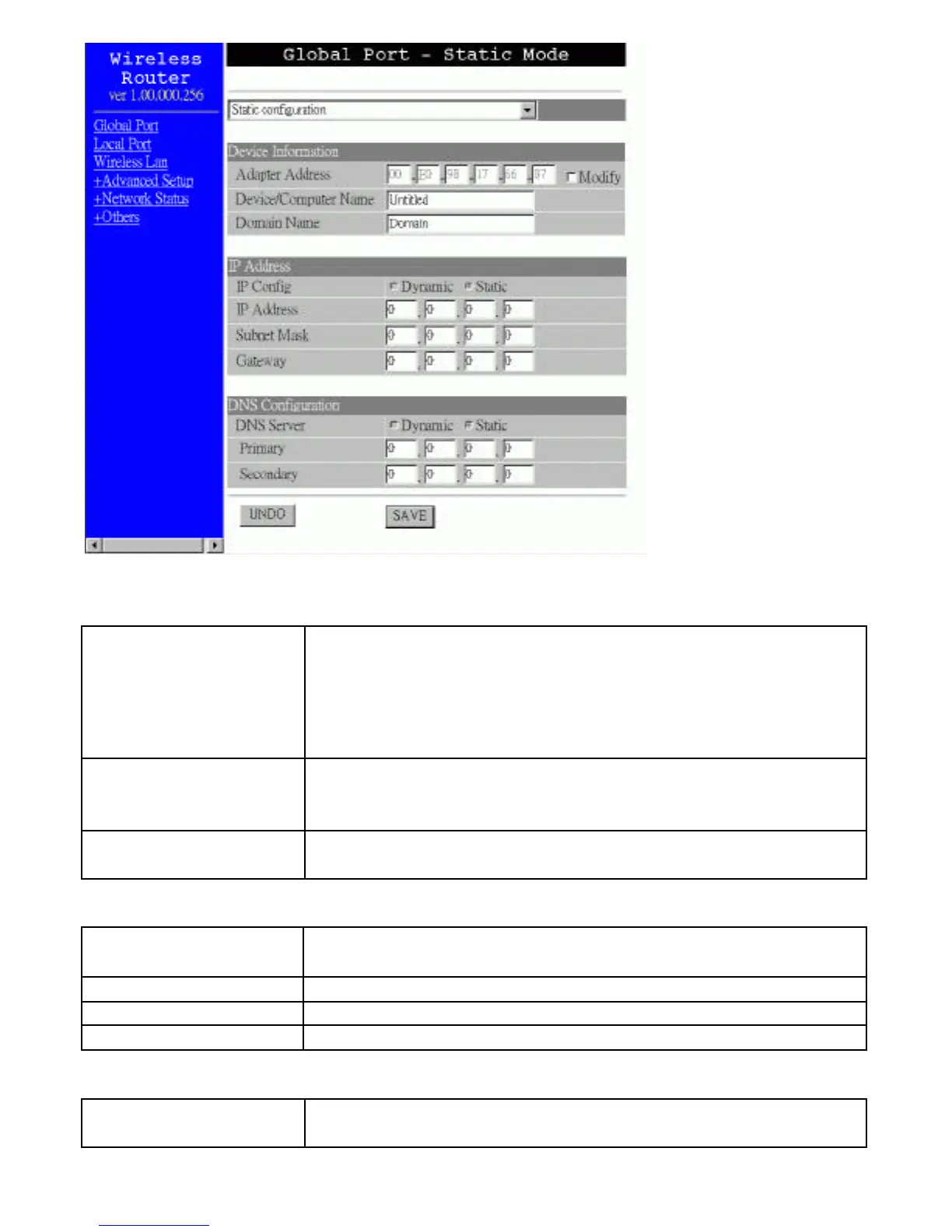
Figure 7
Device Configuration
Adapter Address This field is grayed out, because the Adapter Address is not
supposed to be entered randomly. Do Not change the content
unless you are sure it is necessary to modify your MAC
address. To modify the address, check ? Modify and enter the
desired MAC address.
Device/Computer
Name
Enter a descriptive name for identification purpose. Some
Internet Service Providers (ISP) requires this information and if
that is the case, they will provide you with the name.
Domain Name
For example: yourcompany.com. The maximum input for this
field is 32 alphanumeric characters and it is case insensitive.
IP Address
IP Config ?Dynamic ?Static This line is grayed out for static
configuration.
IP Address Enter the information provided by your ISP.
Subnet Mask Enter the information provided by your ISP.
Gateway Enter the information provided by your ISP.
DNS Server Configuration
DNS Server ?Dynamic ?Static This line is grayed out for static
configuration.



 To Next Page