OvisLink
- 16
Advanced Setup
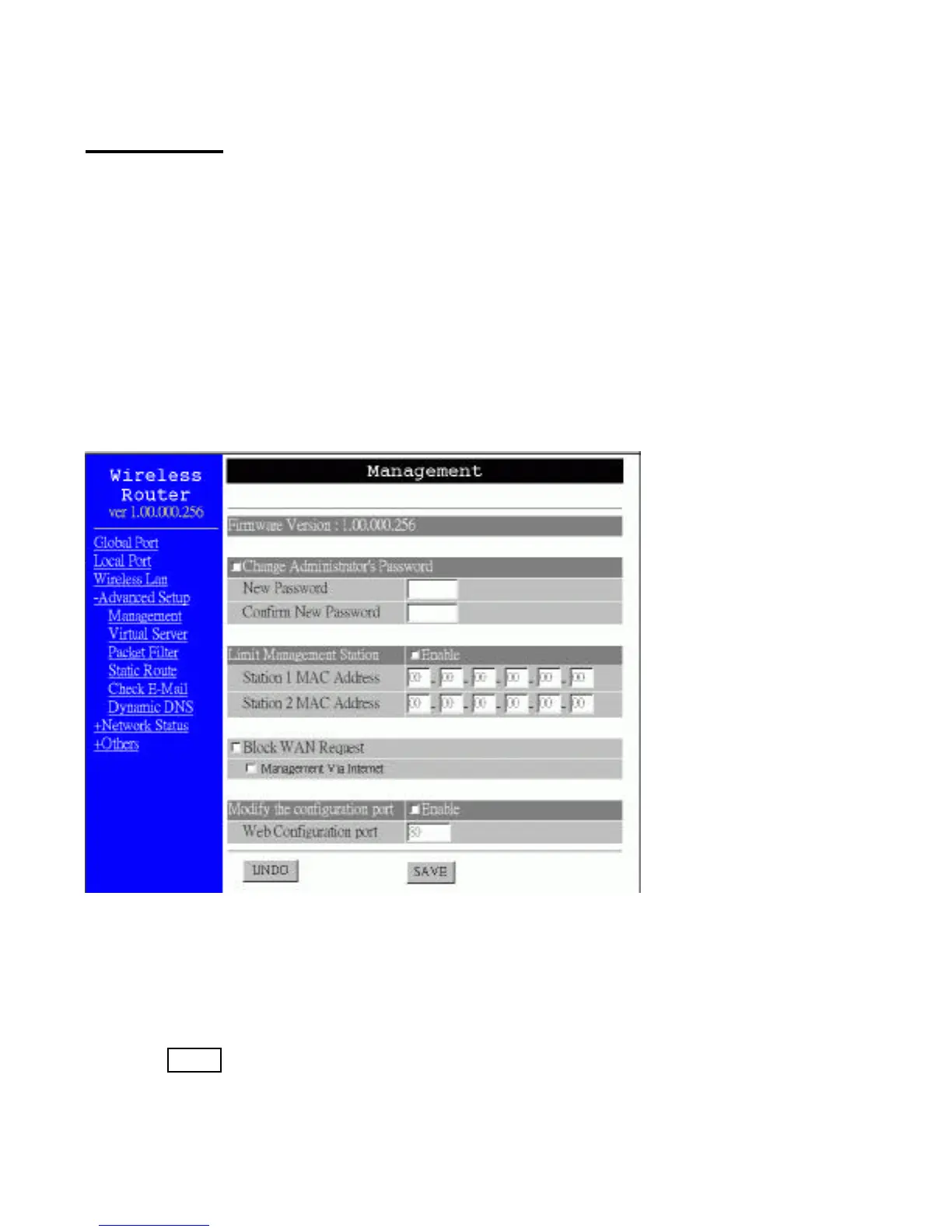
Management
In this management page, you can
1. Change Administrator’s password: change the password for the device.
2. Limit Management Station: Enables two stations to manage this device through Web
configuration. Enter the MAC addresses of the stations you selected for management.
After the setup is completed, only the assigned stations with correct password
authentication can manage this device.
3. Block WAN Request: Blocks requests from Internet to the local network. If this item is
checked, the function of management through Web configuration will be disabled. In
other words, Internet requests and the HTTP management, namely ICMP, IDENT, and
HTTP will be rejected.
4. Modify the configuration port: Enables to modify the port number for web
configuration.
Figure 11
Change Administrator’s password:
1. Click on ? to enable this change.
2. Enter the new password.
3. Re-enter the new password for confirmation.
4. Click SAVE to save the setting.
Limit Management:
1. Click ? to enable this function.
2. Enter the first management station’s network adapter MAC addresss.



 To Next Page