OvisLink
- 12
Primary/Secondary Enter the information provided by your ISP.
UNDO Click UNDO to clear all the settings on this page.
SAVE After completing the settings on this page, click SAVE to
save the settings.
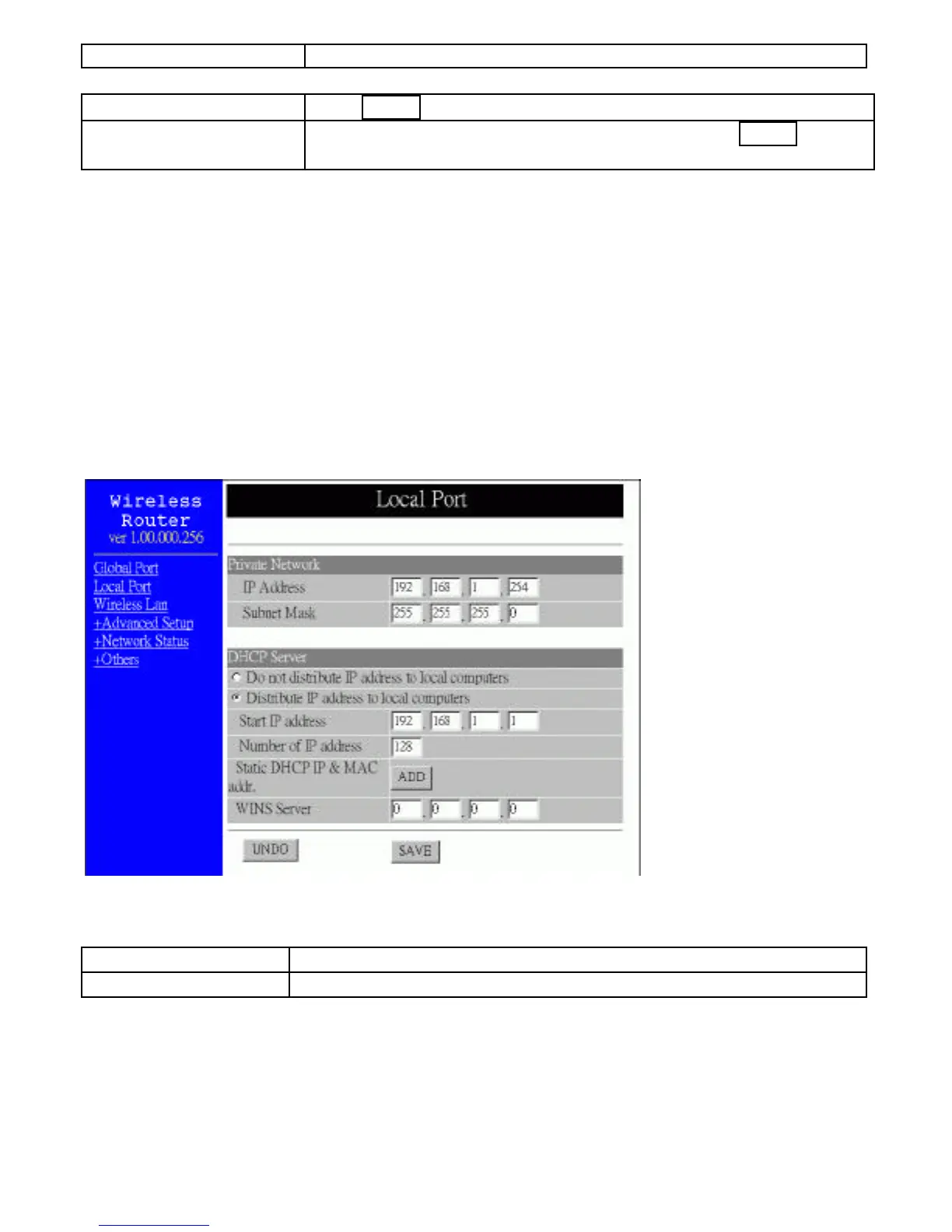
Local Port
This screen contains settings for LAN interface attached to the local network. You can
set to distribute IP address to local PCs or not. If “Distribute IP address to local
computer” is selected, users can enter the IP addresses assigned for the computers on
LAN. The number of IP address decides the number of clients allowed for the assigned
IP addresses. Note that all the PC on the same LAN should use the same subnet Mask.
Users can also set Static DHCP in this page. Users are allowed to set 32 Static DHCP.
Using this feature, the device will assign the same IP address to a computer (according
to the network adapter’s MAC address) and this computer becomes the only one that is
able to request that IP address. This is quite useful to set virtual serveres which requires
particulary fixed IP for outside Internet access.
Figure 8
Private Network
IP Address Default: 192.168.1.254 (this is the local address of this device)
SubNetmask Default: 255.255.255.0
DHCP Server



 To Next Page