OvisLink
- 18
Figure 12
Add Server
Method?By Name ?
By Port
Yo u can select to set up a virtual server either by name
or by port number.
Application (Port) Select and click ? to scroll down. Select from the most
popular server applications for Virtual Server.
Port Type Select the port type (TCP or UDP) for the port number
that was entered earlier.
Single/Range, Port
Number
You can select a specific port or a range of ports which
you want the Internet users to be able to access. The
valid port number ranges from 0 to 65535.
Local Server IP Address Enter the Local Server’s IP address (for the specified
port entered above).
UNDO Click UNDO to clear all the settings on this page.
ADD Each time you finished setting, click ADD and the
added servers will appear on the Server List.
Server List
DELETE ALL Click to delete all the servers on the list.
DELETE Click the Index drop-down menu to select the desired
server number and then click DELETE to delete only
the selected server.
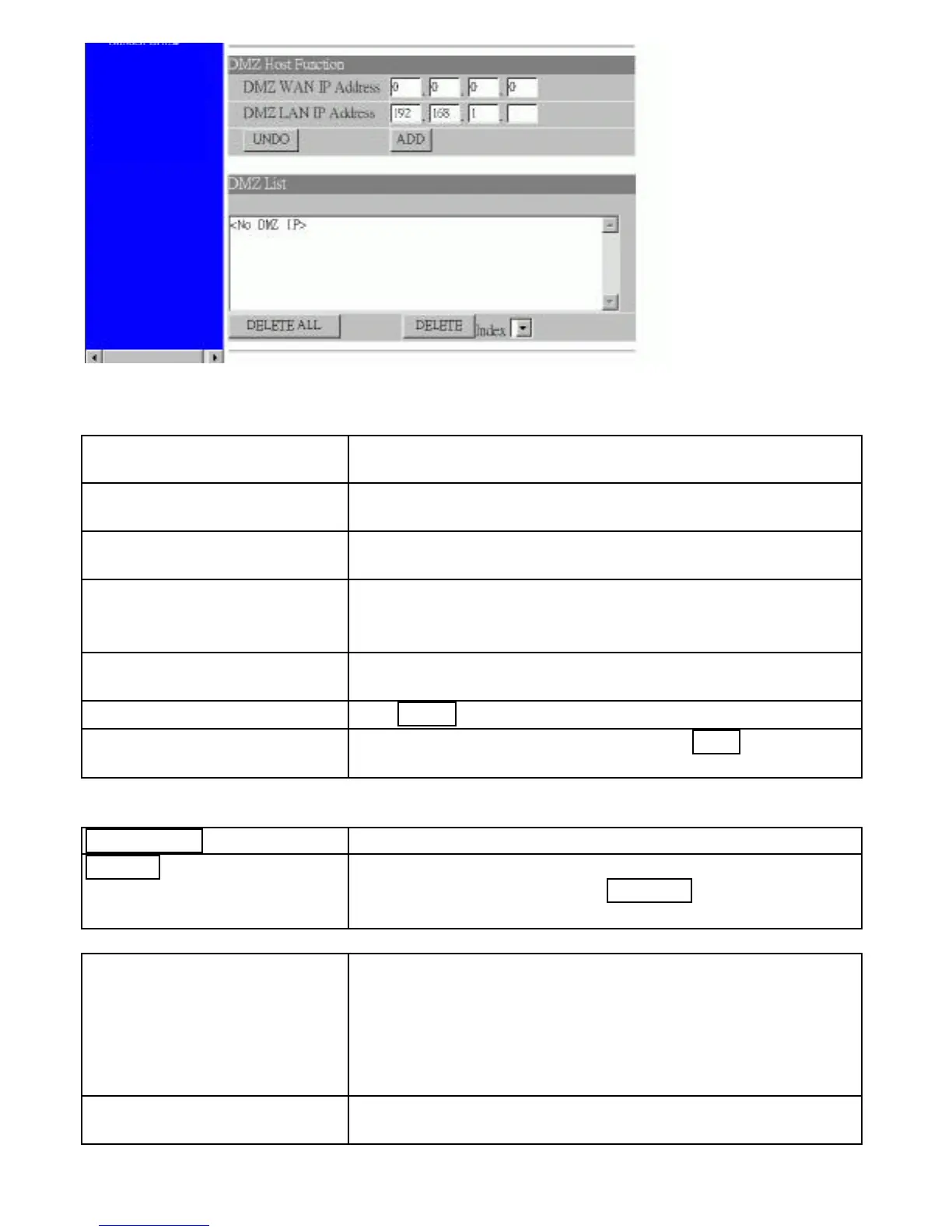
DMZ Host Function If the DMZ Host Function is enabled, it means that you
set up DMZ host at a particular computer to be exposed
to the Internet so that some applications/software,
especially Internet / online game can have two-way
connections. You can enter up to four DMZ Hosts in
the device.
DMZ LAN IP Address Enter the local IP address mapping to the client



 To Next Page