12 -
Packard Bell Easy HDD Recorder User's Guide
and audio (L & R) outputs are built into the scart output. When the scart output is used, none of the above-
mentioned cables is needed for connection.
Note: For Digital Cable and Satellite TV users please connect your decoder’s output to this unit’s input.
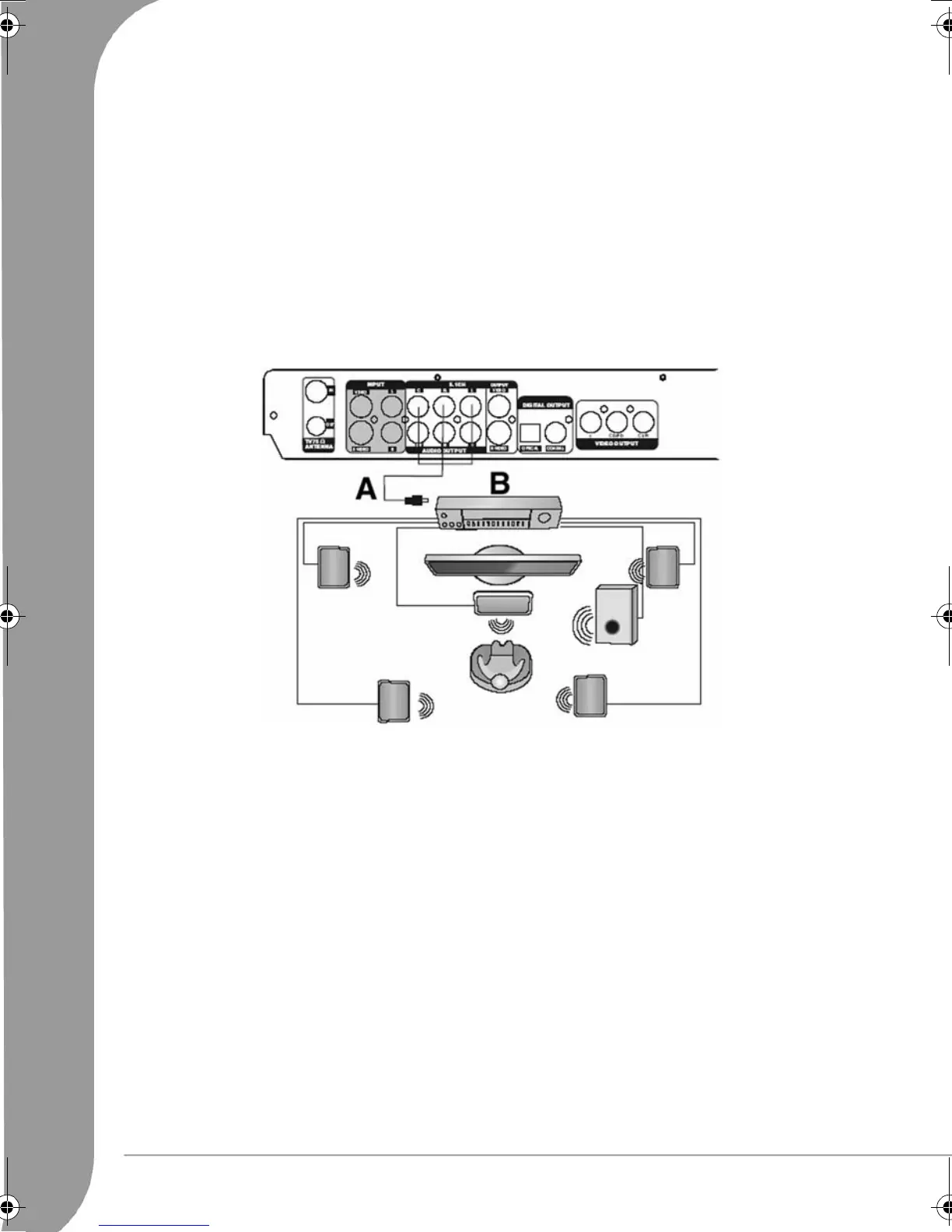
Connecting To A 5.1 Channel Dolby Digital Audio Amplifier
You can enjoy 5.1-channel Dolby Digital audio by connecting the recorder to an amplifier-and-speakers
system with 5.1 Channel Dolby Digital Audio. Dolby Digital programs can deliver surround sound with up to
five discrete full-range channels, Left, Centre, Right, Left Surround, Right Surround—plus a sixth channel for
powerful low-frequency effects (LFE). As it needs only about one-tenth the bandwidth of the others, the LFE
channel is referred to as a ".1" channel (and sometimes erroneously as the "subwoofer" channel).
A Ordinary Cable (Analog Output)
B 5.1 Channel Amplifier
Connecting to a Dolby Digital Decoder Amplifier
You can enjoy the completely-reproduced 5.1-channel Dolby Digital audio effect by connecting the recorder
to an amplifier-and-speakers system with Dolby Digital decoder via a coaxial or optical cable.
6977030000-EHR2080-UG.book Page 12 Wednesday, September 7, 2005 4:43 PM



 To Next Page